2-6 (E)
CA-550
CA-550P
2-7-3. Adjustment After Replacement of
Board
If no adjustment item is listed, no adjustment is required
after replacement.
Board Adjustment required
AU-211 —
TR-90 —
MD-103 —
DM-98
3-5-1. RETURN VIDEO Demodulation Adjustment
3-5-3. RETURN VIDEO Level Adjustment
MB-605 —
FL-180 —
SW-750 —
SW-784 —
CN-1190 —
CN-1164 —
LP-87 —
AC.DC/DC Converter —
2-8. Replacement of AC.DC/DC
Converter
1. Remove the right side panel and top panel referring to
Section 2-1.
2. Carry out Steps 2 and 3 in Section 2-7-1 “Replacement
of FL-180 Board”.
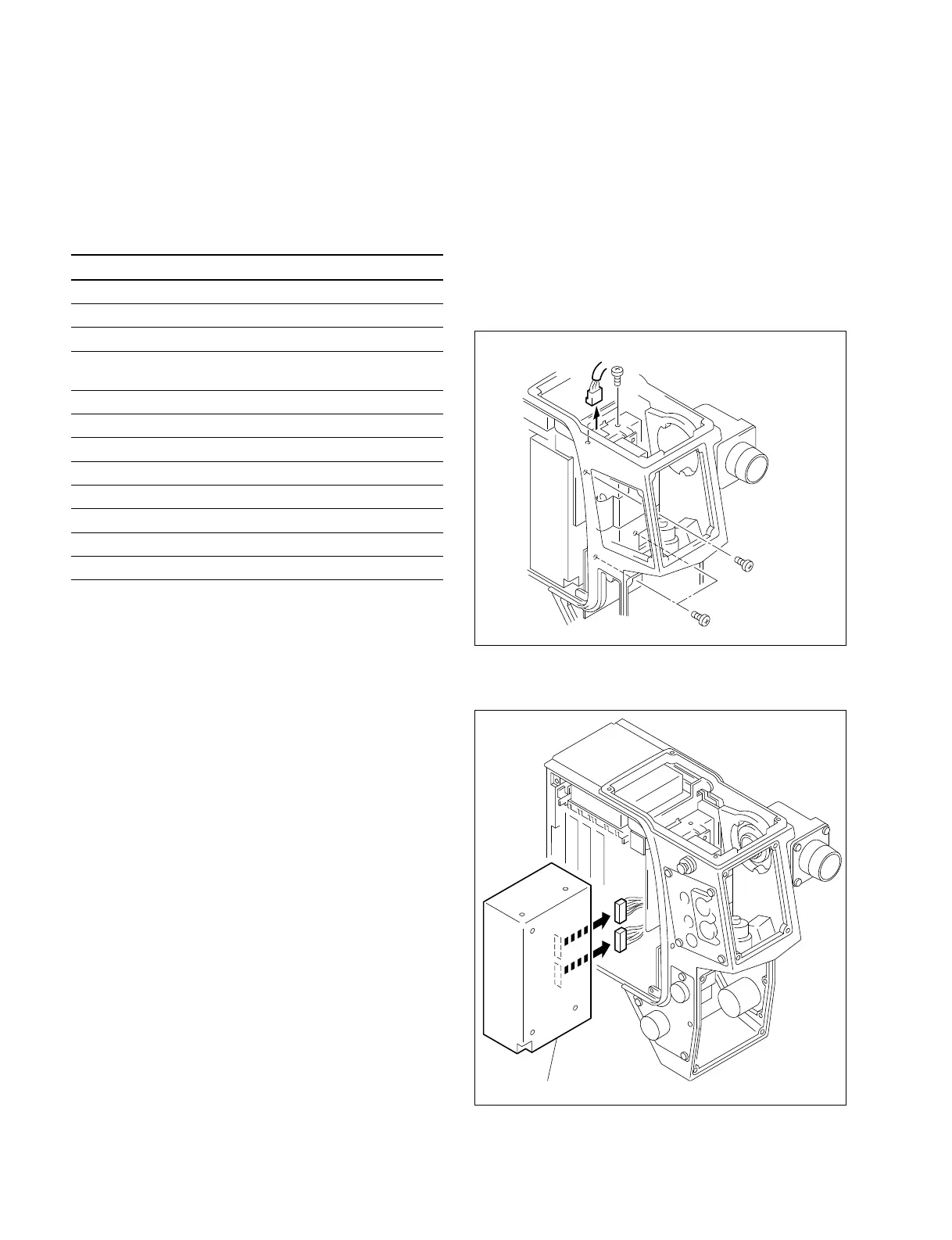
3. Disconnect CN1 from the AC.DC/DC converter.
Remove the four screws securing the AC.DC/DC
converter.
4. Pull out the AC.DC/DC converter and disconnect the
two connectors from the converter.
2-7. Replacement of Board
2-8. Replacement of AC.DC/DC Converter
5. Install a new converter in the reverse procedures of the
removal.
B3
X
6
CN1
B3
X
6
B3
X
6
AC DC/DC converter





 To Next Page