2-1 (E)
CA-550
CA-550P
Section 2
Service Overview
c
The power block inside the CA-550/550P will go very hot during operation. If you remove the side panel
and touch the power block, there is some danger to get burned. When you would open the side panel for
check or adjustment, please allow for at least 10 minutes after powering off until the inside cools off.
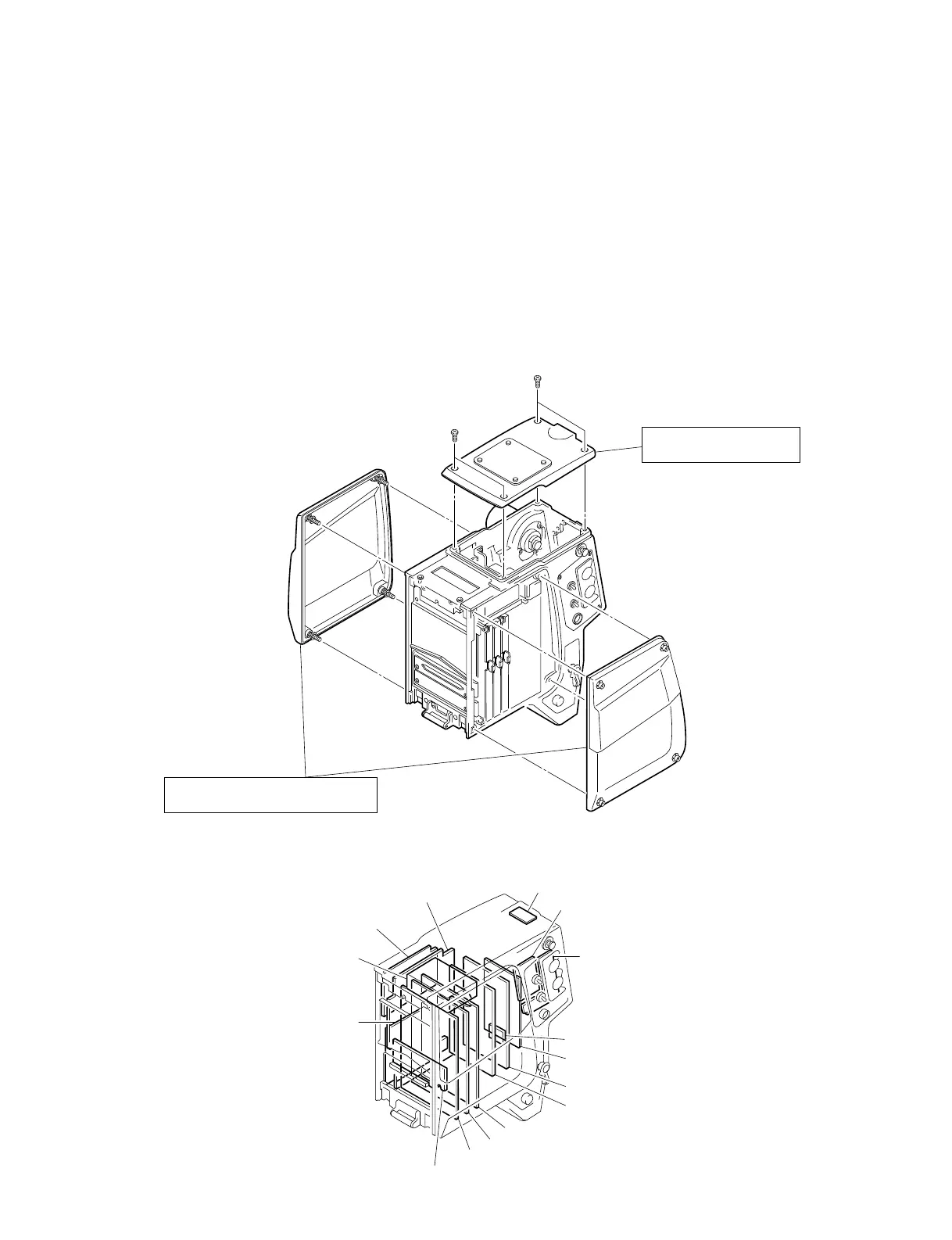
2-1. Removal of Cabinet
n
• In installing the left side panel, take care not to pinch the
harness between the unit and panel.
2-2. Location of Printed Circuit Boards
MB-605
MPX Filter
DM-98
CN-1190
MD-103
AU-211
LP-87
SW-784
SW-750
CN-1164
FL-180
PS-434
PS-435
TR-90
DM-99(option)
To remove the both side panels
Loosen the four screws respectively.
To remove the top panel
Remove the four screws.





 To Next Page