Dubbing only desired scenes - Digital program editing
To edit using tile VCR, send the control signal by infrared rays to the remote sensor on
tile VCR.
When you connect using an A/V connecting cable, %llow the procedures below,
(l) -(4), to send tile control signal correctly.
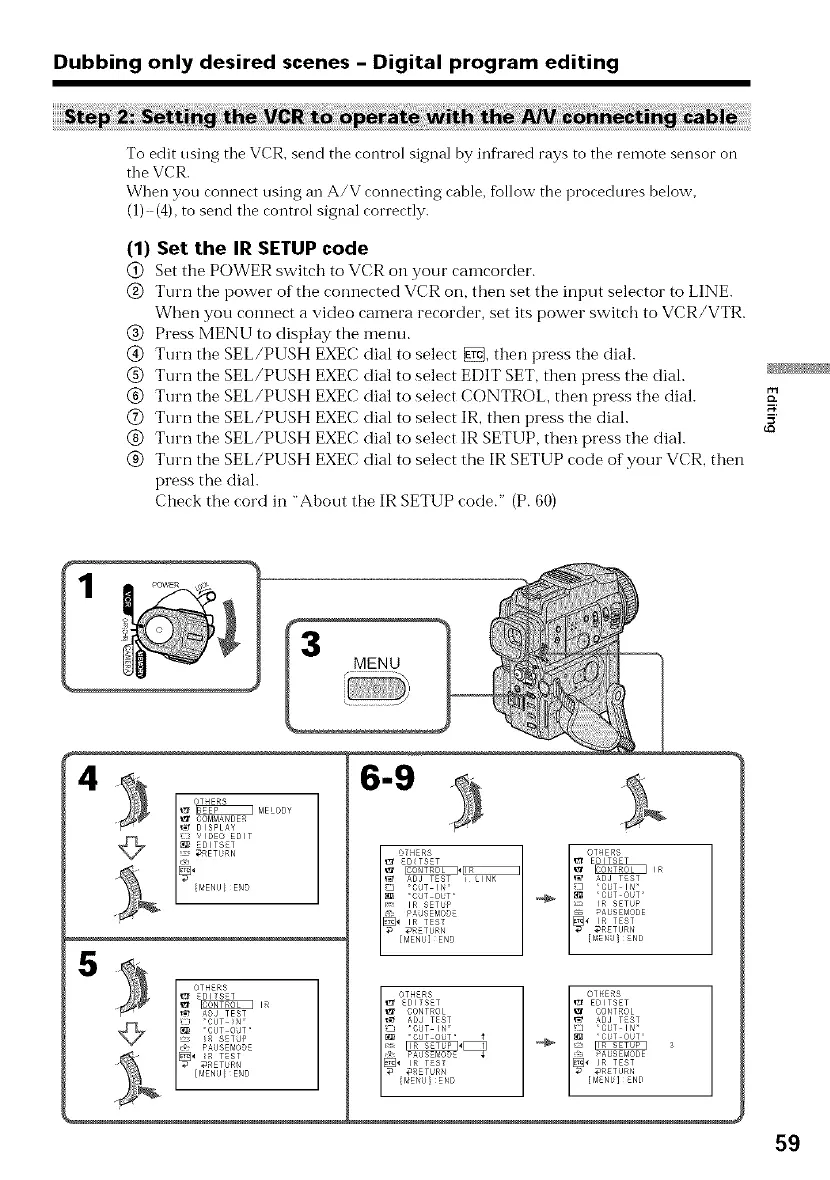
(1) Set the IR SETUP code
Q_) Set the POWER switch to VCR on your camcorder.
(_) Turn the power of the connected VCR on, then set the input selector to LINE.
When you comlect a video camera recorder, set its pow,er switch to VCR/VTR.
(_) Press MENU to display the menu.
(_) Turn the SEL/PUSH EXEC dial to select @, then press the dial.
(_) Turn the SEL/PUSH EXEC dial to select EDIT SET, then press the dial.
@ Turn the SEL/PUSH EXEC dial to select CONTROL, then press the dial.
(_) Turn the SEL/PUSH EXEC dial to select IR, then press the dial.
(_) Turn the SEL/PUSH EXEC dial to select IR SETUP, then press the dial.
(_) Turn the SEL/PUSH EXEC dial to select the IR SETUP code of your VCR, then
press the dial.
Check the cord in "About the IR SETUP code." (P. 60)
5'
5
_Z MEL°DY
COMMANDER
t_ DISPLAY
t:} /IDEO EDIT
_ ED_TSET
RETURN
6-9
OTHERS
EDITSET
ADJ TEST
£:] CUT IN"
r_ _ CUT OUT
IR SETUP
PAUSEMODE
[_]_ IR TEST
_RETURN
p_ENU]END
r_ 3
59















 To Next Page