Dubbing only desired scenes - Digital program editing
You can adjust tile synchronicity of your camcorder and the VCR. Have a pen and
paper ready for notes. Before operation, eject a cassette flora your camcorder.
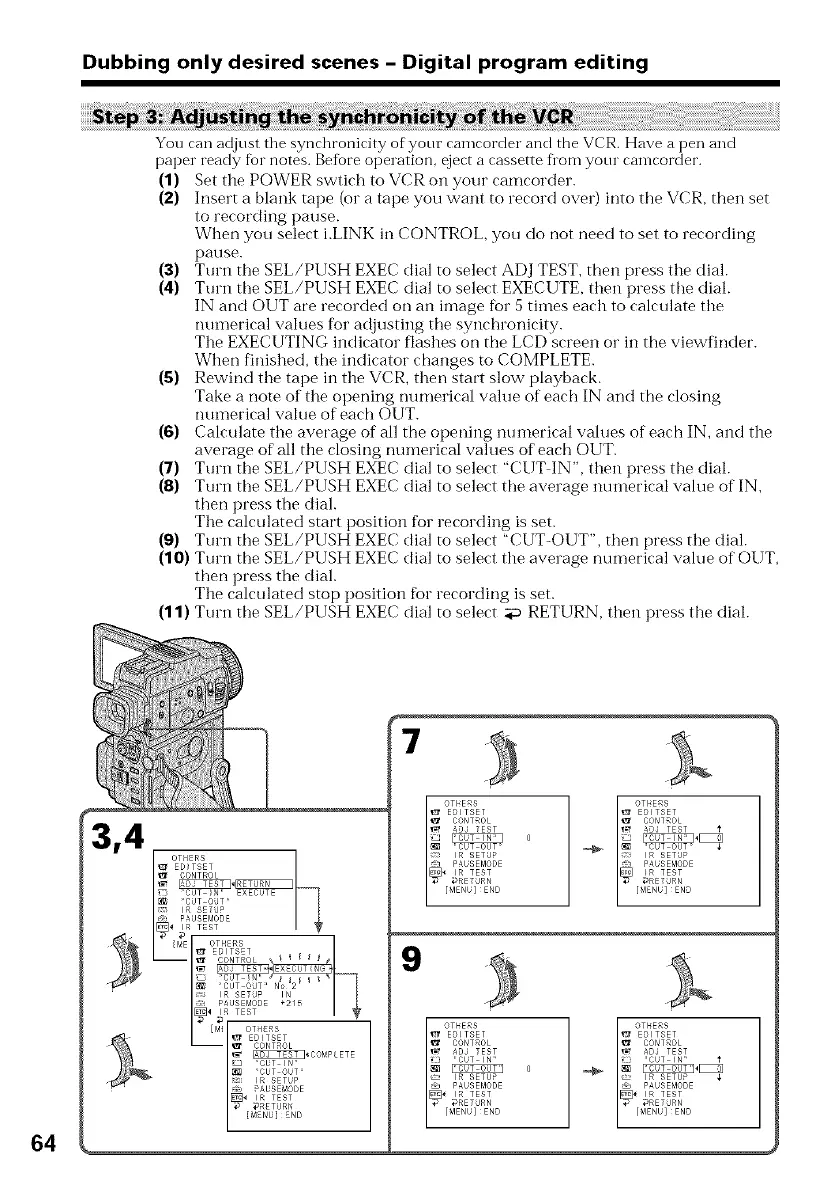
(1) Set the POWER swtich to VCR on your camcorder.
(2) hlsert a blank tape (or a tape you want to record over) into tile VCR, then set
to recording pause.
When you select i.LINK ill CONTROL, you do not need to set to recording
pause.
(3) Turn the SEL/PUSH EXEC dial to select ADJ TEST, then press tile dial.
(4) Turn the SEL/PUSH EXEC dial to select EXECUTE, then press tile dial.
IN and OUT are recorded on all image for 5 tiines each to calculate tile
numerical values for adjusting the synchronicity.
Tile EXECUTING indicator flashes on the LCD screen or in the viewfinder.
When finished, the indicator changes to COMPLETE.
(5) Rewind the tape in tile VCR, then start slow playback.
Take a note of tile opening numerical value of each IN and the closing
numerical value of each OUT.
(6) Calculate the average of all the opening numerical values of each IN, and the
average of all tile closing numerical values of each OUT.
(7) Turn the SEL/PUSH EXEC dial to select "CUT IN", then press the dial.
(8) Turn the SEL/PUSH EXEC dial to select tim average ntmmrical value of IN,
then press the dial.
Ttle calculated start position for recording is set.
(9) Turn the SEL/PUSH EXEC dial to select "CUT-OUT", then press tile dial.
(10) Turn the SEL/PUSH EXEC dial to select the average numerical value of OUT,
then press the dial.
Tile calculated stop position for recording is set.
(11) Turn the SEL/PUSH EXEC dial to select _ RETURN, then press the dial.
64
4
7
0
9
0 r_















 To Next Page