Dubbing only desired scenes - Digital program editing
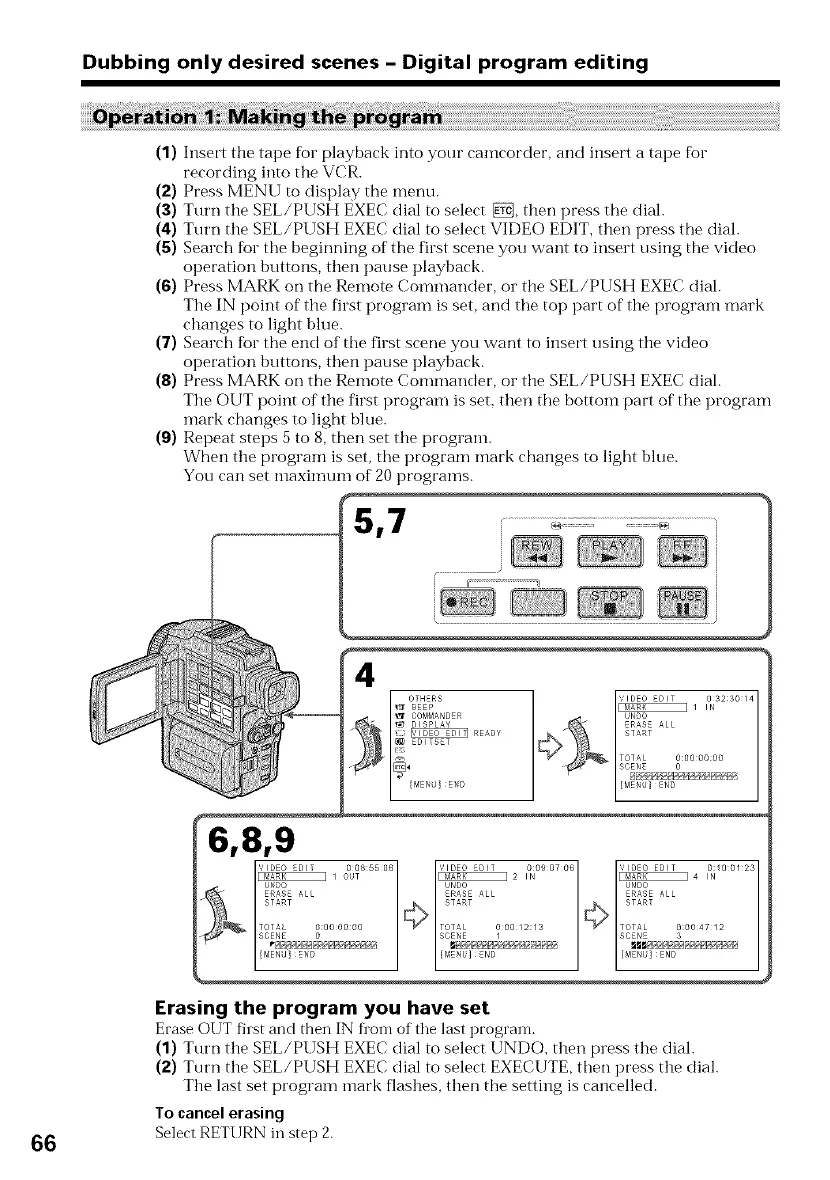
(1) Insert tile tape fbr playback into your camcorder, and insert a tape for
recording into tlle VCR.
(2) Press MENU to display the menu.
(3) Turn the SEL/PUSH EXEC dial to select _, then press tile diah
(4) Turn the SEL/PUSH EXEC dial to select VIDEO EDIT, then press the diah
(5) Search for the beginning of the first scene you want to insert using tile video
operation buttons, then pause playback.
(6) Press MARK on the Remote Commander, or tile SEL/PUSH EXEC diah
The IN point of the first program is set, and tile top part of the program mark
changes to light blue.
(7) Search for the end of the first scene you want to insert using the video
operation buttons, then pause playback.
(8) Press MARK on the Remote Commander, or the SEL/PUSH EXEC diah
The OUT point of the first program is set, then tile bottom part of tile program
mark changes to light blue.
(9) Repeat steps 5 to 8, then set tlle program.
When the program is set, the program mark changes to light blue.
You can set nlaxinmm of 20 programs.
5,7 .......................=========...........................................
r
1
4
OTHERS
SEEP
COMMANDER
DISPLAY
READY
ED_TSET
66
.... _2 ,_........ _4 ,_........
UNDO UNDO UNDO
ER&SE ALL ERASE ALL
_ ALL
START START
TOTAL O:O0000g TOTAL 000/2:/3 TOTAL O:OO4712
SCENE 0 SCENE / SCENE 3
[ME_U]!EN_ {MENU] END [M
Erasing the program you have set
EraseOUT fhst and then IN fl'om of tile last program.
(1) Turn the SEL/PUSH EXEC dial to select UNDO, then press the diah
(2) Turn tile SEL/PUSH EXEC dial to select EXECUTE, then press tile dial.
The last set program nlark flashes, then the setting is cancelled.
Tocancelerasing
Select RETURN in step 2.















 To Next Page