Using with analog video unit and
personal computer- Signal convert
function
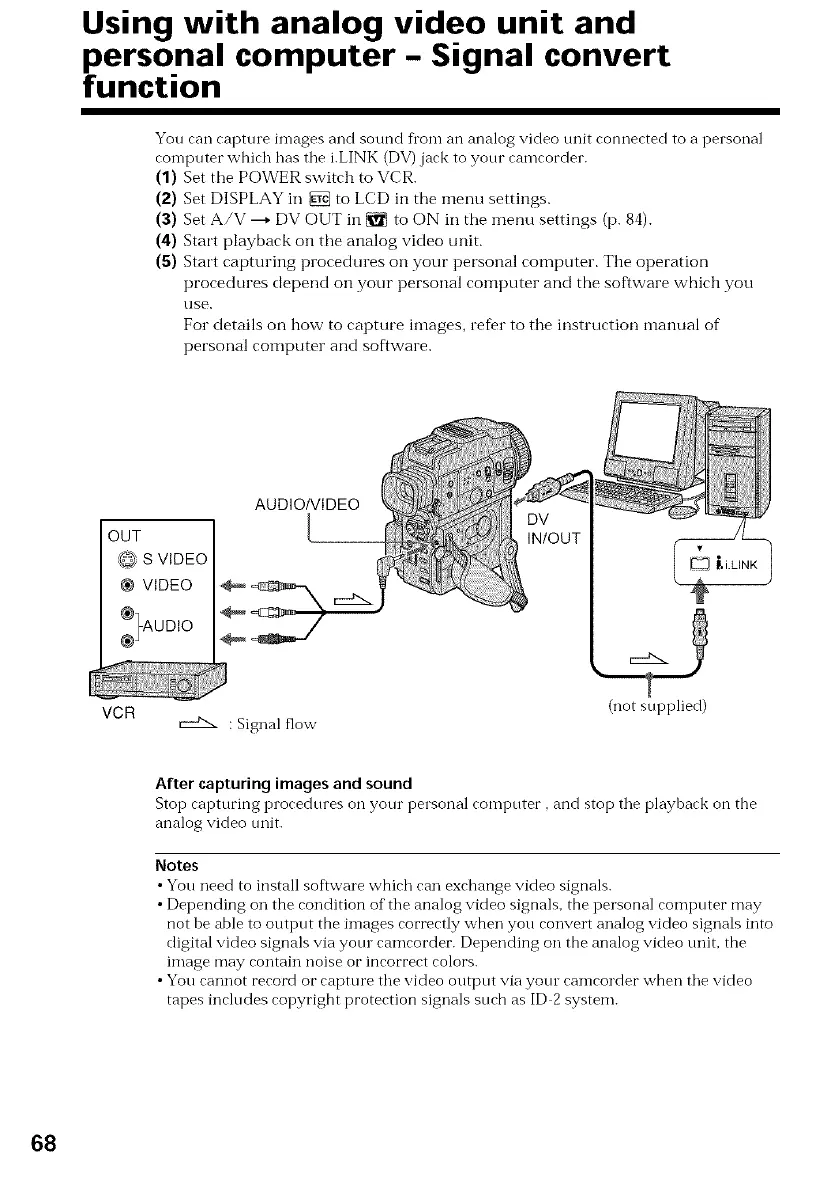
You can capture images and sound from an analog video unit connected to a personal
con-lputer which has tile i.LINK (DV)jack to your camcorder.
(1) Set tile POWER switch to VCR.
(2) Set DISPLAY in I{_ to LCD in the menu settings.
(3) Set A/V ---+DV OUT in _ to ON in tile menu settings (p. 84).
(4) Start playback on the analog video unit.
(5) Start capturing procedures on your personal computer. The operation
procedures depend on your personal computer and the software which you
use.
For details on how to capture images, refer to the instruction manual of
personal computer and software.
OUT
S VIDEO
® VIDEO
>uo,o
VCR
AUDIO/VIDEO
l__
c:::L:::x: Signal flow
(not supplied)
After capturing images and sound
Stop capturing procedures on your personal computer, and stop the playback on the
analog video trait.
Notes
• You need to install sofiware which can exchange video signals.
• Depending on the condition of the analog vicieo signals, the personal computer may
not be able to output the images correctly when you convert analog video signals into
digital video signals via yotu camcorder. Depending on the analog video trait, the
image may contain noise or incorrect colors.
• You cannot record or capture the video output via yotu camcorder when the video
tapes includes copyright protection signals such as ID 2 system.
68















 To Next Page