Recording video or TV programs
Using the i.LINK cable (DV connecting cable)
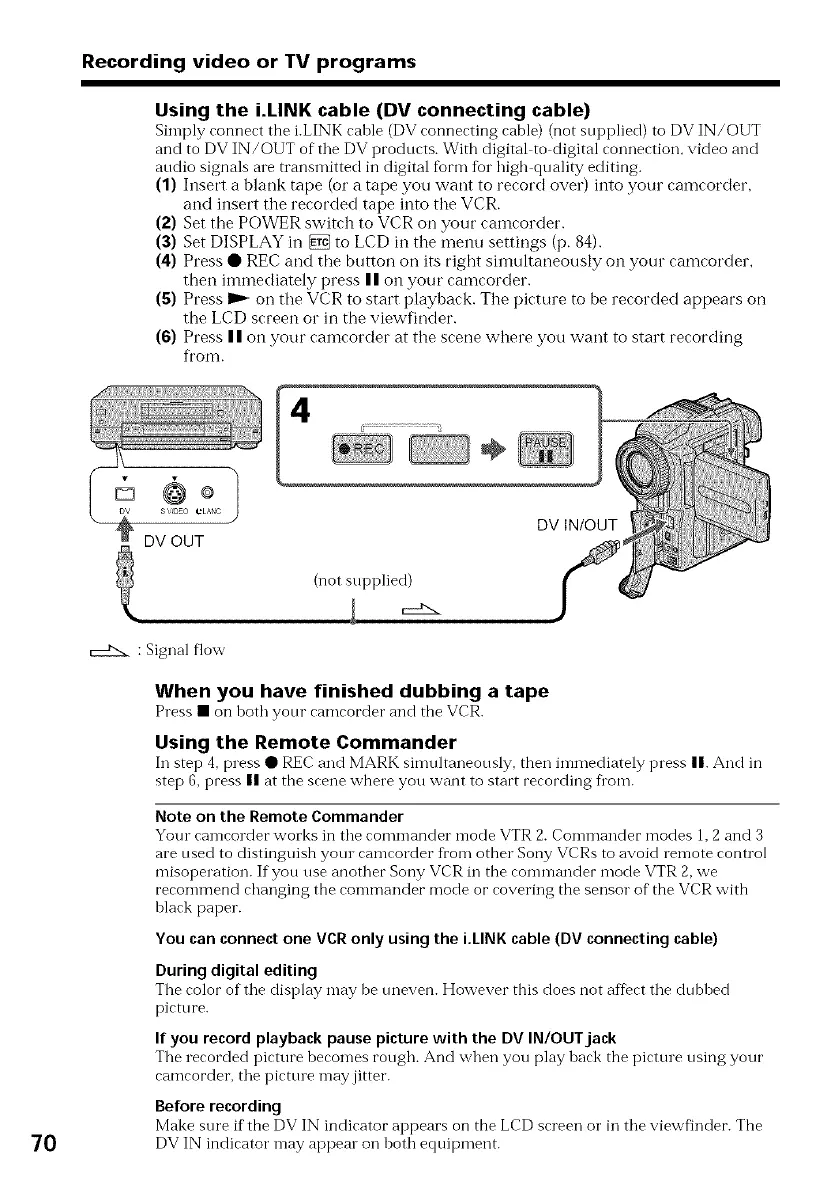
Simply connect the i.LINK cable (DV connecting cable) (not supplied) to DV IN/OUT
and to DV IN/OUT of the DV products. With digital to digital connection, video and
audio signals are transmitted in digital form for high quality editing.
(1) Insert a blank tape (or a tape you want to record over) into your camcorder
and inset't the recorded tape into the VCR.
(2) Set the POWER switch to VCR on your camcorder.
(3) Set DISPLAY in _ to LCD in the menu settings (p. 84).
(4) Press • REC and the button on its right simultaneously on your camcorder
then immediately press II on your camcorder.
(g) Press ID_on the VCR to start playback. The picture to be recorded appears on
the LCD screen or in the viewfinder.
(6) Press II on your camcorder at the scene where you want to start recording
from.
÷
DV INIOUT
(not supplied)
c:d2_
: Signal flow
70
When you have finished dubbing a tape
Press • on hoth your camcorder and the VCR.
Using the Remote Commander
In step 4, press • REC and MARl< simultaneously, then in-lmediately press n. And in
step 6, press II at the scene where you want to start recording from.
Note on the Remote Commander
Your camcorder works in the commander mode VTR 2. Commander modes 1,2 and 3
are used to distinguish yotn camcorder from other Sony VCRs to avoid remote control
misoperation. If you use another Sony VCR in the commander mode VTR 2,we
recommend changing the commander mode or covering the sensor of the VCR with
black paper.
You can connect one VCR only using the i,LINK cable (DV connecting cable)
Duringdigital editing
The color of the display may be uneven. However this does not afDct the dubbed
picture.
If you record playback pause picture with the DV IN/OUT jack
The recorded picture becomes rough. And when you play back the picture using your
camcorder, the picttn e may jitter.
Before recording
Make sure if the DV IN indicator appears on the LCD screen o1"in the viewfinder. The
DV IN indicator may appear on both equipment.















 To Next Page