Making your own titles
You can make up to 2 titles and store then-i in cassette n-len-lory. Each title can
have up to 20 characters.
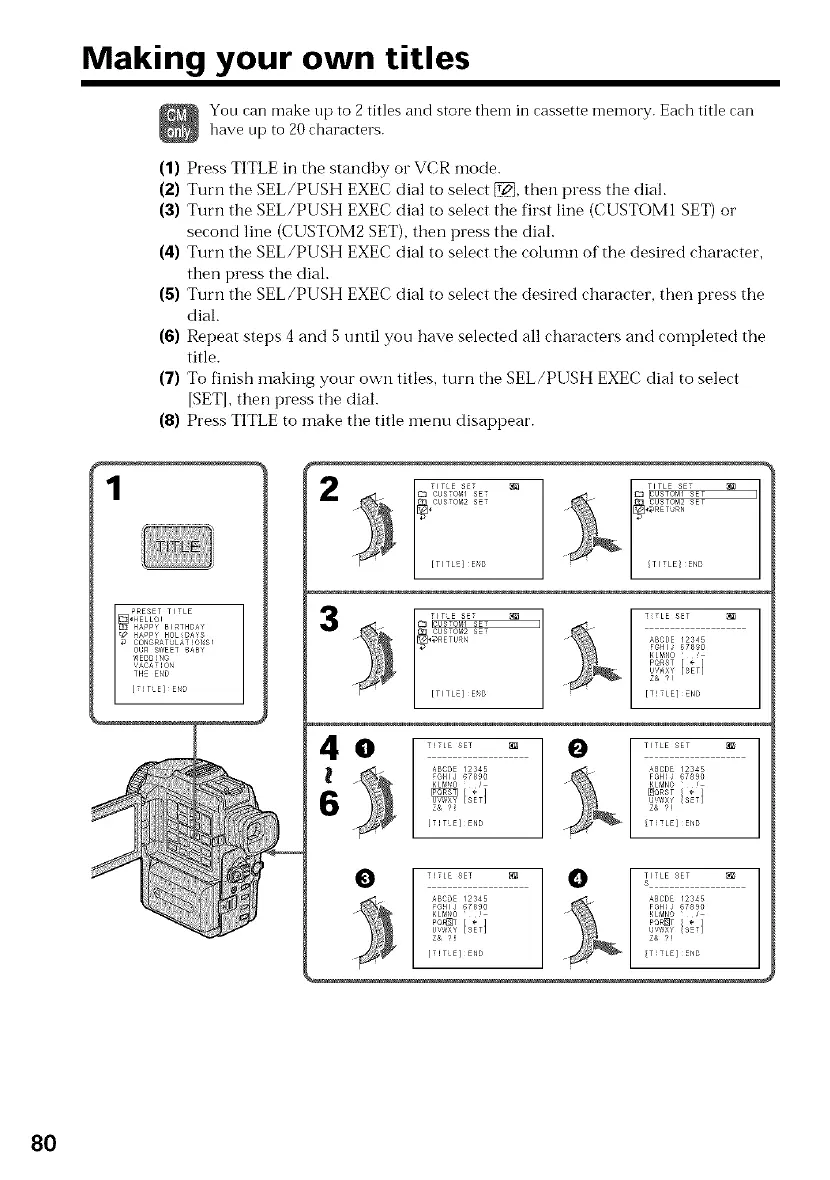
(1) Press TITLE in the standby or VCR mode.
(2) Turn the SEL/PUSH EXEC dial to select _, the:: press the dial.
(3) Turn the SEL/PUSH EXEC dial to select the first line (CUSTOM1 SET) or
second line (CUSTOM2 SET), then press the dial.
(4) Turn the SEL/PUSH EXEC dial to select the cohmm of the desired character,
then press the dial.
(5) Turn the SEL/PUSH EXEC dial to select the desired character, then press the
dial.
(6) Repeat steps 4 and 5 until you have selected all characters and completed the
title.
(7) To finish inaking your own titles, turn the SEL/PUSH EXEC dial to select
[SETI, then press the dial.
(8) Press TITLE to make the title n:enu disappear.
TITLE S:7 _ TITL: SET
TITL: E_D TITLE E_ID
m _r¢1 5E 7
17_ GUBOM2 BE:
_l_RErUa
[rlJk:E_B
T:TLE SET
ABODE 12S4_
FGHIJ 678_0
KLMr40 '
PORST [ _- ]
u/¢ix_ [SET]
Z& 2!
[TITLE] END
do
TITLE SET
_BCgE 12S45
F_HIJ 6789O
KLr¢_O
ij_J_×y SET
Z& ?_
[TiTLEI_E_D
0
TITLE SET
_SCDE _2345
FGHIJ 6789O
KLP_NO
_'aRST ÷
Zt, ?!
T TLE] END
_HIJ 6789O FSHIJ 6789O
u,,_0×Y SEt u"_'_x_:sT
z& ?: z& ?!
[TITLE] END [T TLE] EblD
80















 To Next Page