-- Customizing Your Camcorder --
Changing the menu settings
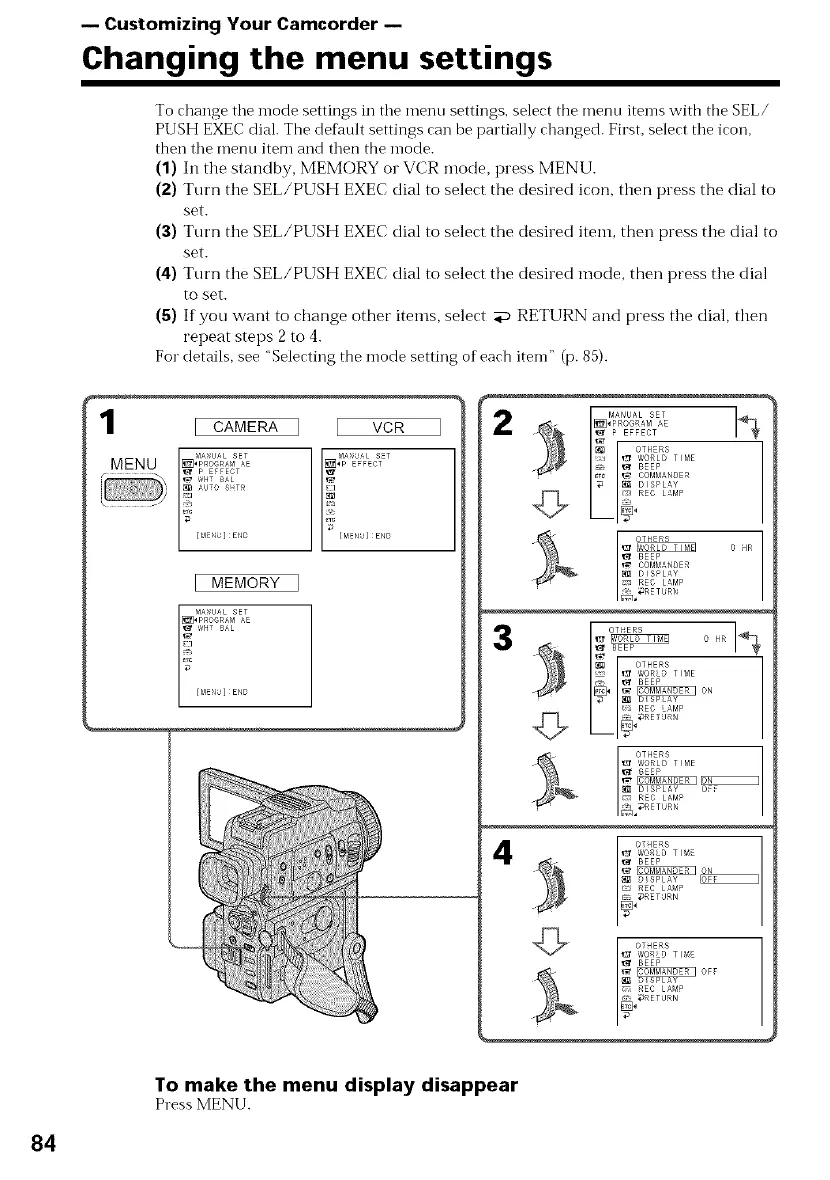
To change tile mode settings in tile menu settings, select the menu items with the SEL/
PUSH EXEC dial. The def.mlt settings can be partially changed. First, select tile icon,
then tile menu item and then the mode.
(1) In the standby, MEMORY or VCR mode, press MENU.
(2) Turn the SEL/PUSH EXEC dial to select the desired icon, then press the dial to
set.
(3) Turn the SEL/PUSH EXEC dial to select the desired item, then press the dial to
set.
(4) Turn the SEL/PUSH EXEC dial to select the desired mode, then press the dial
to set.
(5) If you want to change other items, select aP RETURN and press the dial, then
repeat steps 2 to 4.
For details, see "Selecting the mode setting of each item" (p. 85).
1 :CAMERA ] VCR
MENU [] 2#_%Lo__
! [MENb] END
[ MEMORY ]
[ME_bl END
1
I__ P EFFECT
OTHERS
[_:1 _ 'A'ORLD T{ME
- _ BEEP
_Tc _ COMMANDER
_ DISPLAY
_ _g!l REO L&MP
o HR
OHR
_t BEEP
OTHERS
• ir_ 'A'ORLD TIME
_ BEEP
_, _ON
_ D SP AY
REO AMP
N
4
OTHERS
@ORLD TIME
'1_ BEEP
_;_ D_SPLAY
REC LA_P
RETURN
To make the menu display disappear
Press MENU.
84















 To Next Page