Changing the menu settings
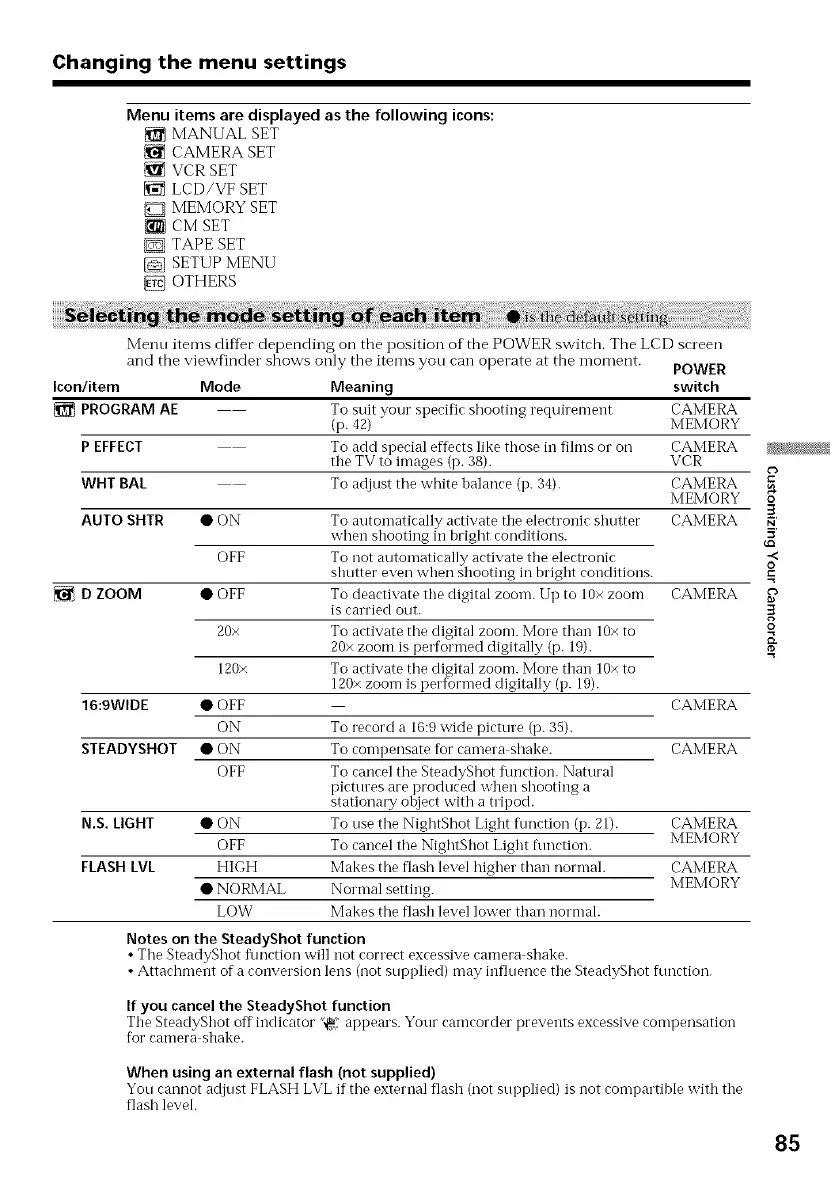
Menu items are displayed as the following icons:
MANUAL SET
CAMERA SET
VCR SET
LCD/VF SET
MEMORY SET
[_7]CM SET
D TAPE SET
SETUP MENU
OTHERS
Menu items differ depending on the position of the POWER switch. The LCD screen
and the viewfinder shows only the items you can operate at the moment.
POWER
Icon/item Mode Meaning switch
PROGRAM AE To suit your specific shooting requirement CAMERA
(p. 42) MEMORY
P EFFECT To add s )ecial effects like those in fihns or on CAMERA
the TV to images p. 38 . VCR
WHT BAL To adjust the white halance (p. 34). CAMERA
MEMORY
CAMERAAUTO SHTR
D ZOOM
16:9WIDE
STEADYSHOT
•ON
OFF
• OFF
20×
120×
• OFF
ON
•ON
OFF
N.S. LIGHT • ON
OFF
FLASH LVL HIGH
• NORMAL
LOW
To automatically activate the electronic shutter
_hen shooting in bright conditions.
To not automatically activate the electronic
shutter even when shooting in bright conditions.
To deactivate the digital zoon-l. Up to 10× zoom CAMERA
is carried out.
To activate the digital zoom. More than 10× to
20× zoom is performed digitally (p. 19).
To activate the digital zoom. More than 10× to
120× zoom is performed digitally (p. 19).
CAMERA
To record a 16:9 wide picture (p. 35).
To compensate for camera shake. CAMERA
To cancel the SteadyShot flmction. Natural
pictures are produced x_hen shooting a
stationary ohject with a tripod.
To use the NightShot Light function (p. 21). CAMERA
To cancel the NightShot Light function. MEMORY
Makes the flash level higher than normal. CAMERA
Normal setting. MEMORY
Makes the flash level lower than normal.
Notes on the SteadyShot function
• The SteadyShot flmction will not correct excessive camera shake.
• Attachment of a conversion lens (not supplied) may influence the SteadyShot function.
If you cancel the SteadyShot function
The SteadyShot off indicator '_ appears. Your camcorder prevents excessive compensation
for camera shake.
When using an external flash (not supplied)
You caIlnot adjust FLASH LVL if the external flash (notsupplied) is not compartible with the
flash level.
O
.<
o
.=
o
85















 To Next Page