Changing the menu settings
POWER
Icon/item Mode Meaning switch
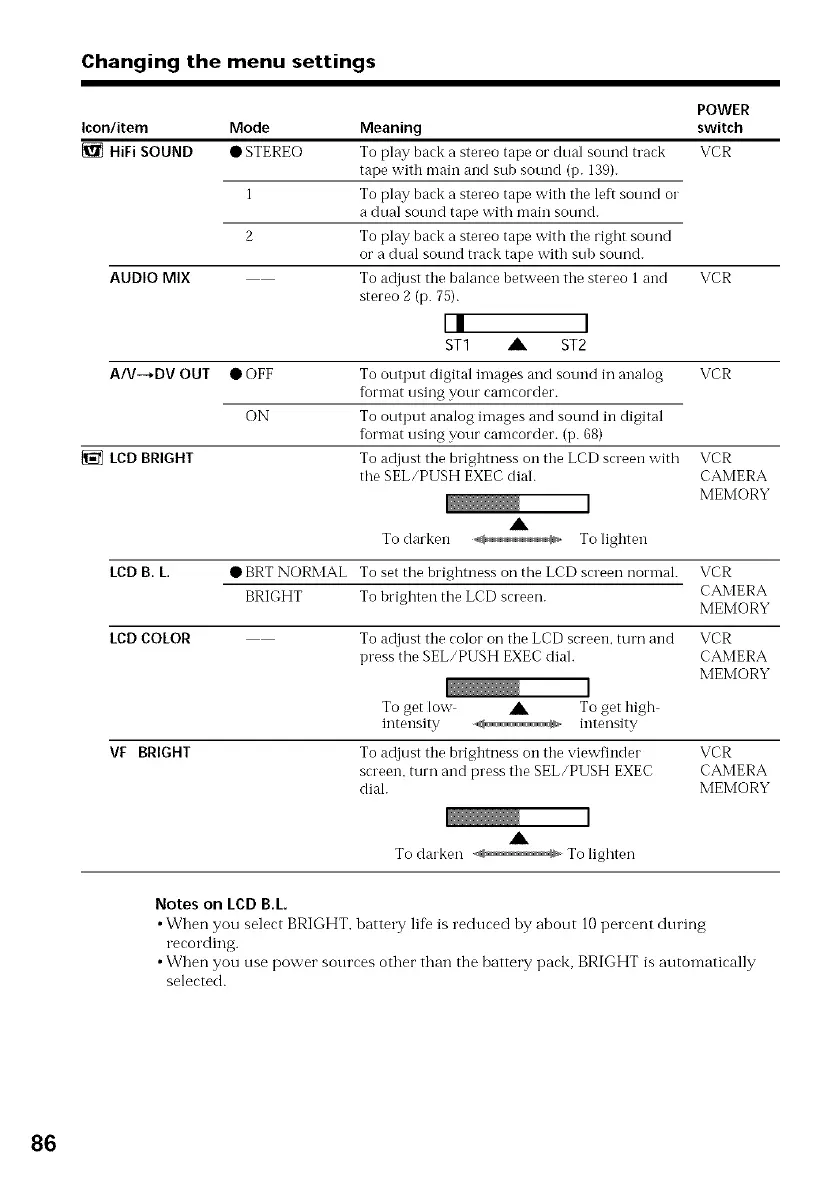
{_ HiFi SOUND • STEREO To play back a stereo tape or dual sound track VCR
tape with main and sub sound (p. 139).
1 To play back a stereo tape with the left sound oi"
a dual sound tape with main sound.
2 To play back a stereo tape with the right sound
or a dual sound track tape with sub sound.
To adjust the balance between the stereo 1 and VCR
stereo 2 (p. 75).
L! 1
ST1 A ST2
To output digital images and sound in analog VCR
format using your camcorder.
To output analog images and sound in digital
format using your camcorder. (i7.68)
To adjust the brighmess on the LCD screen with
the SEL/PUSH EXEC dial.
AUDIO MIX
A/V--*DV OUT •OFF
ON
LCDBRIGHT
LCD B. L.
A
To darken ,_ Tolighten
VCR
CAMERA
MEMORY
LCD COLOR
• BRTNORMAL To set the brightness 0*7the LCD screennorlnal. VCR
BRIGHT To brighten the LCD screen. CAMERA
MEMORY
VF BRIGHT
To adjust the color on the LCD screen, turn and VCR
press the SEL/PUSH EXEC dial. CAMERA
MEMORY
To get low A To get high
intensity -,,_ intensity
To adjust the brightness on the viewfinder VCR
screen, turn and press the SEL/PUSH EXEC CAMERA
dial. MEMORY
A
To darken To lighten
Notes on LCDB.L
•When you select BRIGHT, batte W life is reduced by about 10 percent during
recording.
•When you use power sources other than the battery pack, BRIGHT is automatically
selected.
86















 To Next Page