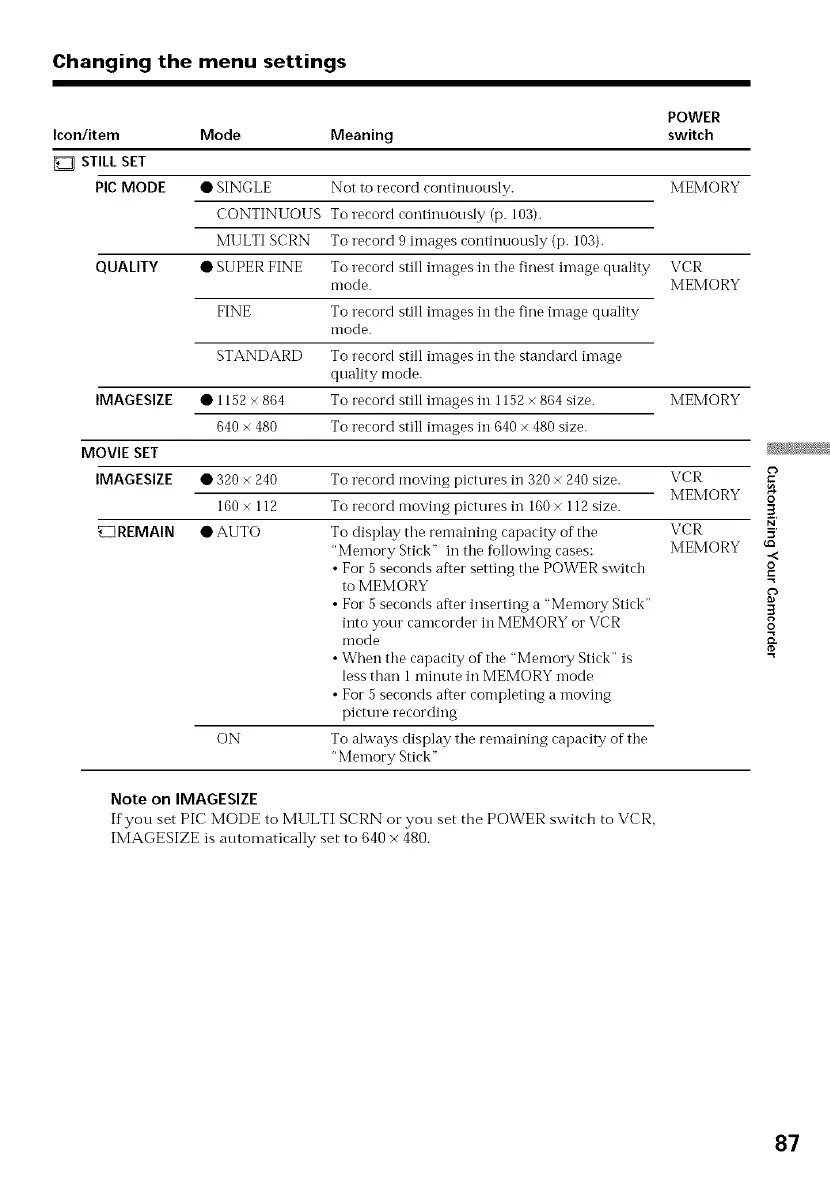
Changing the menu settings
POWER
Icon/item Mode Meaning switch
STILL SET
Pie MODE • SINGLE Not to record continuously. MEMORY
CONTINUOUS Torecord continuously (p. 103).
MULTI SCRN To record 9 images continuously (p. 103).
QUALITY • SUPER FINE To record still images in the finest image quality VCR
mode. MEMORY
FINE To record still images in the tine image quality
mode.
STANDARD To record still images in the standard image
quality mode.
IMAGESIZE • 1152 × 864 To record still images in 1152 × 864 size. MEMORY
640 × 480 To record still images in 640 × 480 size.
MOVIE SET
IMAGESIZE
VCR
MEMORY
ON
• 320 × 240 To record moving pictures in 320 × 240 size.
160 × 112 To record moving pictures in 160 × 112 size.
REMAIN • AUTO To display the remaining capacity of the VCR
"Memory Stick" in the following cases: MEMORY
• For 5 seconds after setting the POWER switch
to MEMORY
• For 5 seconds after inserting a "Memory Stick"
into your camcorder in MEMORY or VCR
mode
• When the capacity of the "Memory Stick" is
less than 1 minute in MEMORY mode
• For 5 seconds after completing a moving
picture recording
To ahvays display the remaining capacity of the
"Memory Stick"
Note on IMAGESIZE
If you set PIC MODE to MULTI SCRN ocyou set the POWER switch to VCR,
IMAGESIZE is auton-latically set to 640 x 480.
O
.<
o
.=
87















 To Next Page