Using a "Memory Stick" - introduction
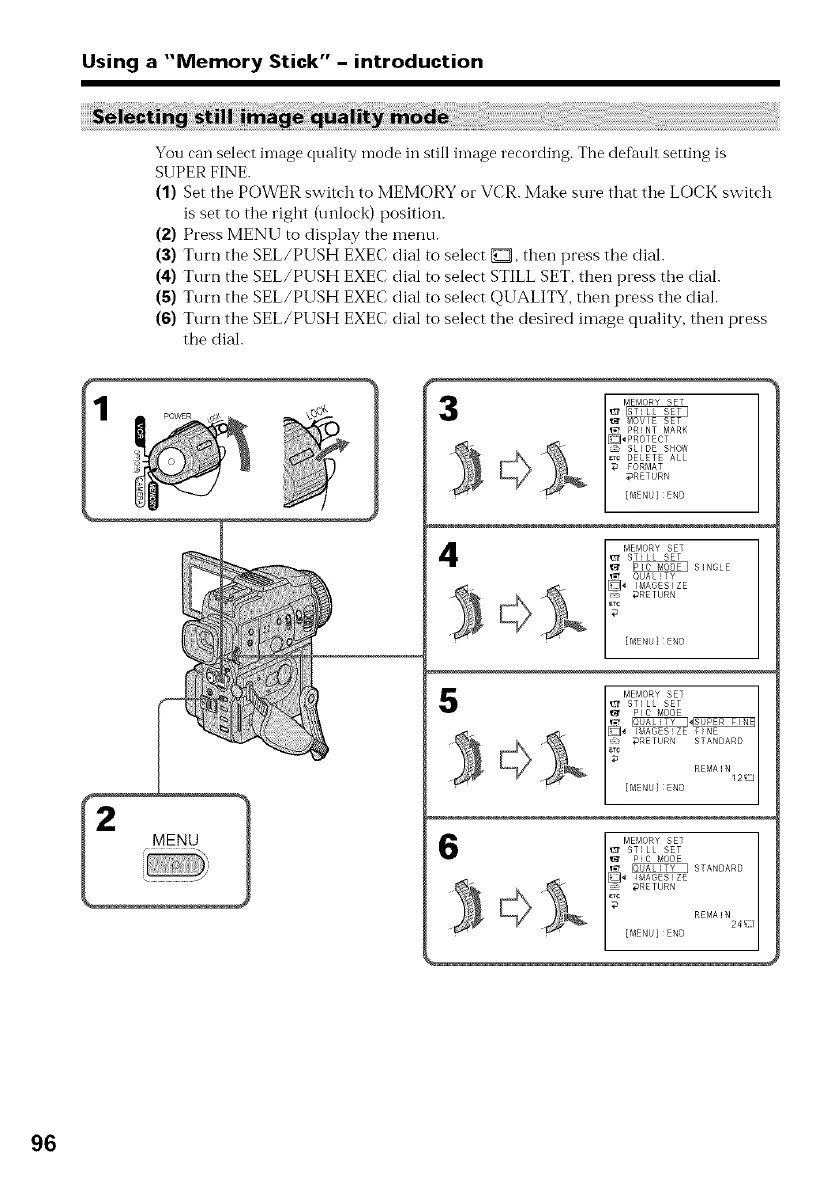
You can select image quality mode in still image recording. The default setting is
SUPER FINE.
(1) Set tile POWER switch to MEMORY or VCR. Make sure that the LOCK switch
is set to the right (unlock) position.
(2) Press MENU to display the menu.
(3) Turn the SEL/PUSH EXEC dial to select {_D,then press the dial.
(4) Turn the SEL/PUSH EXEC dial m select STILL SET, then press the dial.
(5) Turn the SEL/PUSH EXEC dial to select QUALITY, then press the dial.
(6) Turn the SEL/PUSH EXEC dial to select the desired image quality, then press
the dial.
_t MOVIE SET
PRINT MARK
_PROTECT
_ SLIDE SOd
_c DELETE ALL
FORMAT
DRETURN
{flIER } END
I EMORY SET
_c [flIENU} END
_ _RETURN STANDARD
_ [flIENU} END REMA ! NI212J
6 STANDARD
{MEN}END REMA!N24_ ;
96















 To Next Page