45
GB
Printing using a TV monitor (MONITOR OUT mode)
7
Press the arrow (B/b/V/v)
button to select the desired
image, then press ENTER.
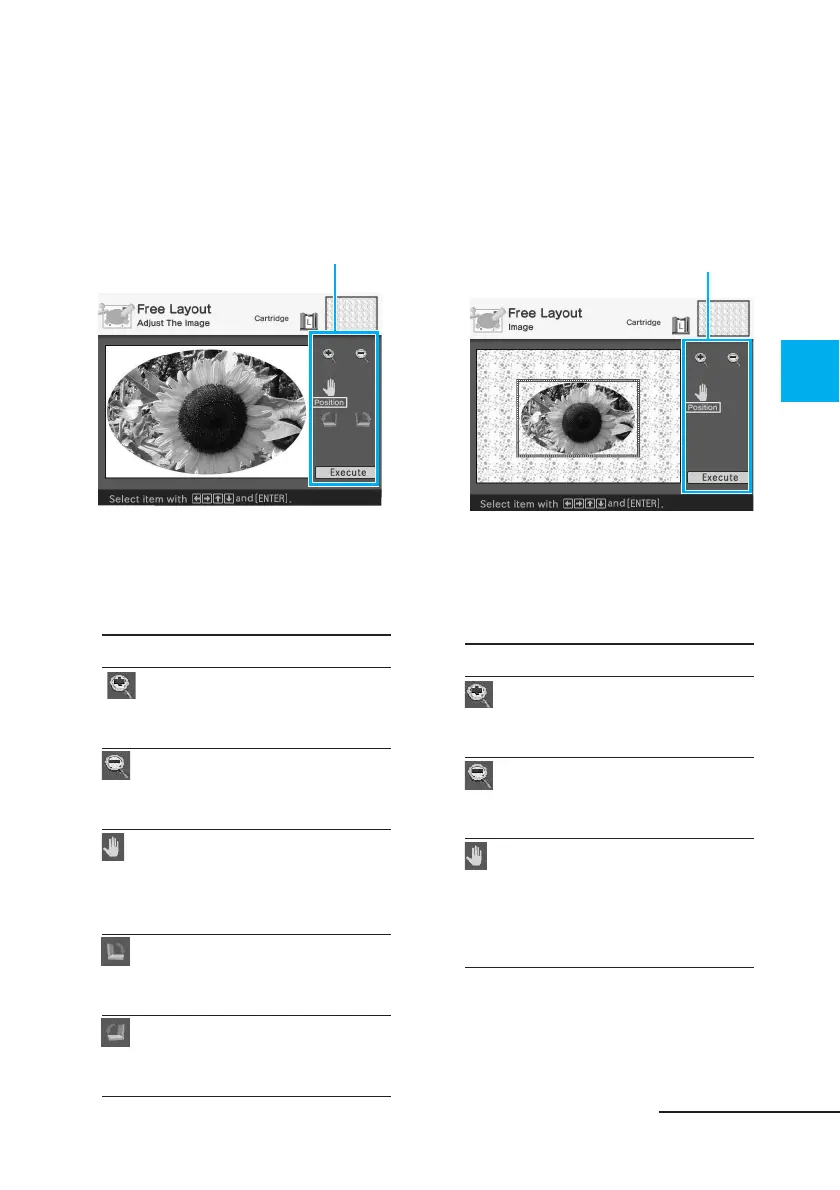
The window used for adjusting the
image size and position is
displayed.
Adjustment tools
8
Press the arrow (B/b/V/v)
button to select the desired
adjustment tool, then press
ENTER.
Items Procedures
Each time you press
ENTER, the image becomes
larger.
Each time you press
ENTER, the image becomes
smaller.
Move the adjustment frame
with the arrow (B/b/V/v)
button, and then press
ENTER.
Each time you press
ENTER, the image rotates
90° clockwise.
Each time you press
ENTER, the image rotates
90° counterclockwise.
9
Press the arrow (B/b/V/v)
button to select “Execute” and
press ENTER.
The window used for adjusting the
framed image size and position is
displayed.
Adjustment tools
10
Press the arrow (B/b/V/v)
button to select the desired
adjustment tool, then press
ENTER.
Items Procedures
Each time you press
ENTER, the framed image
becomes larger.
Each time you press
ENTER, the framed image
becomes smaller.
Move the framed image
surrounded by the
adjustment frame with the
arrow (B/b/V/v) button,
and then press ENTER.
Continued



 To Next Page