107
Enjoying images on your computer
Installing “Image Transfer”
You can use the “Image Transfer” software
to copy images to your computer
automatically when you connect the camera
to your computer.
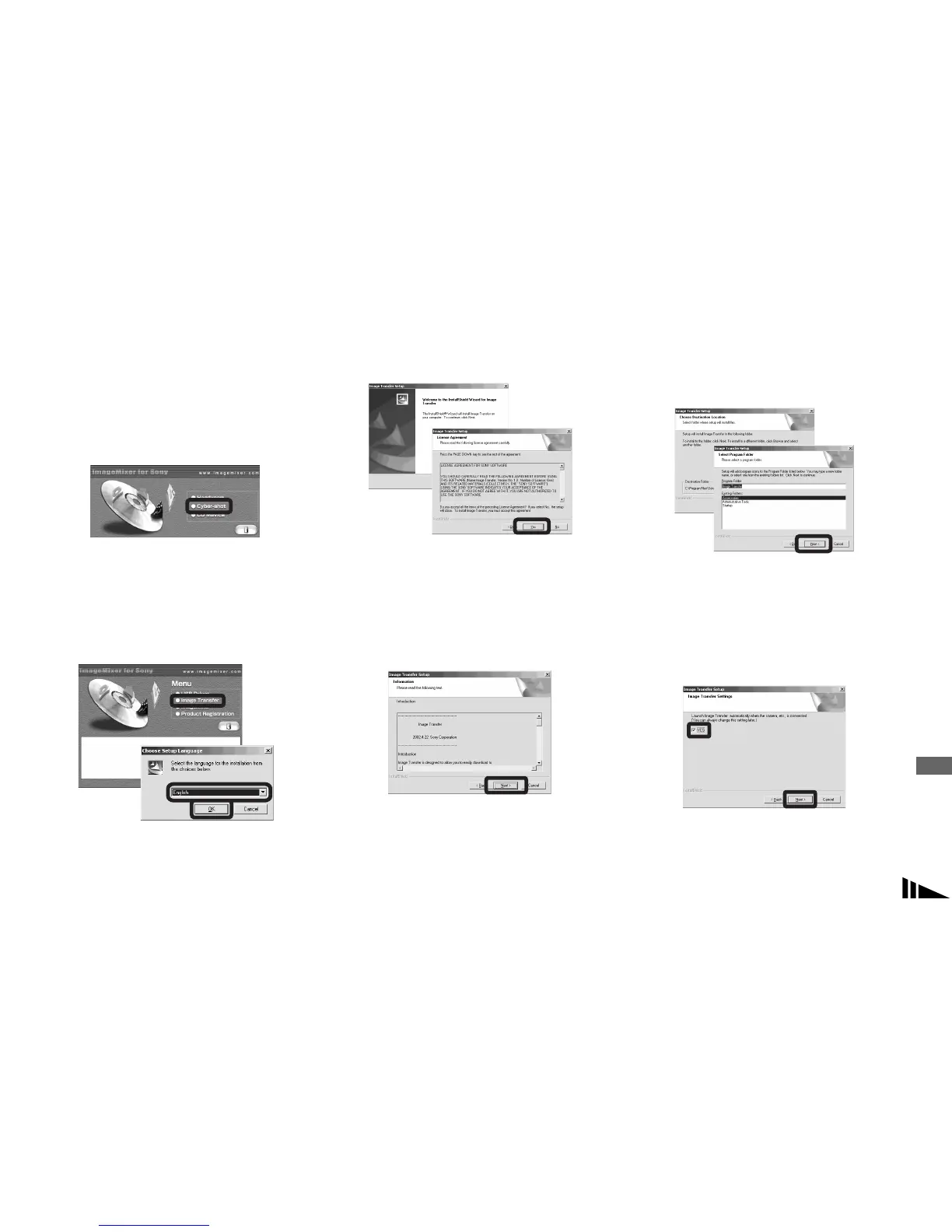
a Click [Cyber-shot] on the
model selection screen.
The installation menu screen appears.
b Click [Image Transfer] on the
installation menu screen.
Select the desired language,
then click [OK].
The “Welcome to the InstallShield
Wizard for Image Transfer” screen
appears.
• This section describes the English screen.
c Click [Next]. When “License
Agreement” screen appears,
click [Yes].
Read the agreement carefully. If you
accept the terms of the agreement,
proceed with the installation. The
“Information” screen appears.
d Click [Next].
e Select the folder to be
installed, then click [Next].
Select the program folder, then
click [Next].
f Confirm if the checkbox is
checked on the “Image
Transfer Settings” screen,
then click [Next].
When the installation is completed, the
screen informs you of completion.



 To Next Page
 Loading...








