3-23
DSR-80/80P/60/60P
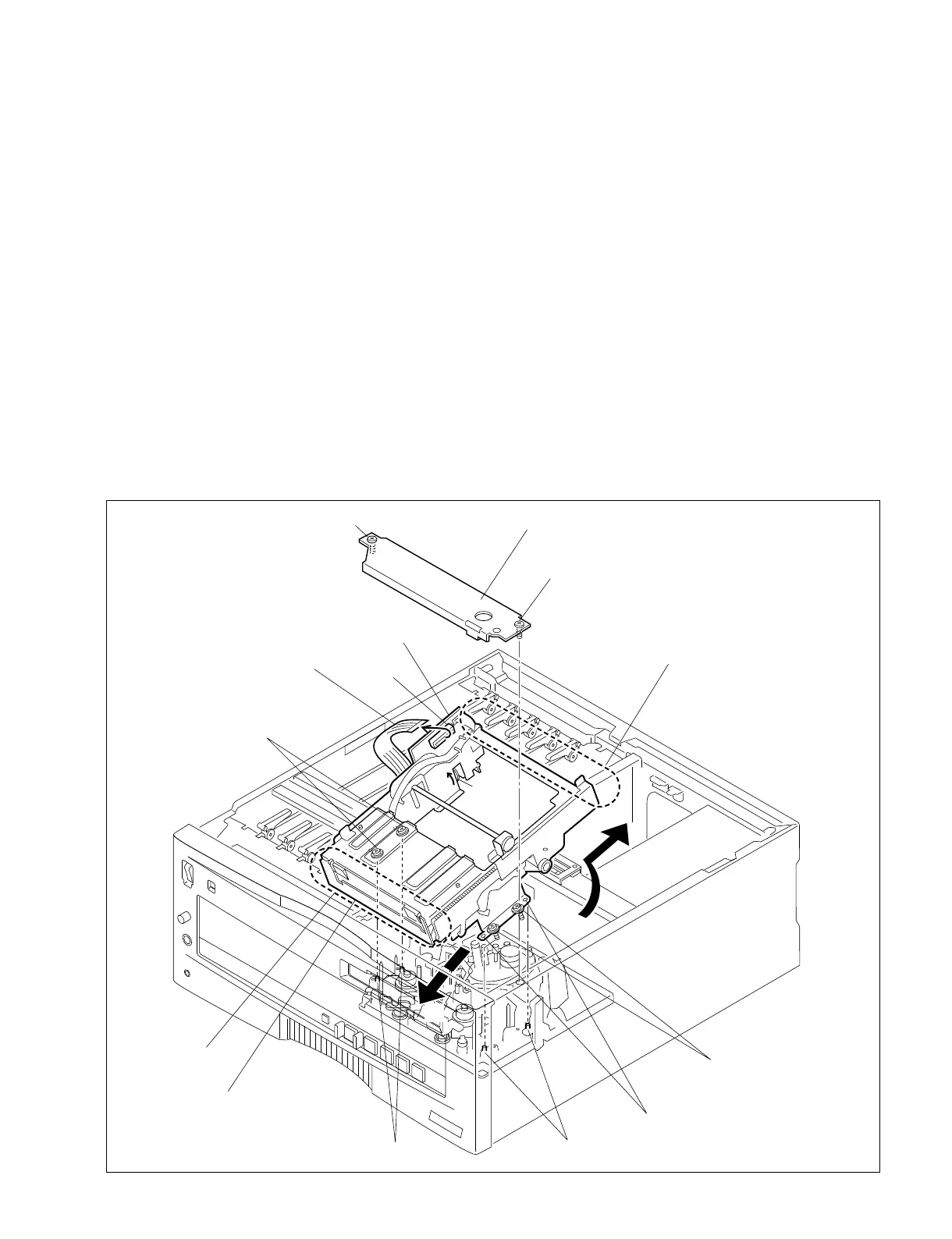
3-5. REMOVAL AND ATTACHMENT OF THE CASSETTE COMPARTMENT
Removal
1) Remove the top panel. (Refer to section 3-4.)
2) Pull the flexible card wire out of the connector (CN50)
on the CC-75 board.
3) Remove the cassette compartment retainer assembly by
loosing the 2 screws.
The screw cannot fall out of the cassette compartment
retainer assembly because it has a drop-protector.
4) Loosen the four screws fixing the cassette
compartment.
The screw cannot fall out of the cassette compartment
because it has a drop-protector.
5) Rotate the gear of the cassette compartment in the
direction of arrow C and back the rack about 5 mm.
Remove the cassette compartment in the direction of
arrow A.
Attachment
6) Insert the front side of the cassette compartment from
the angled B direction, and down the rear side of the
cassette compartment.
7) Reverse the removal procedure from steps 3) to 1) to
attach the cassette compartment.
. The cassette compartment is positioned by the four
positioning pins. Tighten the screws after ensuring
that these pins are correctly inserted in each hole.
Fixing screw (with drop-protector)
Fixing screw (with drop-protector)
Positioning hole
Positioning pin
Positioning pin
Rear
Cassette compartment
Cassette compartment retainer assembly
CC-75 board
Flexible card wire
CN50
Front
Fixing screws (with drop-protector)
Fixing screws (with drop-protector)
A
Gear
C
B


 To Next Page