Receiver (Amplifier) Hookups
o
_Q
tD
¢L
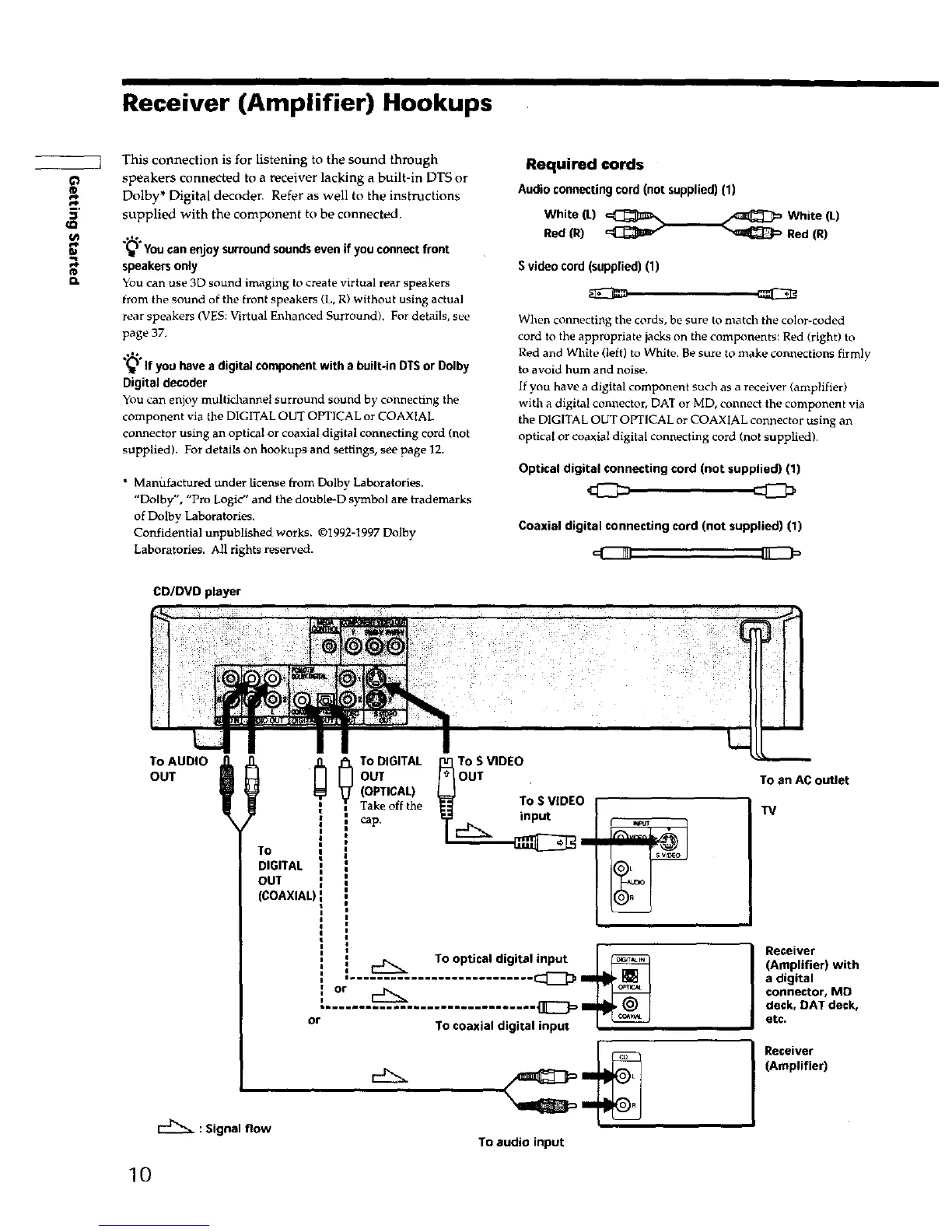
This connection is for listening to the sound through
speakers connected to a receiver lacking a built-in DTS or
Dolby* Digital decoder. Refer as well to the instructions
supplied with the component to be connected.
.,%
"_ You can enjoy surround sounds even if you connect front
speakers only
You can use 3D sound imaging to create virtual rear speakers
from the sound of the front speakers (L, R) without using actual
rear speakers (VES: Virtual Enhanced Surround). For details, see
page 37.
.,leo
(_ If you have a digital component with a built-in DTSor Dolby
Digital decoder
You can enjoy multichannel surraund sound by connecting the
component via the DIGITAL OUT OPTICAL or COAXIAL
connector using an optical or coaxial digital connecting cord (not
supplied). For details on hookups and settings, see page 12.
• Manufactured under license from Dolby Laboratories.
"Dolby", "Pro Logic" and the double-D symbol are trademarks
of Dolby Laboratories.
Confidential unpublished works. ©1992-1997 Dolhy
Laboratories. All rights reserved.
Required cords
Audio connecting cord (not supplied) (1)
White (L) _ White (L)
Red (R) _ Red (R)
S video cord (supplied) (1)
When connecting the cords, be sure to match the color-coded
cord to the appropriate jacks on the components: Red (right) to
Red and White (left) to White. Be sure to make connections firmly
to avoid hum and noise.
If you have a digital component such as a receiver (amplifier)
with a digital connector, DAT or MD, connect the component via
the DIGITAL OUT OPTICAL or COAXIAL connector using an
optical or coaxial digital connecting cord (not supplied).
Optical digital connecting cord (not supplied) (1)
Coaxial digital connecting cord (not supplied) (1)
CD/DVD player
T°AUOOt;OUT
To
DIGITAL
OUT
(COAXIAL)
: Signal flow
_ To DIGITAL
OUT
(OPTICAL)
Take offthe
cap.
To S VIDEO
OUT
To S VIDEO
input
To an AC outlet
TV
To optical digital input
..................
or To coaxial digital input I --
Receiver
(Amplifier) with
a digital
connector, MD
deck, DAT deck,
etc.
Receiver
(Amplifier)
To audio input
10











 To Next Page