TV Hookups
u_
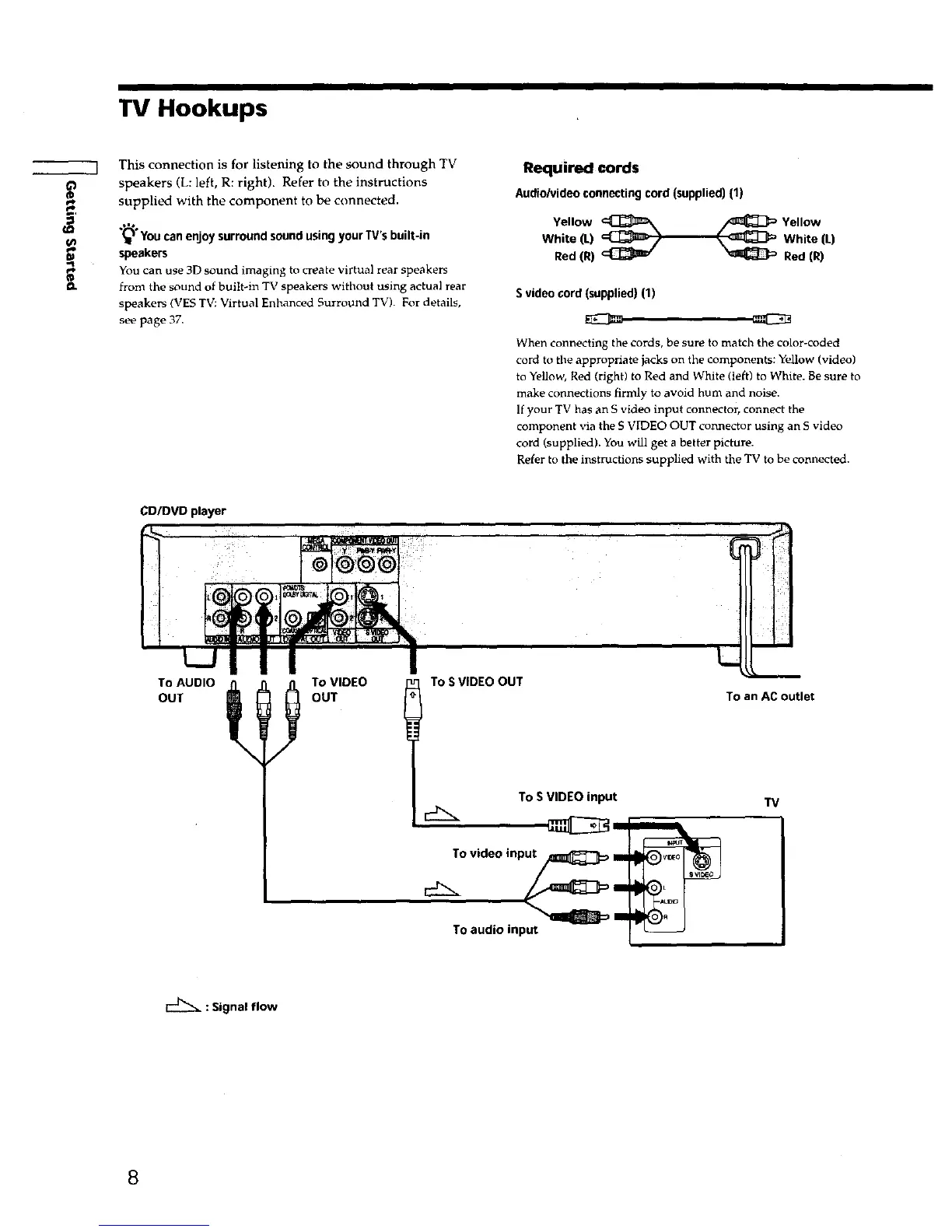
This connection is for listening to the sound through TV
speakers (L: left, R: right). Refer to the instructions
supplied with the component to be connected.
,=,
(_" You can enjoy surround sound using your TV's built-in
speakers
You can use 3D sound imaging to create virtual rear speakers
from the sound of built-in TV speakers without using actual rear
speakers (VES TV: Virtual Enhanced Surround TV). For details,
see page 37,
Required cords
Audio/video connecting cord (supplied) (1)
Yellow _ YellowWhite (L) White (L)
Red (R) _ _ Red (R)
S video cord (supplied) (1)
When connecting the cords, be sure to match the color-coded
cord to the appropriate jacks on the components: Yellow (video)
to Yellow, Red (right) to Red and White (left) to White. Be sure to
make connections firmly to avoid hum and noise.
If your TV has an S video input connector, connect the
component via the S VIDEO OUT connector using an S video
cord (supplied). You will get a better picture.
Refer to the instructions supplied with the TV to be connected.
CD/DVD player
To AUDIO
OUT
/
To VIDEO
OUT
To S VIDEO OUT
To S VIDEO input
To video input_ Im
/
TO audio input
To an AC outlet
TV
: Signal flow
8











 To Next Page