Controlling the CD Changer (Mega Control)
o
=
5'
&
€
ta
$,P
®
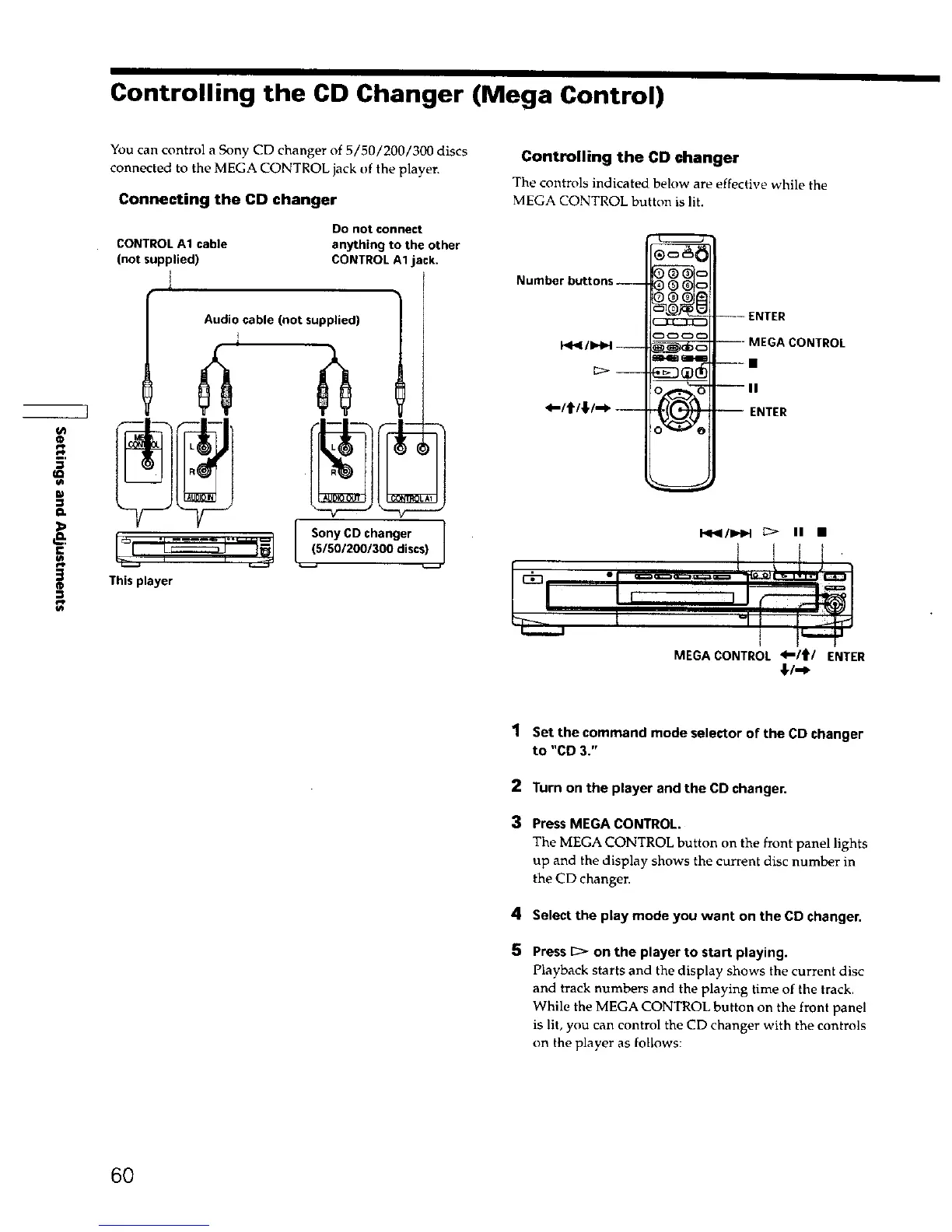
You can control a Sony CD changer of 5/50/200/300 discs
connected to the MEGA CONTROL jack of the player.
Connecting the CD changer
CONTROL A1 cable
(not supplied)
1
Do notconnect
anything to the other
CONTROL A1 jack.
i
Audio cable (not supplied)
[__(sSonyCD changer 1
15012001300 discsL I
This player
Controlling the CD changer
The controls indicated below are effective while the
MEGA CONTROL button is lit.
Number buttons ----
_-/t/;f-_--
)0_
iI-mt _
--- ENTER
--- MEGA CONTROL
---II
--II
-- ENTER
1_I41/IHH ;:> IN •
MEGACONTROL <-1t1'/ ENTER
€/"_
1 Set the command mode selector of the CD changer
to "CO 3."
2 Turn on the player and the CD changer.
3 Press MEGA CONTROL.
The MEGA CONTROL button on the front panel lights
up and the display shows the current disc number in
the CD changer.
4 Select the play mode you want on the CD changer.
5
Press _ on the player to start playing.
Playback starts and the display shows the current disc
and track numbers and the playing time of the track.
While the MEGA CONTROL button on the front panel
is lit, you can control the CD changer with the controls
on theplayer as follows:
60











 To Next Page