Selecting the Language for the On-Screen Display
U_
g
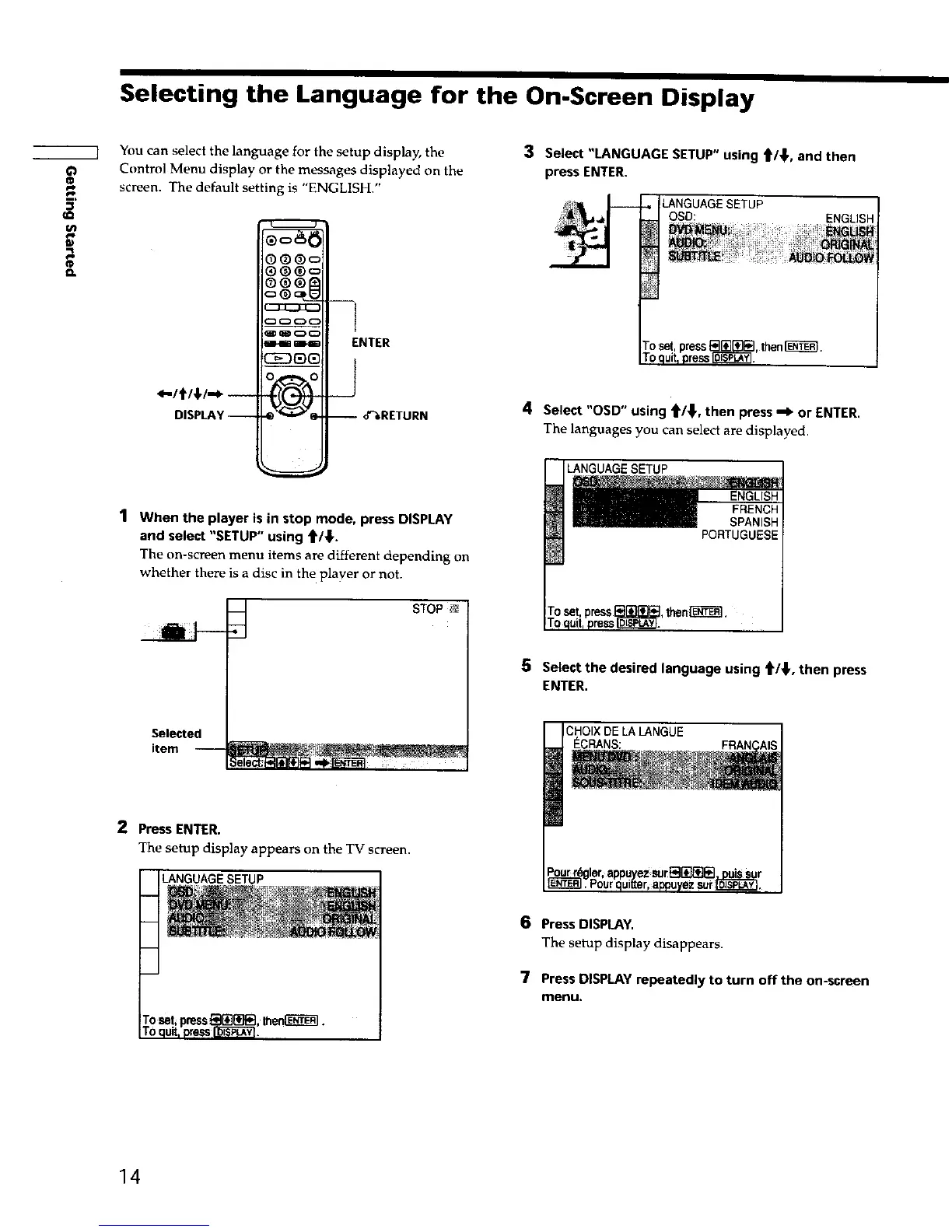
You can select the language for the setup display, the
Control Menu display or the messages displayed on the
screen. The default setting is "ENGLISH."
DISPLAY--
_)®c=
m_
_o
i i+ 4kt+4_
-I
ENTER
_J
--o'%RETURN
1 When the player is in stop mode, press DISPLAY
and select "SETUP" using _/_,.
The on-screen menu items are different depending on
whether there is a disc in the player or not.
STOP
3 Select "LANGUAGE SETUP" using _/_, and then
press ENTER.
LANGUAGE SETUP
OSD: ENGLISH
4 Select "OSD" using _/_, then press _" or ENTER.
The languages you can select are displayed.
UAGESETUP
5 Selectthe desJredlanguage using _/_,then press
ENTER,
Selected
item
2 Press ENTER.
The setup display appears on the TV screen.
LANGUAGE SETUP
CHOIX DE LA LANGUE
_CRANS:
6 Press DISPLAY.
The setup display disappears.
7 PressDISPLAY repeatedly to turn off the on-screen
menu.
14











 To Next Page