Locking Discs (Custom Parental Control) [] 0 0
o
e-
£
5'
tD
n
o
€
Using a registered password, you can set playback
restrictions for the desired disc(s).
You can set the same Custom Parental Control password
for up to 300 discs. When you set the three-hundred and
first disc, the first disc is canceled.
The same password is used for both Parental Control
(page 53) and Custom Parental Control.
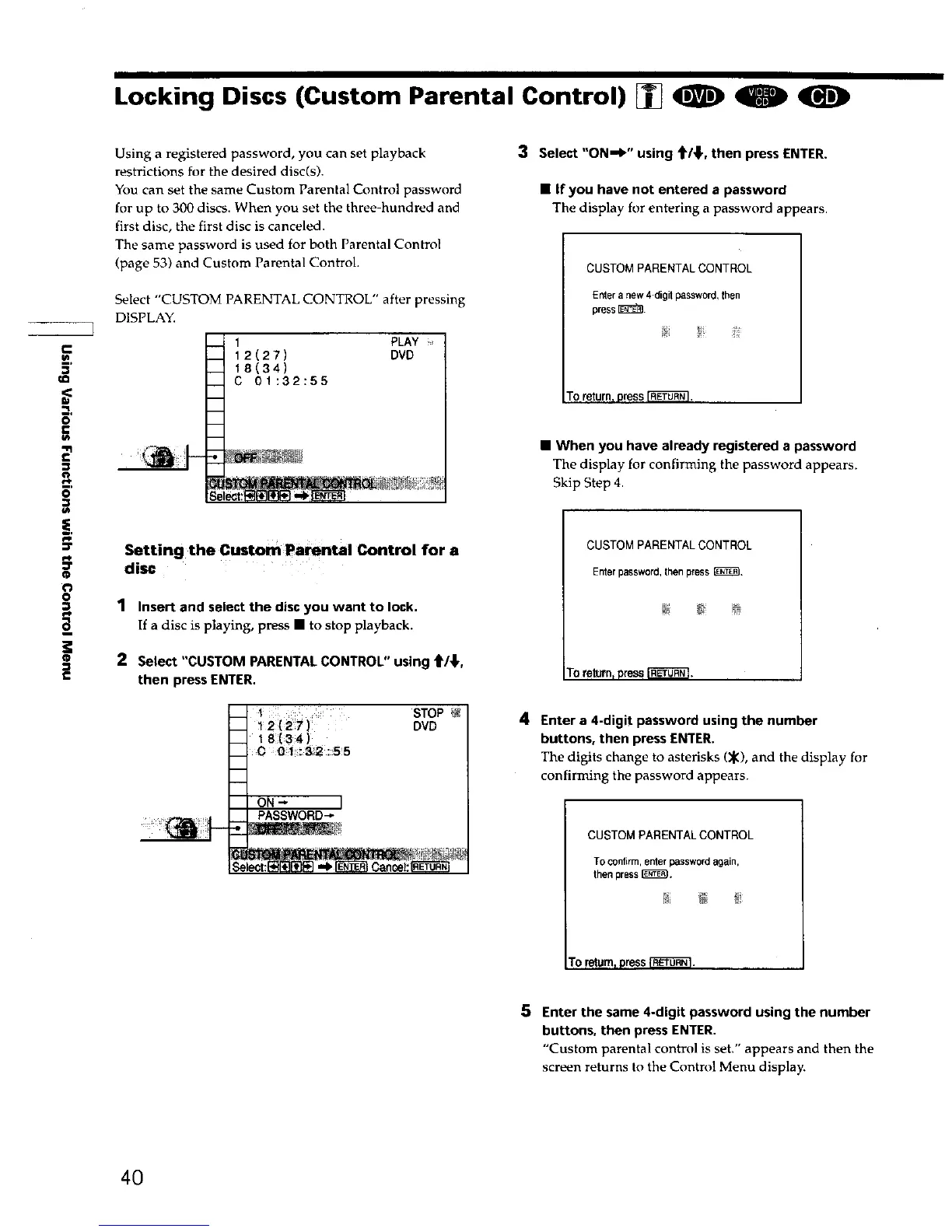
Select "CUSTOM PARENTAL CONTROL" after pressing
DISPLAY.
I PLAY i,
12(27) DVD
I 8(3 4)
C 0 1:3 2:5 5
Setting the Custom Pa_ntal Control for a
disc
1 Insert and select the disc you want to lock.
If a disc is playing, press • to stop playback.
2 Select "CUSTOM PARENTAL CONTROL" using t/_,
then press ENTER.
__ I STOP et
12(27) DVD
18(34 )
__ C 01132:55
" " ON-- ]
PASSWORD_
3 Select "ON-,W' using _/_,, then press ENTER.
• If you have not entered a password
The display for entering a password appears.
CUSTOMPARENTALCONTROL
Enteranew4digitpassword, then
press _.
Toreturn, press _.
• When you have already registered a password
The display for confirming the password appears.
Skip Step 4.
CUSTOM PARENTAL CONTROL
Enterpassword,thenpress_,
TOreturnrpressI-_'_O-_.
4 Enter a 4-digit password using the number
buttons, then press ENTER.
The digits change to asterisks (_), and the display for
confirming the password appears.
CUSTOMPARENTALCONTROL
TOconfirm,enter passwordagain,
then press I_L
To retum_pressI'€_L_]. I
5 Enter the same 4-digit password using the number
buttons, then press ENTER.
"Custom parental control is set." appears and then the
screen returns to the Control Menu display.
40











 To Next Page