Repeating a Specific Portion (A-B Repeat) 0
You can play a specific portion of a title, chapter or track
repeatedly. This function is useful when you ,/,,ant to do
such things as memorize lyrics.
During PBC Playback of V[DEO CDs (page 20), this
function is available only while playing moving pictures.
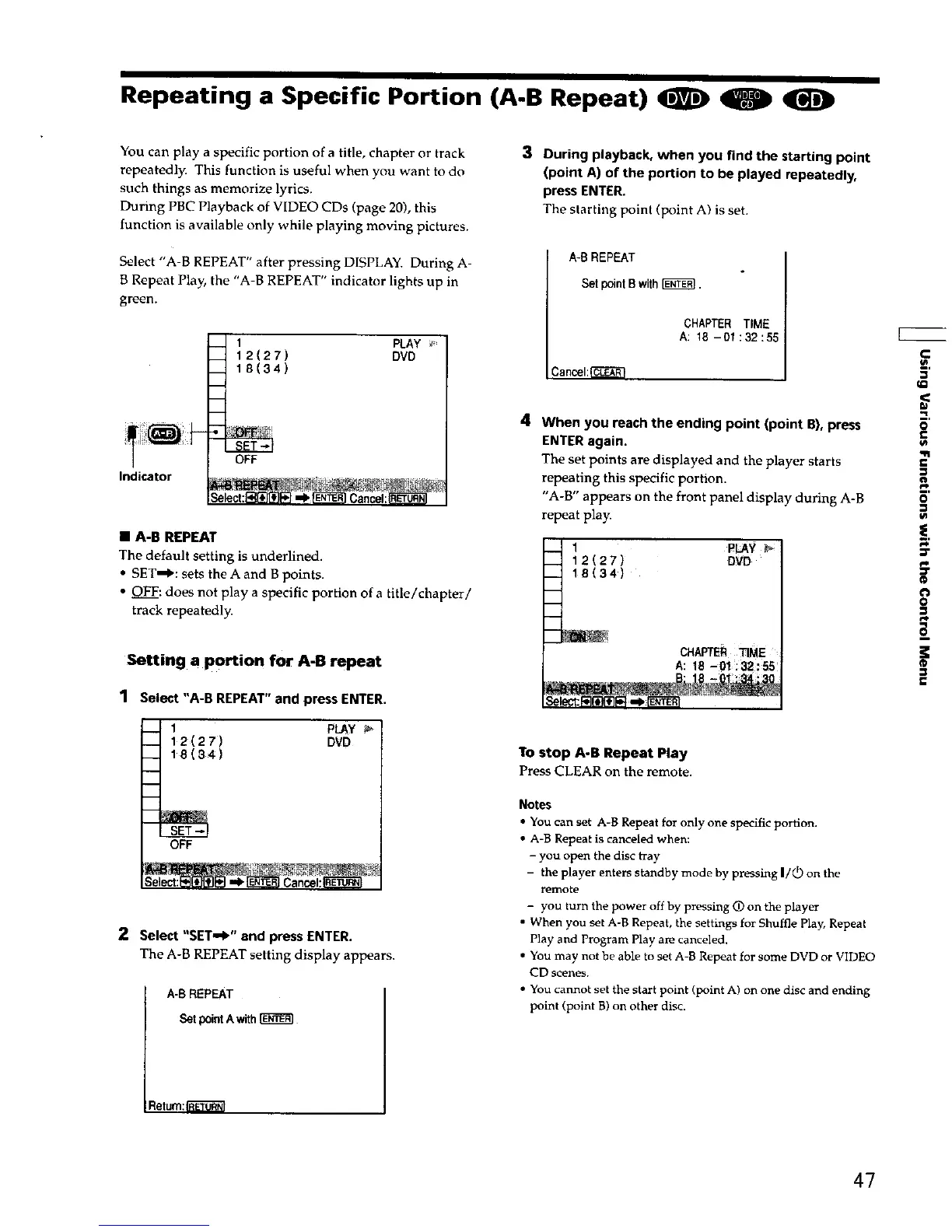
Select "A-B REPEAT" after pressing DISPLAY. During A-
B Repeat Play, the "A-B REPEAT" indicator lights up in
green.
Indicator
12(27)
18(34_,
OFF
PLAY _,
DVD
• A-B REPEAT
The default setting is underlined.
• SET,,*': sets the A and B points.
• _Q_F__:does not play a specific portion of a title/chapter/
track repeatedly.
Setting a portion for A-B repeat
1 Select "A-B REPEAT"and press ENTER.
1 PLAY
1 2(2 7) DVD
18(34)
OFf:
2 Select "SET-'_" and press ENTER.
The A-B REPEAT setting display appears.
A-B REPEAT
SetpointAwith
Retum:_
3 During playback, when you find the starting point
(point A) of the portion to be played repeatedly,
press ENTER.
The starting point (point A) is set.
A-B REPEAT
Set pointB with_.
CHAPTER TiME
A: 18 -01:32:55
Cancel_'_-'_
4 When you reach the ending point (point B), press
ENTER again.
The set points are displayed and the player starts
repeating this specific poition.
"A-B" appears on the front panel display during A-B
repeat play.
1 PLAY
12(27) DVD
18(34)
CHAPTERTIME
A: 18-0!:32:55
To stop A-B Repeat Play
Press CLEAR on the remote.
Notes
• You can set A-B Repeat for only one specific portion.
• A-B Repeat is canceled when:
- you open the disc tray
- the player enters standby mode by pressii_g I/_) on the
remote
- you turn the power off by p_ssing O on the player
• When you set A-B Repeat, the settings for Shuffle Play, Repeat
Play and Program Play are canceled.
• You may not be able to set A-B Repeat for some DVD or VIDEO
CD scenes.
• You cannot set the start point (point A) on one disc and ending
point (point B) on other disc.
.=
o
!
47











 To Next Page