)p_back a CDNIDE0 CD
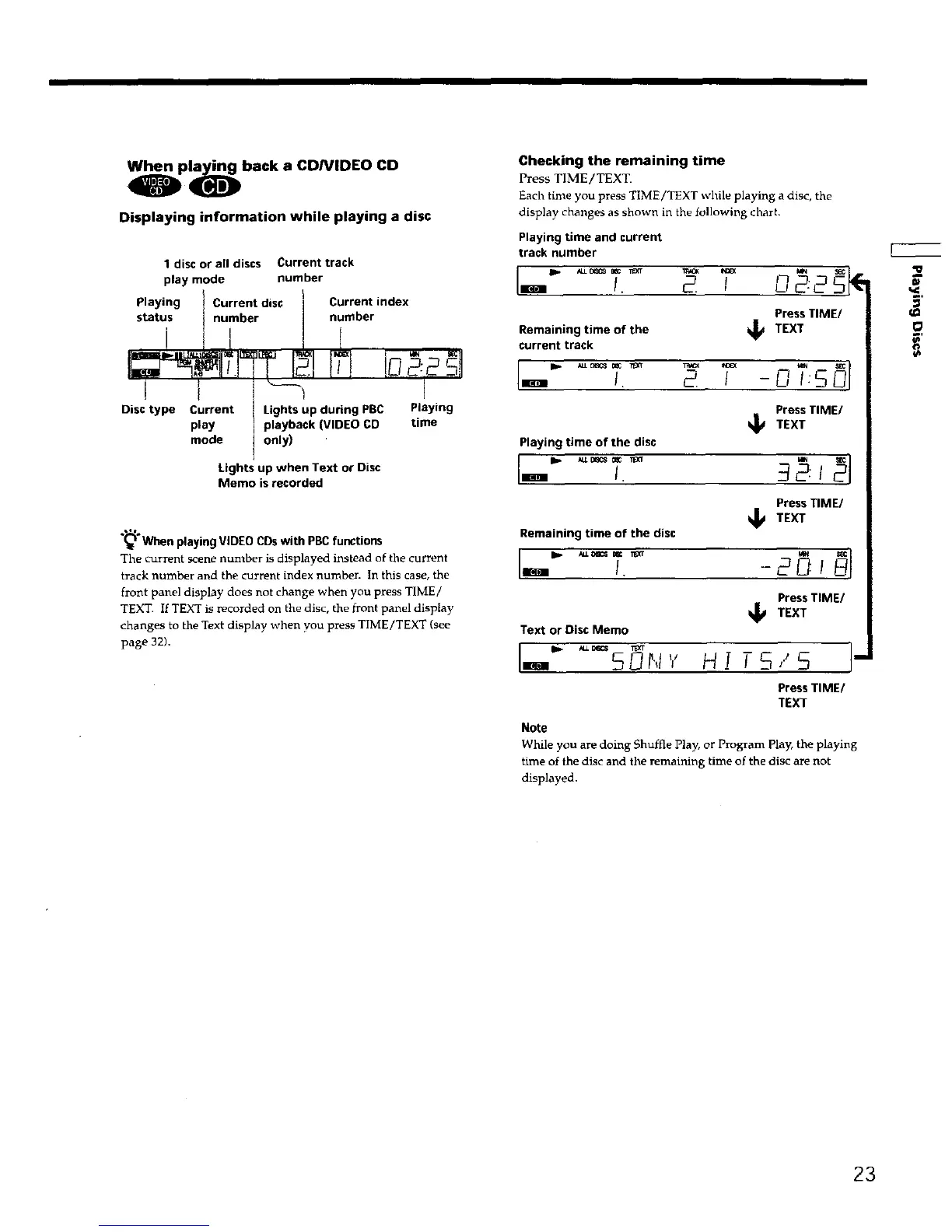
Displaying information while playing a disc
1 disc or all discs Current track
play mode number
Playing I Current disc Current index
)
status I number number
i /i If
i t "-_ aE
Disc type Current Lights up during PBC PI y g
play playback (VIDEO CD time
mode t only) '
Lights up when Text or Disc
Memo isrecorded
.,1%
(_ When playing VIDEO CDswith PBCfunctions
The current scene number is displayed instead of the current
track number and the current index number. In this case, the
front panel display does not change when you press TIME/
TEXT. If TEXT is recorded on the disc, the front panel display
changes to the Text display when you press TIME/TEXT (see
page 32).
Checking the remaining time
Press TIME/TEXT.
Each time you press TIME/TEXT while playing a disc, the
display changes as shown in the following chart•
Playing time and current
track number
• I_1
Press TIME/
time of the Jj TEXTRemaining
current track
Press TIME/
TEXT
Playing time of the disc
I-"
Press TIME/
TEXT
Remaining time of the disc
Press TIME/
_1_ TEXT
Text or Disc Memo
I_ ALLB_CS
I- soN,,,H rs,.,sl"
Press TIME/
TEXT
Note
While you are doing Shuffle Play, or Program play, the playing
time of the disc and the remaining time of the disc are not
displayed.
O
23











 To Next Page