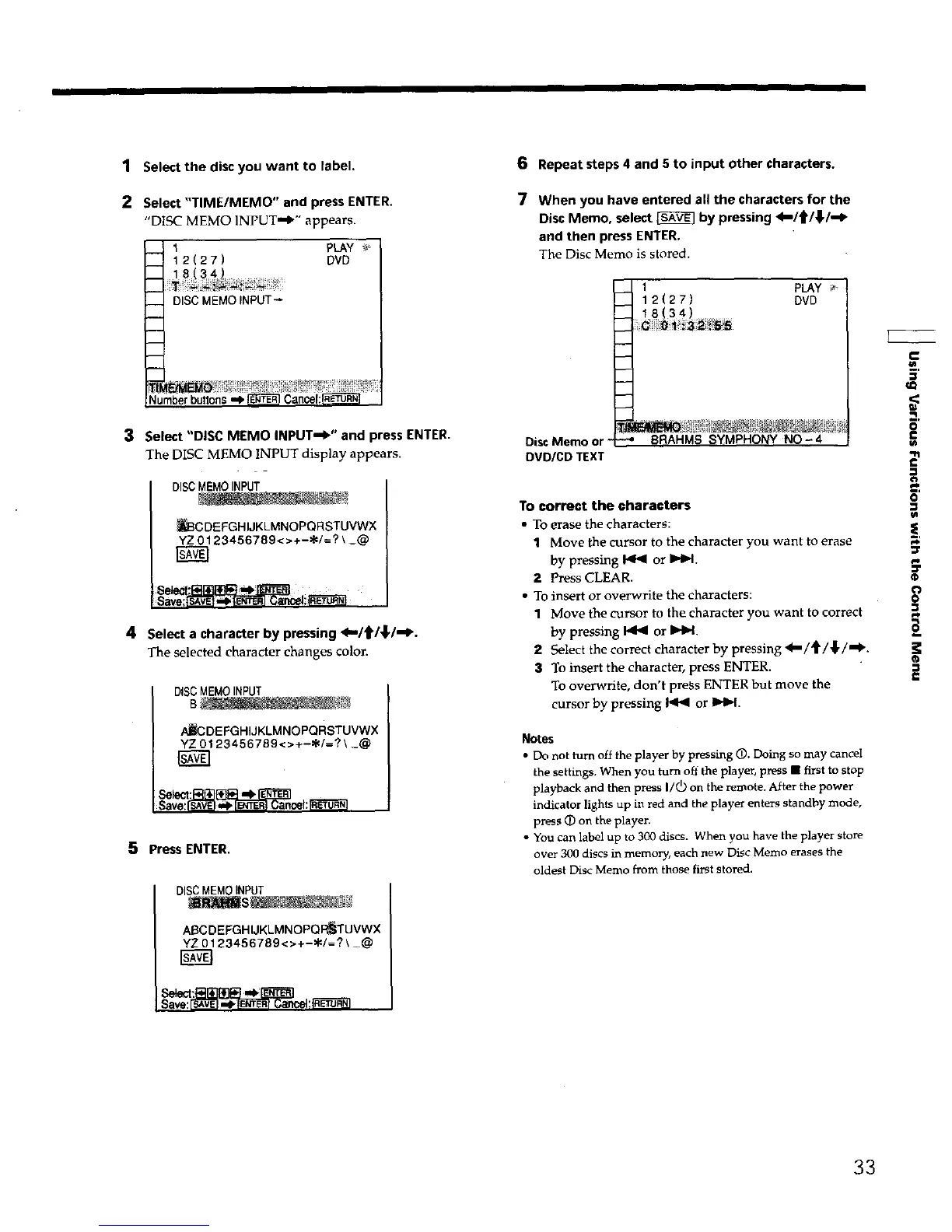
1 Select the disc you want to label.
2 Select "TIME/MEMO" and press ENTER.
"DISC MEMO INPUT='0"" appears.
__ I pLAY _
12(27) DVD
--_ DISC MEMOINPUT_
---H
,---4
3 Select "DISC MEMO INPUT=W ' and press ENTER.
The DISC MEMO INPUT display appears.
_CDEFGHIJKLMNOPQRSTUVWX
YZ0123456789<>+-_/=?\_@
4 Select a character by pressing _J'ltl,_l'_'.
The selected character changes color.
DISCMEMOINPUT
AJ_DEFGHIJKLMNOPQRSTUVWX
YZ 0123456789<>+-_/=? \ _@
Save:_ ,_ _ Cancel:t'R_t'_]
5 Press ENTER.
DISCMEMOINPUT
6 Repeat steps 4 and 5 to input other characters.
7 When you have entered all the characters for the
Disc Memo, select [_ by pressing <=I_/_.I_P
and then press ENTER.
The Disc Memo is stored.
Disc Memo or"
DVDICD TEXT
I PLAY
12(27) DVD
18 34
-.--4
-_ BRAHMS SYMPHONY NO-4
To correct the characters
• To erase the characters:
1 Move Lhecursor to the character you want to erase
by pressing _ or I=,tH.
2 Press CLEAR.
• To insert or overwrite the characters:
t Move the cursor to the character you want to correct
by pressing _ or IHH
2 Select the correct character by pressing a=/_'/,}/'€'.
3 To insert the character, press ENTER.
To overwrite, don't press ENTER but move the
cursor by pressing _ or It,.l_l.
Notes
• Do not turn off the player by pressing @. Doing so may canceI
the settings, When you turn off the player, press • first to stop
playback and then press I/_) on the remote. After the power
indicator lights up in red and the player enters standby mode,
press (D on the player.
• You can label up to 300 discs. When you have the player store
over 300 discs in memory, each new Disc Memo erases the
oldest Disc Memo from those first stored.
e"
m,
_o
=<
ml
o
1-
€
3
_,a*.
o
la
i,o
=r
o
o
+_
@
£
ABCDEFGHIJKLMNOPQ_UVWX
YZ0123456789<>+-_/=?\_@
Save:_ ,.lPFE+_P_]Cancei:_
33











 To Next Page