Displaying the audio information of the
disc 0
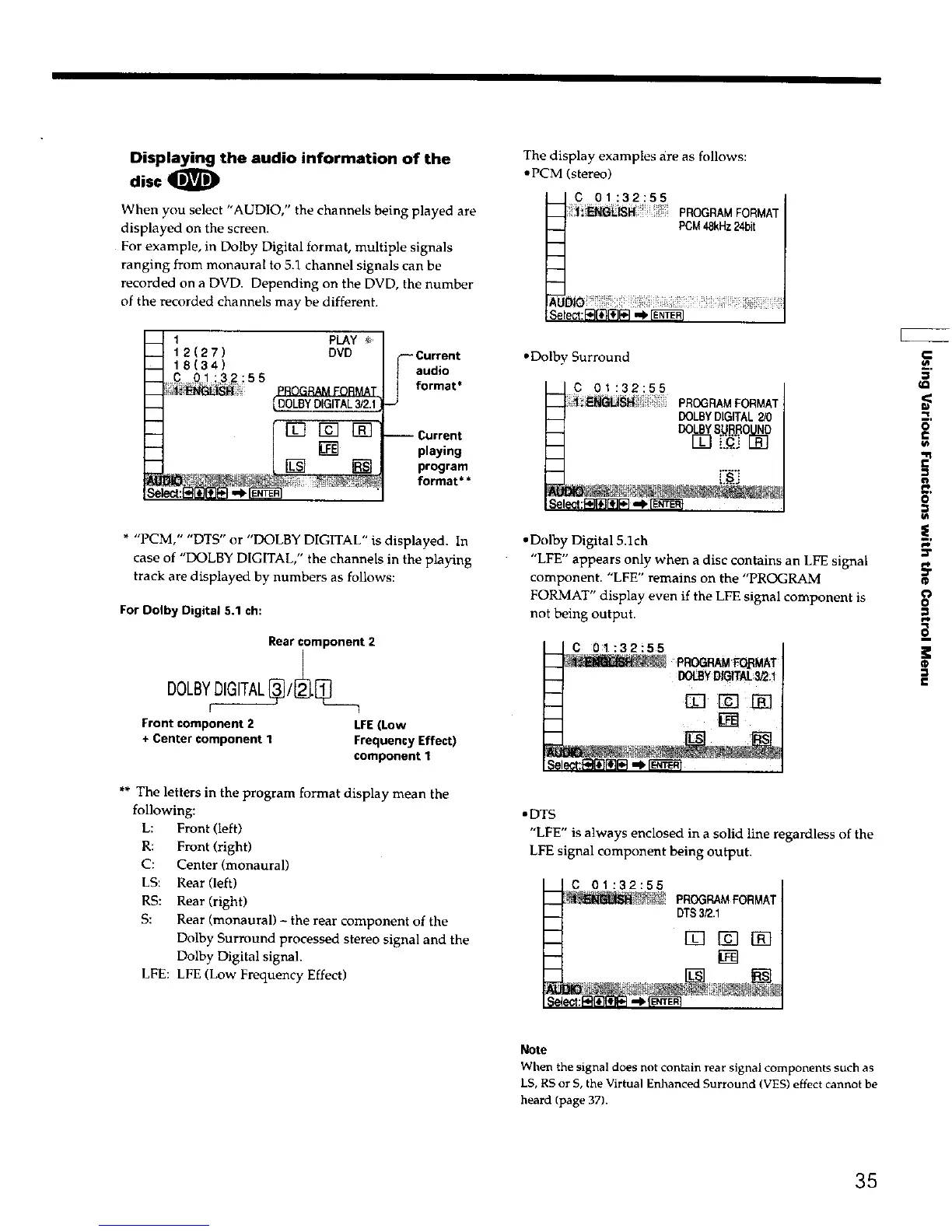
When you select "AUDIO," the channels being played are
displayed on the screen.
For example, in Dolby Digital format, multiple signals
ranging from monaural to 5.1 channel signals can be
recorded on a DVD. Depending on the DVD, the number
of the recorded channels may be different.
_ 1 PLAY _-
_ 12(27) DVD
18(34)
;3_. :55
_;_i_ PROGRAMFORMAT
__ _DOLSYDIGITAL3/2.1
t iN []
Current
F audio
] format*
_J
-- Current
playing
program
format**
* "PCM," "DTS" or "DOLBY DIGITAL" is displayed. In
case of "DOLBY DIGITAL," the channels in the playing
track are displayed by numbers as follows:
For Dolby Digital 5.1 ch:
Rearcomponent 2
Front component 2 LFE(Low
+ Center component 1 FrequencyEffect)
component 1
** The letters in the program format display mean the
following:
L: Front (left)
R: Front (right)
C: Center (monaural)
LS: Rear (left)
RS: Rear (right)
S: Rear (monaural) - the rear component of the
Dolby Surround processed stereo signal and the
Dolby Digital signal.
LFE: LFE (Low Frequency Effect)
The display examples are as follows:
• PCM (stereo)
_c 01:32:55
PROGRAMFORMAT
l PCM48kHz24bit
AU_
Select:_ ,,_
•Dolby Surround
C 01:32:55
-- _ _WS_ PROGRAMFORMAT
__ DOLBYDIGITAL2/0
__ DOL.BYSURROUND
-- []3 []
Se _:F_F,_ll_l_3-,_,F_ifi_'fil
• Dolby Digital 5.1ch
"LFE" appears only when a disc contains an LFE signal
component. "LFE" remains on the "PROGRAM
FORMAT" display even if the LFE signal component is
not being output.
SE
C 01:32!55
PROr'._RAM_AT
DOLBYDIGITAL_2:!
[] [] [_]
•DTS
"LFE" is always enclosed in a solid line regardless of the
LFE signal component being output.
C 01:32:55
_ PROGRAMFORMAT
__ DTS3/2.1
m
_ rTl
-- [rEl
w.
IQ
o
€
i-
n
o
n
o
Note
When the signal does not ¢ontaln rear signal components such as
LS, RS or 5, the Virtual Enhanced Surround (YES) effect cannot be
heard (page 37).
35











 To Next Page