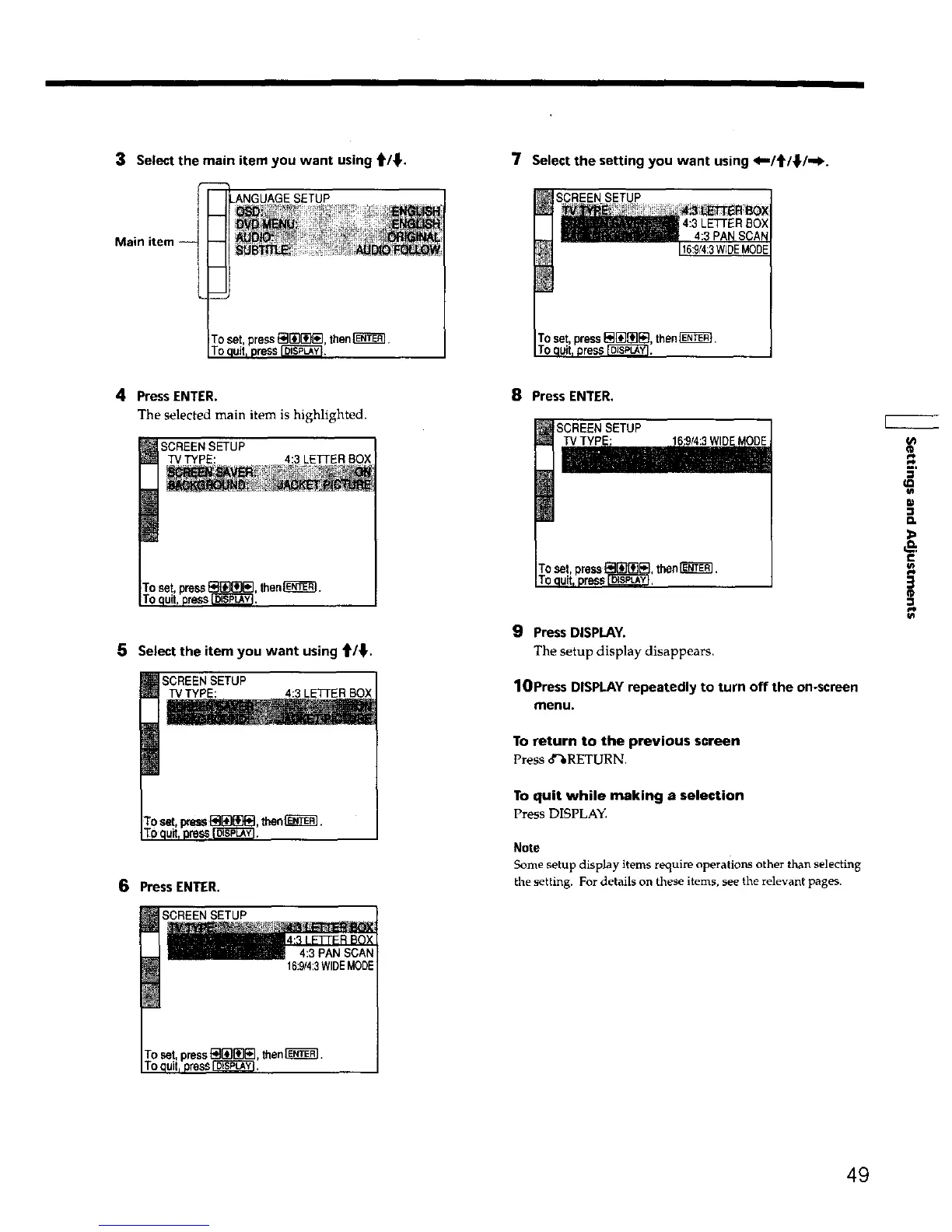
3 Select the main item you want using t/_. 7 Select the setting you want using <"/t/_l./-I_.
SCREENSETUP
then_.
4 Press ENTER.
The selected main item is highlighted.
SCREEN SETUP
TV TYPE: 4:3 LETi-ER BOX
Toset pressE_{!][_E] then[_C_L
To quitt press_,
5 Select the item you want using t/_'.
SCREEN SETUP
TV TYPE: 4:3 LETrER BOX
6 Press ENTER.
SCREENSETUP
8 PressENTER,
SCREEN SETUP
16:9_:3WI
9 Press DISPLAY.
The setup display disappears.
lOPress DISPLAYrepeatedly to turn off the on-screen
menu.
To return to the previous screen
Press 8%RETURN,
To quit while making a selection
Press DISPLAY.
Note
Some setup display items require operations other than selecting
the setting. For details on these items, see the relevant pages.
D,
&
€
3
4:3 PAN SCAN
16:9/4:3WIDEMODE
49











 To Next Page