EasyManua.ls Logo

Sony EVO-720P - Page 200

Sony EVO-720P
287 pages
Print Icon
To Next Page IconTo Next Page
To Previous Page IconTo Previous Page
Loading...
2)
3)
4)
Mounting
(See
Fig.
7-12.)
Mount
the
threading
ring
assembly
@
so
that
it
becomes
in
the
unthreaded
state
(pinch
roller
arm
assembly
is
on
the
front
panel
side.)
(Confirm
that
is
in
the
state
in
1,
Removal
2).)
Mount
the
ring
roller
@
and
ring
stopper
@
and
tighten
with
the
two
screws
@.
(No.8
guide
assembly
@
should
be
closer
to
the
front
panel
than
the
ring
stopper
©.)
Mount
the
ring
roller
@
and
roller
top
plate
@
and
tighten
with
screw
@.
(Confirm
that
the
threading
ring
assembly
matches
the
three
ring
rollers.)
Put
a
half
drop
of
oil
on
the
shaft
®.
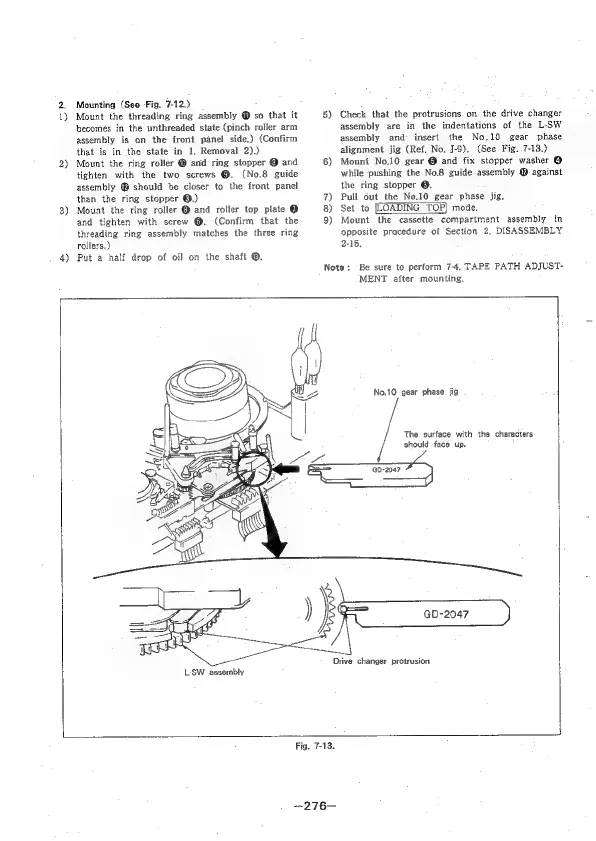
5)
Check
that
the
protrusions
on
the
drive
changer
assembly
are
in
the
indentations
of
the
L-‘SW
assembly
and
insert
the
No,10
gear
phase
alignment
jig
(Ref.
No.
J-9).
(See
Fig.
.7-13.)
6)
Mount
No,10
gear
@
and
fix
stopper
washer
@
while
pushing
the
No.8
guide-assembly
@
against
the
ring
stopper
®.
7)
Pull
out
the
No.10
gear
phase
jig,
8)
Set
to
[LOADING
TOP|
mode,
9)
Mount
the
cassette
compartment
assembly
in
opposite
pracedure
of
Section
2,
DISASSEMBLY
2-15.
Note:
Be
sure
to
perform
7-4,
TAPE PATH
ADJUST-
MENT
after
mounting.
L-SW
assembly
No.10
gear
phase
jig
The
surface
with
the
characters
should
face
up.
Drive
changer
protrusion
GD-2047
Fig.
7-13.
-276—

Table of Contents

Related product manuals