EasyManua.ls Logo

Sony EVO-720P - Page 219

Sony EVO-720P
287 pages
Print Icon
To Next Page IconTo Next Page
To Previous Page IconTo Previous Page
Loading...
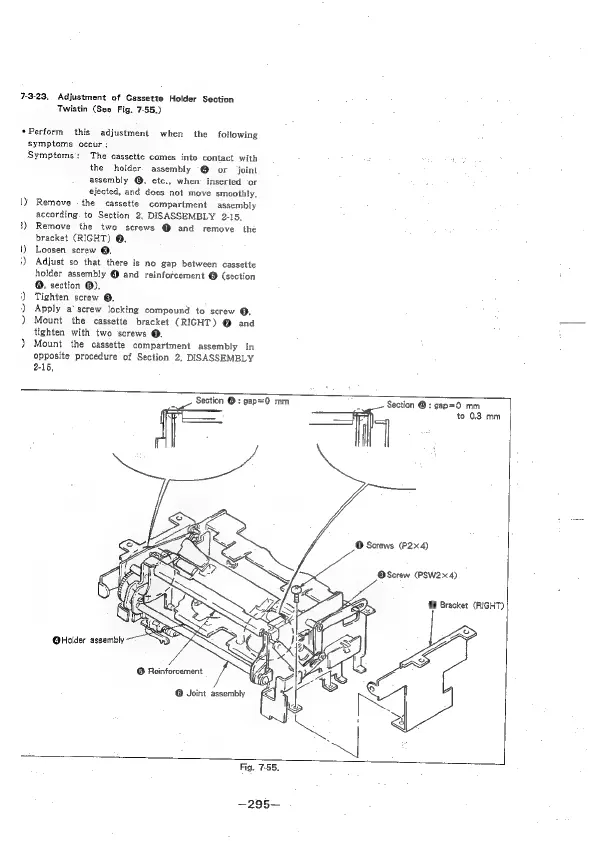
7-3-23,
Adjustment
of
Cassette
Holder
Section
Twistin
(See
Fig.
7-55.)
«Perform
this
adjustment
when
the
following
symptoms
occur
:
Symptoms:
The
cassette
comes
into
contact
with
the
holder.
assembly
@
or
joint
assembly
@,
etc.,
when
inserted
‘or
ejected,
and
does
not
move
smoothly,
\y
Remove
the
cassette
compartment
assembly
according.
to
Section
2,
DISASSEMBLY
2-15,
1)
Remove
the
two
screws
@
and
remove
the
bracket
(RIGHT)
@.
5)
Loosen
screw
@,
:)
Adjust
so
that
there
is
no
gap
between
cassette
holder
assembly
@
and
reinforcement
@
(section
@,
section
®).
‘)
Tighten
screw
@,
)
Apply
a‘
screw
locking
compound
to
screw
@,
)
Mount
the
cassette
bracket
(RIGHT)
@
and
tighten
with
two
screws
@.
)}
Mount
the
cassette
compartment
assembly
in
opposite
procedure
of
Section
2,
DISASSEMBLY
2-15,
Section
@
:
gapo=O
mm
.
Section
®:
gap=0
mm
j
Sh
©
Screws
(P2x4)
@Screw
(PSW2x4)
to
0.3
mm
@
Bracket
(RIGHT)

Table of Contents

Related product manuals