EasyManua.ls Logo

Sony EVO-720P - Page 254

Sony EVO-720P
287 pages
Print Icon
To Next Page IconTo Next Page
To Previous Page IconTo Previous Page
Loading...
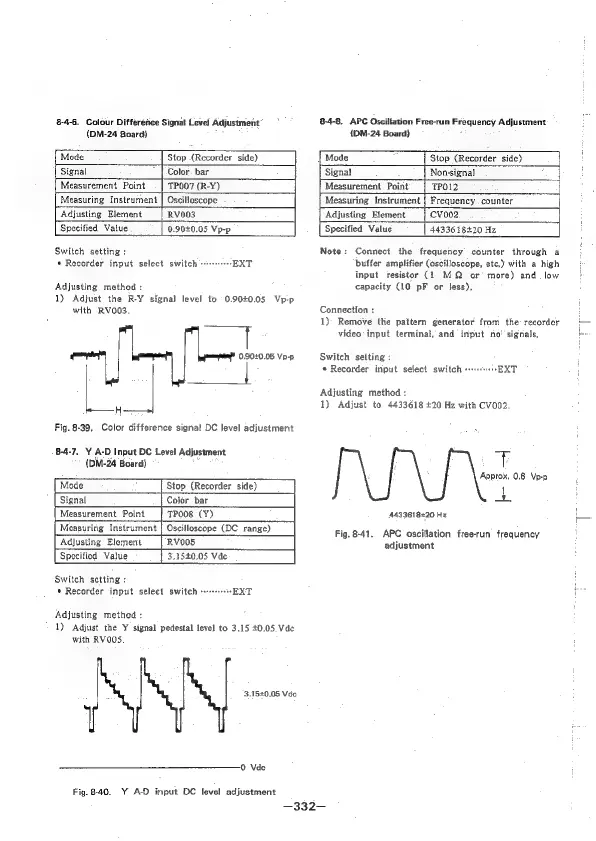
8-4-6,
Colour
Difference
Signat
Level
Adjustment’
(DM-24
Board)
8-4-8.
APC
Oscillation
Free-run
Frequency
Adjustment
(DM-24
Board)
Mode
Stop
(Recorder
side)
Mode
Stop
(Recorder
side)
Signal
Color.
bar
Signal
Non-signal
Measurement
Point
TPOO7
(R-Y)
Measurement
Point
TPO12
Measuring
Instrument
|
Oscilloscope
Measuring
Instrument
|
Frequency
counter
Adjusting
Element
RV003
|
Adjusting
Element
CVvo002
Specified
Value
0.90+0.05
Vp-p
[
Specified
Value
4433618420
Hz
Switch
setting
:
*
Recorder
input
select
switch
++++++++-EXT
Adjusting
method
:
1)
Adjust
the
R-Y
signal
level
to
0.9040.05
Vp-p
with
RVO003,
0,90+0.05
Vp-p
Ge
H
Fig.
8-39.
Color
difference
signal
DC
level
adjustment
8-4-7.
Y
A-D
Input
DC
Level
Adjustment
(DM-24
Board)
Mode
Stop
(Recorder
side)
Signal
Color
bar
Measurement
Point
TPOO8
(Y)
Measuring
Instrument
|
Oscilloscope
(DC
range)
Adjusting
Element
RVOO5
Specified
Value
3,1540.05
Vde
Switch
setting
:
*
Recorder
input
select
switch
s--+--EXT
Adjusting
method
:
1)
Adjust
the
Y
signal
pedestal
level
to
3.15
+0.05
Vde
with
RVOOS.
3.1520.05
Vde
Vde
Fig.8-40.
Y
A-D
input
DC
level
adjustment
Note:
Connect
the
frequency
counter
through
a
buffer
amplifier
(oscilloscope,
etc.)
with
a
high
input
resistor
(1
MQ
or
more)
and.
low
capacity
(10
pF
or
less).
Connection
:
1)
Remove
the
pattern
generator
from
the:
recorder
video
input
terminal,
and
input
no’
signals,
Switch
setting:
*
Recorder
input
select
switch
e+-EXT
Adjusting
method
:
1)
Adjust
to
4433618
+20
Hz
with
CV002.
+
Approx.
0.6
Vp-p
+
4433618220
Hz
Fig.
8-41.
APC
oscillation
free-run
frequency
adjustment
—332-—

Table of Contents

Related product manuals