EasyManua.ls Logo

Sony EVO-720P - Page 253

Sony EVO-720P
287 pages
Print Icon
To Next Page IconTo Next Page
To Previous Page IconTo Previous Page
Loading...
[8-4-2
Decoder
Oscillation
Free-run
Frequency
8-4-4.
Ciemp
Pulse
Amplitude
Adjustment
Adjustment
(DM-24
Board)
{(DM-24
Board)
{
Mode
Stop
(Recorder
side)
Mode
Stop
(Recorder
side)
Signal
Non-signal
Signal
Color
bar
Measurement
Point
TPOGS
(Pin
@
of
iCo0i)
Measurement
Point
TPOIS
Measuring
Instrument
}
Frequency
counter
*Note
Measuring
Instrument
|
Oscilloscope
{Adjusting
Element
cvool
Adjusting
Element
RV007
|
Specified
Value
4433618420
Hz
{
Specified
Value
3,.0+0.2
zsec
ote:
Connect
the
frequency
counter
through
a
Switch
setting
:
buffer
amplifier
(oscilloscope,
ete.)
with
a
high
¢
Recorder
input
select
switch
+
‘EXT
}
input
resistor
(1
MQ
or
more)
and
low
capacity
(10
pF
or
fess).
Adjusting
method
:
1)
Adjust
pulse
amplitude
to
3,040.2
asec
with
‘onnection
:
a
RVOO07.
|)
Remove
the
pattern
generator
from
the
recorder
|
video
input
terminal,
and
input
no
signals,
\witen
setting
:
»
Recorder
input
select
switch
»
|
adjusting
method
:
“LINE
)
Adjust
to
4433618
£20
Hz
with
CVOO1.
+
Approx.
0.6
Vp-p
4
(4433618220
Hz)
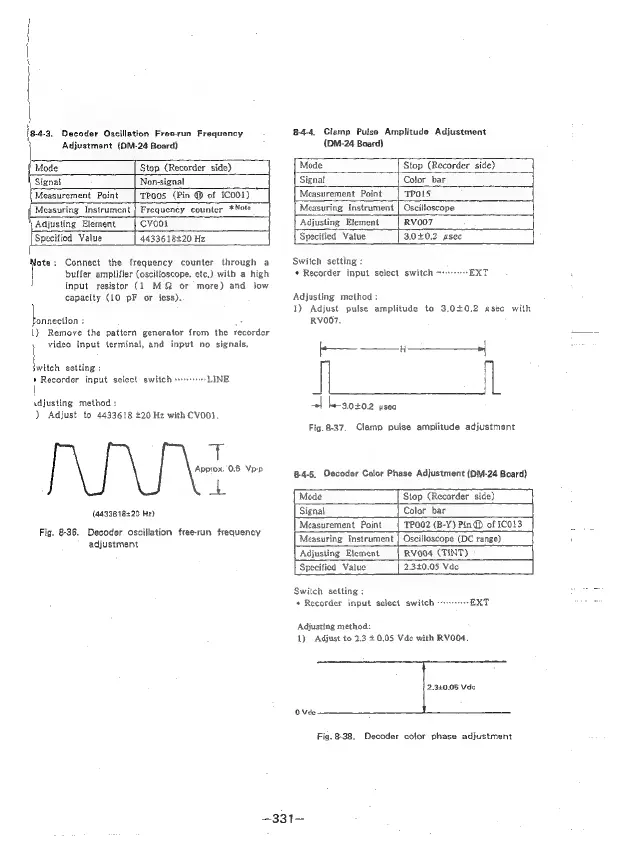
Fig.
8-36,
Decoder
oscillation
free-run
frequency
j¥——
1
——_____+|
|
le-s.0+02
useo
Fig.
8-37.
Clamp
pulse
amplitude
adjustment
8-4-5.
Decoder
Color
Phase
Adjustment
{DM-24
Board)
Mode
Signal
Measurement
Point
Stop
(Recorder
side)
Color
bar
TPOO2
(B-Y)
Pin
@
of
}CO13
adjustment
Measuring
Instrument
|
Oscilloscope
(DC
range)
Adjusting
Element
RV004
(TINT)
Specificd
Value
2.340.05
Vde
Switch
setting
:
+
Recorder
input
select
switch
«rr
EXT
Adjusting
method:
1)
Adjust
to
2.3
£0.05
Vde
with
RV004.
2,320.05
Vde
OVde
Fig.
8-38.
Decoder
color
phase
adjustment
—331-—

Table of Contents

Related product manuals