EasyManua.ls Logo

Sony EVO-720P - Page 38

Sony EVO-720P
287 pages
Print Icon
To Next Page IconTo Next Page
To Previous Page IconTo Previous Page
Loading...
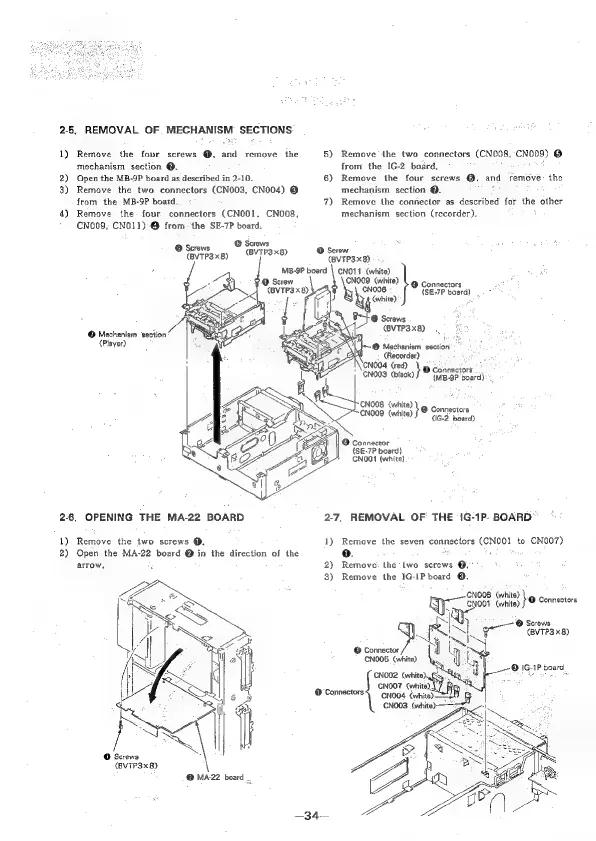
2-5,
REMOVAL
OF.
MECHANISM
SECTIONS
1)
Remove
the
four
screws
@,
and
remove
the
mechanism
section
@.
2)
Open
the
MB-9P
board
as
described
in
2-10.
3)
Remove
the
two
connectors
(CN003,
CN004)
@
from
the
MB-9P
board.
4)
Remove
the-
four
connectors
(CNO01,
CNO08,
+
CN009,
CNO11)-@
fromthe
SE-7P
board:
@
Screws
b
thrarbaul
(BVIP3x8)
(BYTP3x8)
@
Screw
(BVTP3x8)
'
@
Mechanism
‘section
(Player)
26,
OPENING
THE
MA-22
BOARD
1)
Remove
the
two
screws
@.
2)
Open
the
MA-22
board
@
in
the
direction
of
the
arrow,
(BVTP3x8)
@
MA22
board
_
+34—
MB-9P
board
\Se
(white)
@
Connectors.
5)
Remove
the
two
connectors
(CN008,
CN009)
©
from
the
IG-2
board.
i
6)
Remove
the
four
screws
@,
and
remové:
the
mechanism
scction
@.
7)
Remove
the
connector
as
described
for
the
other
mechanism
section
(recorder),
©
Screw
(BVTP3x8)
CNOO9
(white)
©
Connectors
CNOO8
{SE-7P
board)
White)
@
Scrows
(BVTP3x8)
‘@
Mechanism
section
(Recorder)
‘CNOO4
(red)
;
Gno03
prea
©
Connectors
.
(MB-9P
board)
CNOO8
(white)
}
CNOOD
(white)
s&
Connectors
(IG-2
board)
@
Connector
{SE-7P
board)
CNO01
(white)
2.7,
REMOVAL
OF
THE
IG-1P.
BOARD”
1)
Remove
the
seven
connectors
(CNO01
to
CN007)
0.
iat
2)
Remove:
the
two
screws
@.°°
3)
Remove
the
IG-IP
board
©.
,
CNOOS
(white)
re
CNOOt
(wie)
Lo
Connectors
e
a,
SS
|
‘@
Screws
|
gr
vTPaxay
CNOOS
(white)
cN00e
Gwhited
oS
CNOO?
corn
CNO04
(white)
CNOO3
aes
=o
/
@
1G-1P
board

Table of Contents

Related product manuals