EasyManua.ls Logo

Sony EVO-720P - Page 39

Sony EVO-720P
287 pages
Print Icon
To Next Page IconTo Next Page
To Previous Page IconTo Previous Page
Loading...
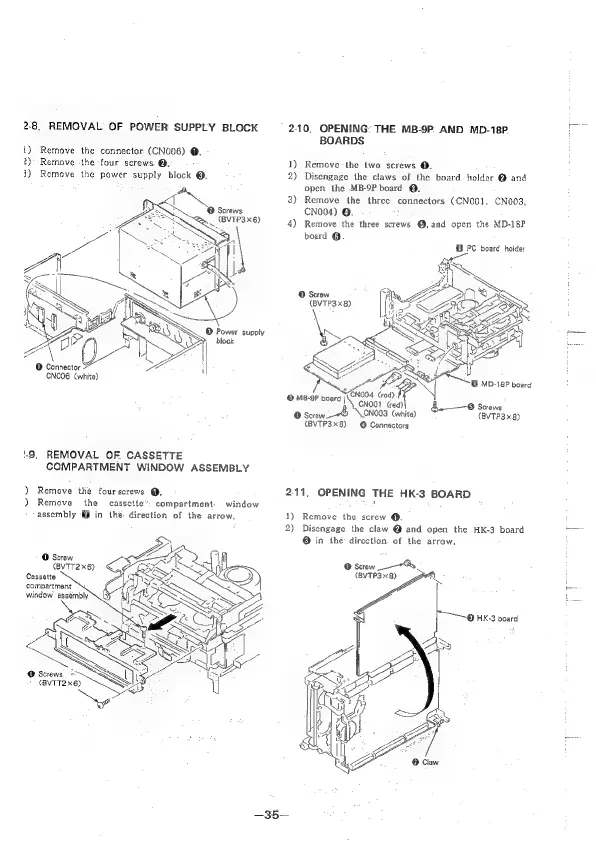
2-8.
REMOVAL’
OF
POWER
SUPPLY
BLOCK
210.
OPENING:
THE
MB-9P.
AND
MD-18P.
BOARDS
{)
Remove
the
connector
(CN006)
@.
2)
Rethove
the
four
screws.
@.
1)
Remove
the
two
screws
@.
3)
Remove
the
power
supply
block
©.
2)
Disengage
the
claws
of
the
board
holder
@
and
open
the
MB-9P
board
®.
3)
Remove
the
three
connectors
(CNOO1,
CNO03,
@
Screws
CNo04)
@.
~,
(VTP3x6)
4)
Remove
the
three
screws
@,and
open
the
MD-18P
board
@.
@
PC
board
holder
o
tate
oA
CNOO6
(white)
CNO04
(rod).f
CNOO1
(red)
©
Screws
©
Screw.
CNOO3
(white)
(BVTP3x
8)
(BVTP3x8)
@
Connactors
©
MD-18P
board
©
MB-9P
board
j
9.
REMOVAL
OF
CASSETTE
COMPARTMENT
WINDOW
ASSEMBLY
)
Remove
thé
four
screws
@.
211,
OPENING
THE
HK-3
BOARD
)
Remove
the
cassette’:
compartment.
window
bee
assembly
@
in
thé
direction
of
the
arrow.
1)
Remove
the
screw
@.
2)
Disengage
the
claw
@
and
open
the
HK-3
board
=
@
in
the
direction
of
the
arrow,
©
Screw
(BVTT2x6)
©
Screw
7B
Cassette
(BYTP3x
8)
compartment
@
HK-3
board
—35—

Table of Contents

Related product manuals