37
GB
Other Recording Operations
Select the file to which you want to add a
recording first.
1 Press and hold •DISP
–
MENU in the stop
mode to enter the menu mode.
The menu mode window will be
displayed.
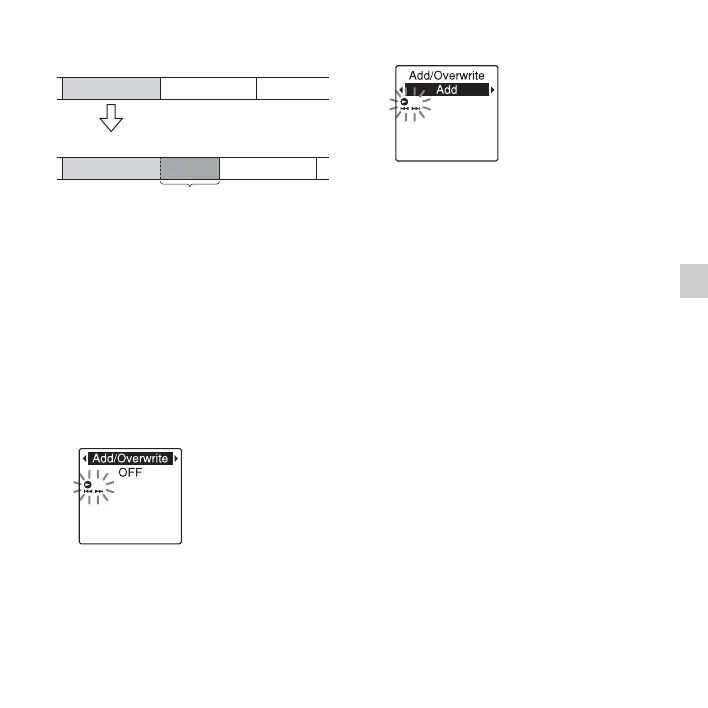
2 Press –. or >+ to select “Add/
Overwrite,” and then press
N PLAY/
STOP•ENTER.
3 Press –. or >+ to select “Add,”
and then press
N PLAY/
STOP•ENTER.
“Add/Overwrite” is set to “OFF” when
you purchase the IC recorder.
4 Press x (stop) to exit the menu mode.
5 When the file to be added is played back,
press
z REC/PAUSE.
“Add REC?” will be displayed.
For details on playback, see page 25.
6 While “Add REC?” is displayed, press
z REC/PAUSE.
The recording indicator will turn red.
Then recording starts.
7 Press x (stop) to stop recording.
P Notes
• You cannot add a recording when the file has
reached the maximum size limit (500 MB).
• You cannot add a recording to an MP3 file
that was not recorded using the IC recorder.
Moreover, when you edit files using the
supplied Sound Organizer software, adding a
recording to the files may not be possible.
During playback of file 3
File 3 File 4
After adding a recording
File 3 File 4
Added recording



 To Next Page