66
GB
To cancel erasing
Select “NO” in step 5, and then press
N PLAY/STOP•ENTER.
Erasing all the track marks
in the selected file at one
time
1 Select a file from which you want to
erase the track marks.
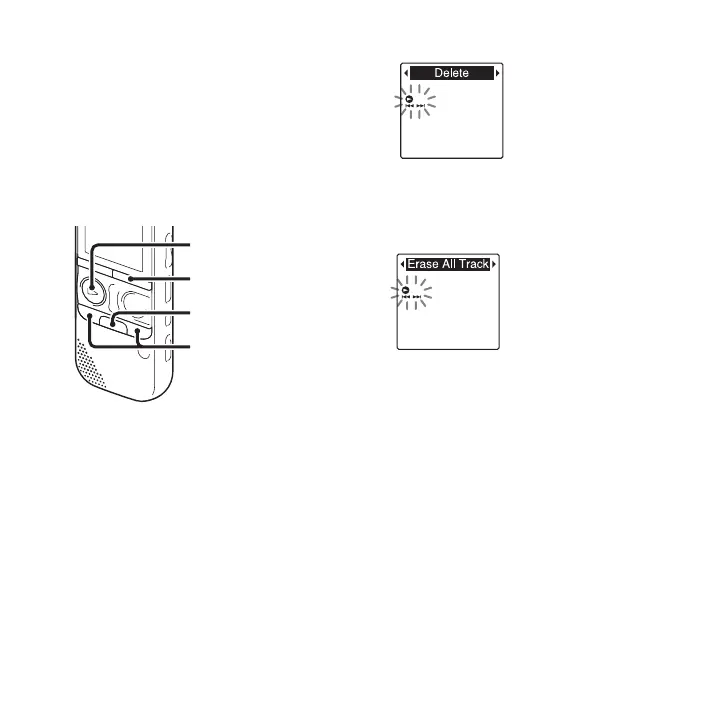
2 Press and hold •DISP
–
MENU in the stop
mode to enter the menu mode.
The menu mode window will be
displayed.
3 Press –. or >+ to select “
Delete
,”
and then press
N
PLAY/STOP•ENTER
.
4 Press –. or >+ to select “Erase All
Track Marks,” and then press
N PLAY/
STOP•ENTER.
“Erase All Track Marks?” will be
displayed.
5 Press –. or >+ to select “YES,”
and then press
N PLAY/
STOP•ENTER.
The “Erasing...” animation appears in the
display window and all the track marks
will be erased at one time.
6 Press x (stop) to exit the menu mode.
To cancel erasing
Select “NO” in step 5, and then press
N PLAY/STOP•ENTER.
N PLAY/
STOP•ENTER
x
–., >+
•DISP
–
MENU



 To Next Page