46
GB
If the input level is not strong enough,
adjust the “Mic Sensitivity” setting on
the IC recorder.
When a plug in power type microphone
is connected, power is automatically
supplied to the microphone from the IC
recorder.
5 Press x (stop) to stop recording.
z Recommended microphones
You can use the Sony ECM-CS10,
ECM-CZ10, ECM-DS70P, ECM-DS30P
electret condenser microphone (not supplied).
To record sound from a
telephone or a cell phone
You can use the ECM-TL1 headphone-type
electret condenser microphone (not
supplied) to record sound from a telephone
or a cell phone.
For details on how to make the connection,
refer to the operating instructions supplied
with the ECM-TL1 microphone.
P Notes
• After you have made the connection, check
the sound quality of the conversation and the
recording level before you start recording.
• If the beep of the telephone or a dial tone is
recorded, the conversation may be recorded
with lower level of sound. In this case, start
recording after the conversation has started.
• The VOR function (page 39) may not work,
depending on the kind of telephone or the
line condition.
• We assume no responsibility whatsoever for
any inconvenience, even if you cannot
record a conversation using the IC recorder.
Recording from other
equipment
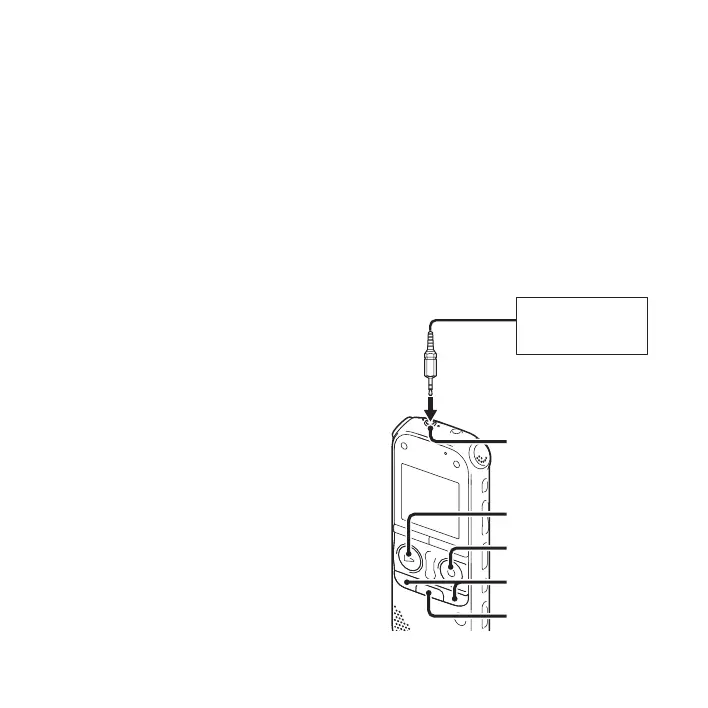
z REC/PAUSE
CD player, etc.
m (microphone) jack
x
–., >+
N PLAY/
STOP•ENTER



 To Next Page