Help Guide
IC Recorder
ICD-TX800
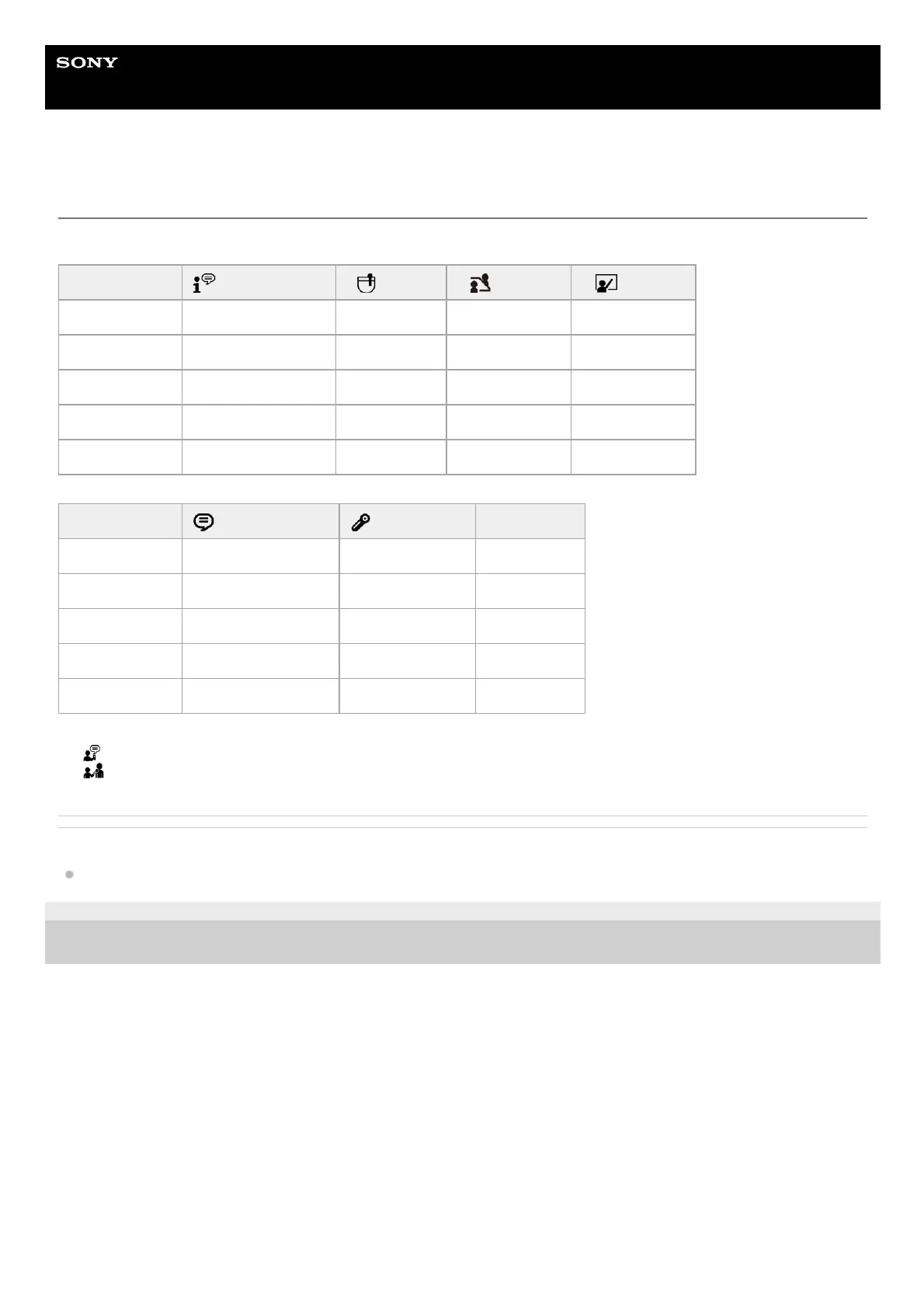
Default settings for the recording scenes of the Scene Select function
By default, the settings for the recording scenes of the Scene Select function are as follows:
Related Topic
Selecting a recording scene for an individual situation
4-699-323-32(1) Copyright 2017 Sony Corporation
Auto Voice Rec Pocket Meeting Lecture
REC Mode MP3 192kbps MP3 192kbps MP3 192kbps MP3 192kbps
Mic Sensitivity Auto Medium Medium Medium
Focused/Wide OFF OFF Wide Focused
VOR OFF OFF OFF OFF
Recording Filter NCF(Noise Cut) LCF(Low Cut) NCF(Noise Cut) NCF(Noise Cut)
Voice Notes (*1) Interview (*2) OFF
REC Mode MP3 128kbps MP3 128kbps MP3 192kbps
Mic Sensitivity Low Medium Medium
Focused/Wide OFF OFF OFF
VOR OFF OFF OFF
Recording Filter LCF(Low Cut) NCF(Noise Cut) OFF
appears on the recording screen.
*1
appears on the recording screen.
*2



 To Next Page