– 40 –
KP-44PS2/44PS2U/51PS2
RM-903
6-2-3.Operation Method for Projector Engine
Mode
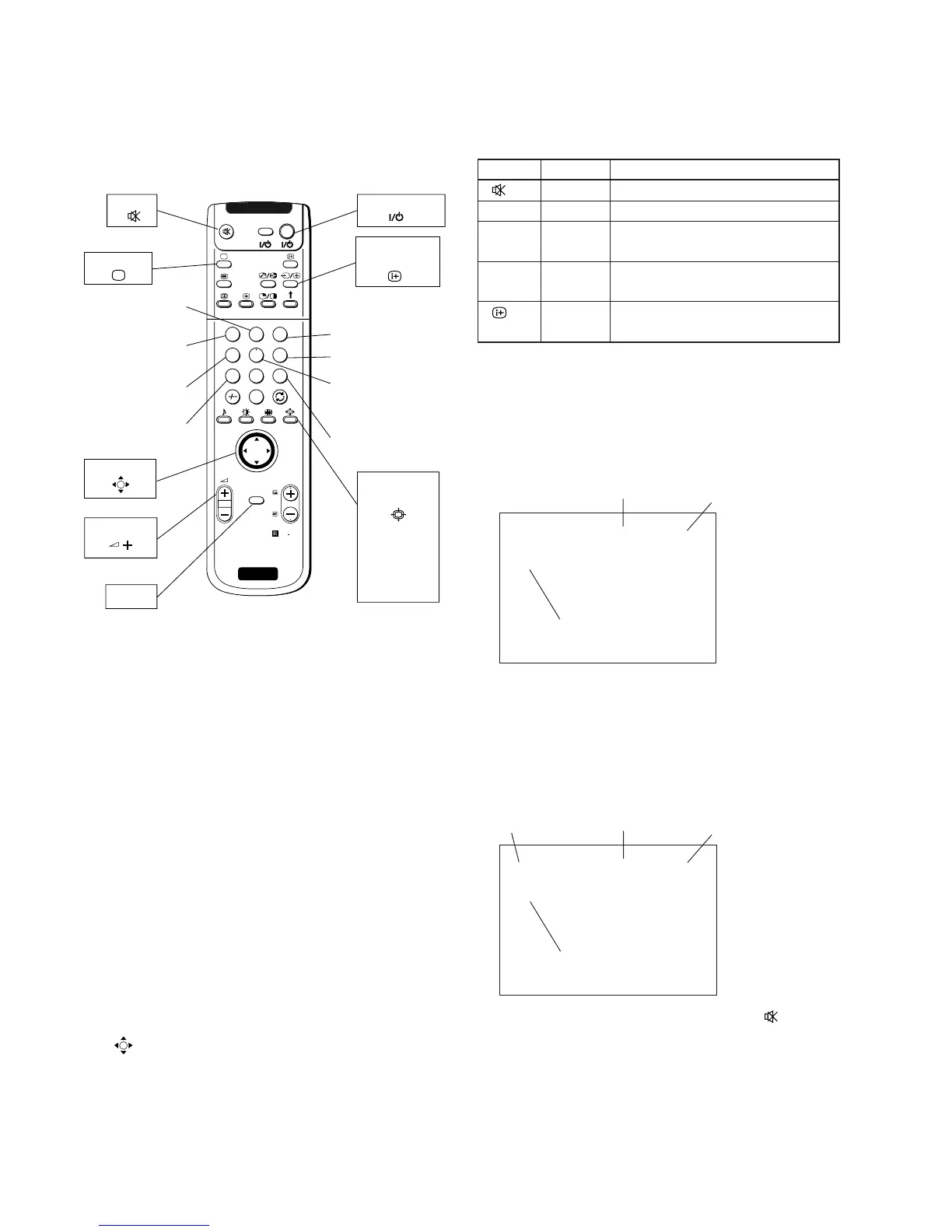
1. Functions of Keys on Commander
• 1 : Changes adjustment item. (item No. moves up)
: Marker moves clockwise from center to out-
side. (in fine adjustment mode)
• 4 : Changes adjustment item.
(item No. moves down)
: Marker moves counterclockwise from outside
to center. (in fine adjustment mode)
• v V b B : Changes data value. (up or down)
: Marker moves up, down, or to the left or right.
(in fine adjustment mode)
• 3 : Changes adjustment color.
(except item No. 00~77) GRN c BLU c RED
• 6 : Displays or changes internal test signals.
: crosshatch + external signal c dot + external
signal c crosshatch only c dot only c off
• 9 : Switches adjustment mode.
rough adjustment mode c fine adjustment
mode
•
(OK): Switches marker moving method.
(in fine adjustment mode)
joystick (v, V, b, B) keys c 1 and 4 buttons
2. Operation Method for Rough Adjustment
1) Enter the Service menu, and select “Device Register Set-
ting” b “Projector Engine”.
2) Press “1” or “4” button on the commander to select the
item, and press v, V, b, B key on the joystick to change the
data.
3) Select “GRN CENT” . When BLU or RED is displayed,
press “3” button on the commander to change the adjust-
ment color in the order of GRN c BLU c RED.
4) In the GRN, BLU, or RED mode, v, V keys on the joystick
can change the data in vertical direction, or b, B keys in
horizontal direction.
5) Before returning to the Service menu, press “
(MUTE)”
+“-” buttons on the commander to write the data.
(Omission of this operation causes the set data to be returned
to the data before adjustment)
6) Press “MENU” button on the commander to return to the
Service menu.
ON SCREEN
DISPLAY
Color change
Internal test signal
Mode select
(Fine or Rough)
TV MODE
Adjustment item
up
Adjustment item
down
JOYSTICK
Copy data to all
mode
Read data from
NVM
Write data to NVM
RM-903
Copy PAL data
to NTSC
RM
903
PROGR
MENU
1
4
7
2
5
8
0
3
6
9
VI DEO TV
TV STANDBY
SCREEN
FORMAT
Wide
Zoom
14 : 9
4 : 3
Smart
MUTE
VOLUME +
MENU
SONY
OK
TV
Initialize data
(Not stored)
PJE 00 00
FDIS |
Adjustment Item
Item No.
Data
v, B : Data up
V, b : Data down
GRN 000 000
CENT
Adjustment Item
Data (H)
Data (V)
Color
b : Data (H) up
B : Data (H) down
v : Data (V) up
V : Data (V) down
Commander Function
Buttons Mode Description
+ - WRITE Writes data to NVM.
7 + - READ Reads data from NVM.
5 + - PJE Service data initialization. Not stored.
INITIAL
(Be sure not to use usually)
2 + - PJE Copies and writes data of DRC1250
COPY
(50Hz) mode to all other modes.
+ - PJE Copies data of PAL mode to NTSC mode.
WRT5060



 To Next Page