– 42 –
KP-44PS2/44PS2U/51PS2
RM-903
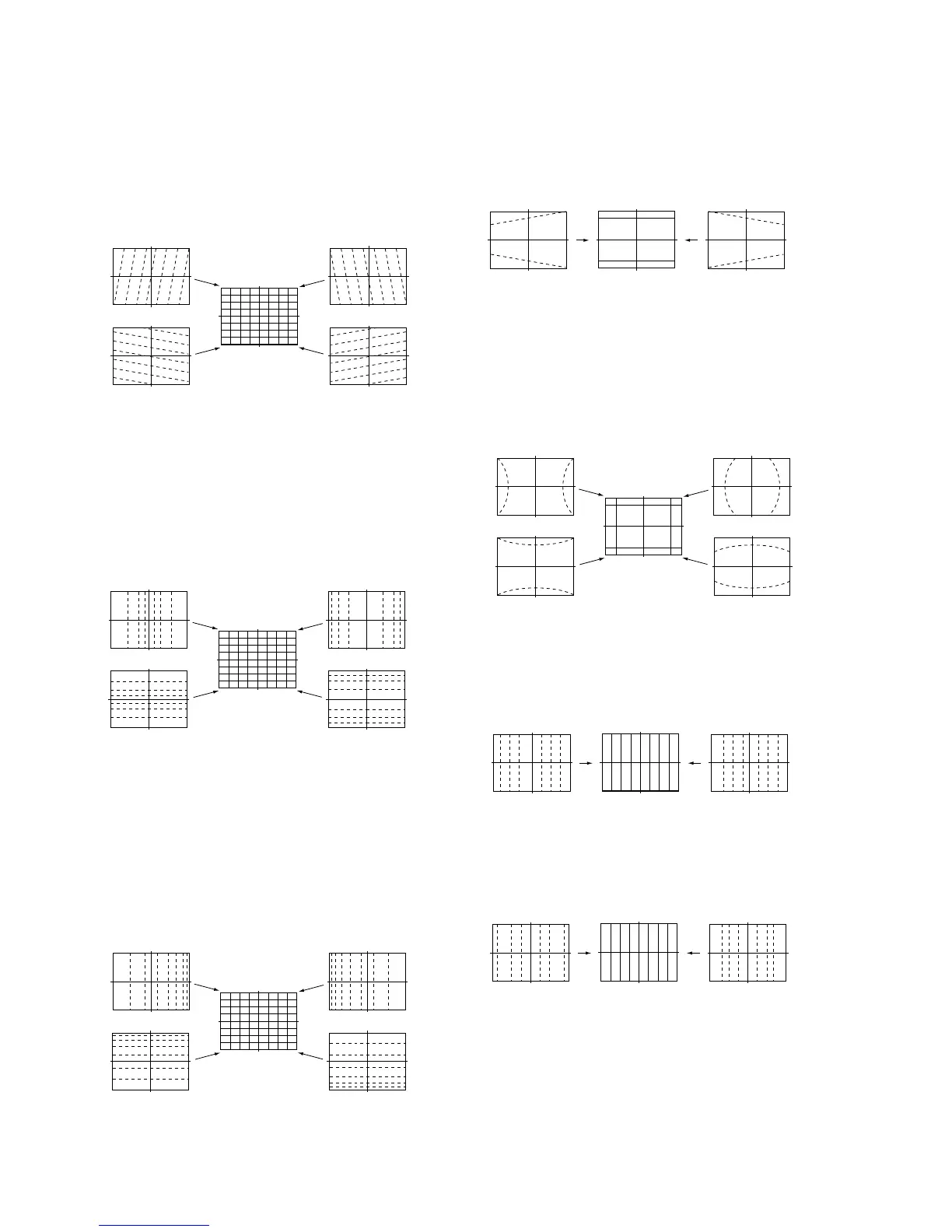
7) Select “GRN SKEW”, and correct the tilt of horizontal lines
and vertical lines.
14) Press “9” button on the commander to enter the fine adjust-
ment mode.
15) Make fine adjustment so that horizontal lines and vertical
lines become straight.
16) Press “9” button on the commander to return to the rough
adjustment mode.
8) Select “GRN SIZE”, and adjust so that each distance from
center to left end and to right end is equal. Adjust so that
each distance from center to top and to bottom is equal.
• GRN SIZE (horizontally/vertically)
9) Select “GRN LIN”, and adjust so that each space at the right
end and at the left end of screen is equal. Adjust so that each
space at the top and at the bottom of screen is equal.
11) Select “GRN PIN”, and adjust so that right and left vertical
lines on the screen become straight. Adjust so that upper and
lower horizontal lines on the screen become straight.
13) Select “GRN MSIZ”, and correct the space intervals for the
horizontal section of the screen are equal.
• GRN SKEW (horizontally/vertically)
• GRN MLIN (horizontally)
• GRN MSIZ (horizontally)
• GRN LIN (horizontally/vertically)
12) Select “GRN MLIN”, and correct the sizes of the horizontal
line at the center of the screen are symmetrical left and right.
10) Select “GRN KEY”, and adjust so that upper and lower hori-
zontal lines on the screen become parallel.
• GRN KEY (vertically)
• GRN PIN (horizontally/vertically)
Push the joystick
to v
Push the joystick
to V
Push the joystick
to B
Push the joystick
to b
Push the joystick
to v
Push the joystick
to V
Push the joystick
to B
Push the joystick
to b
Push the joystick
to B
Push the joystick
to b
Push the joystick
to B
Push the joystick
to b
Push the joystick
to B
Push the joystick
to b
Push the joystick
to v
Push the joystick
to V
Push the joystick
to v
Push the joystick
to V
Push the joystick
to v
Push the joystick
to B
Push the joystick
to b
Push the joystick
to V



 To Next Page