8
First Time Operation
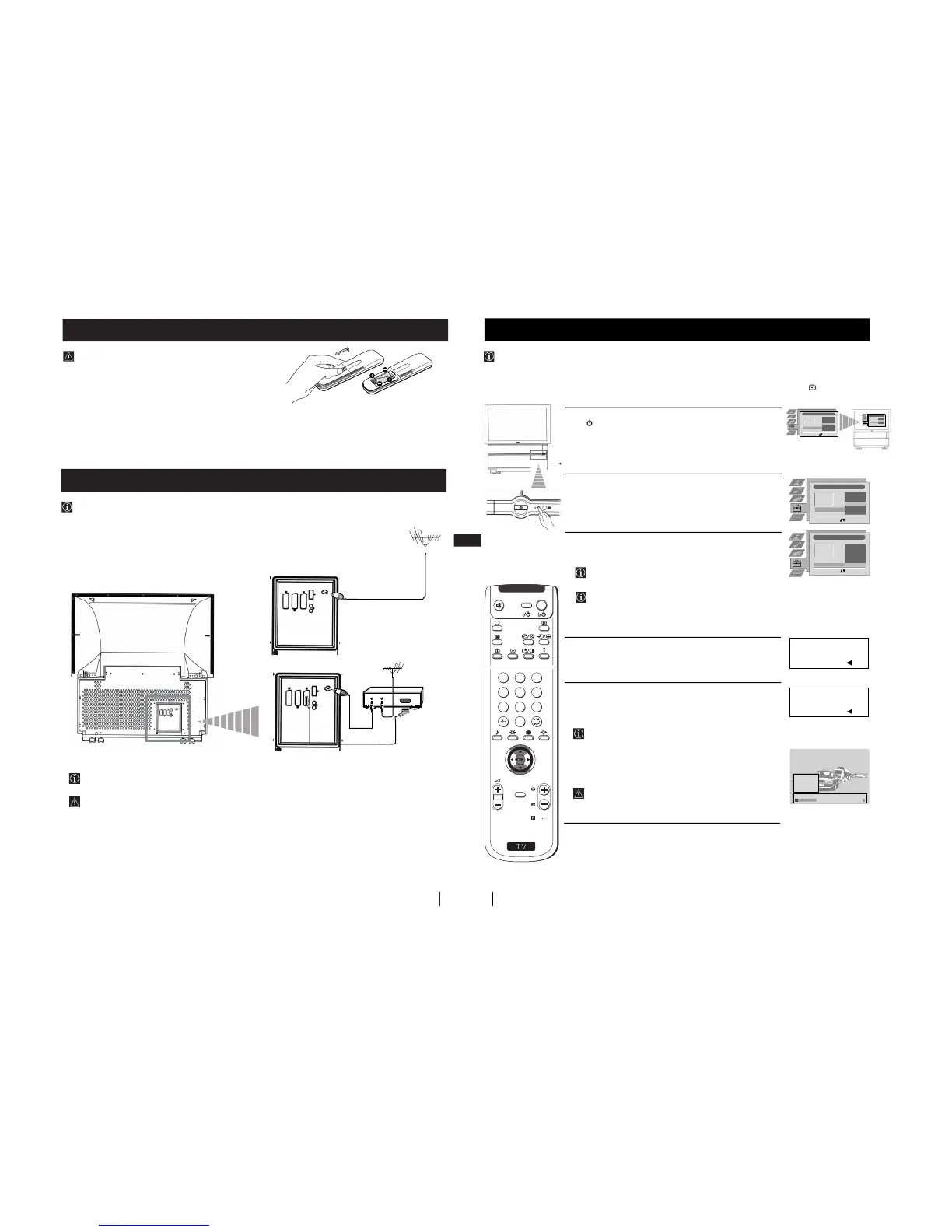
The first time you switch on your TV, a sequence of menu screens appear on the TV enabling you to 1) choose the language
of the menu screen, 2) choose the country in which you wish to operate the set, 3) search and store all available channels
(TV Broadcast) and 4) change the order in which the channels (TV Broadcast) appear on the screen.
However, if you need to change the language menu, change the country, change or repeat the tuning (e.g. when you move
house) or rearrange the order of the channels, you can do that by selecting the appropriate menu in the (Set Up)
.
Switching on the set and Automatically Tuning
1
Connect the set plug to the mains socket (220-240V AC, 50 Hz). Press
the
on/off button on your set to switch on. The first time you press
this button the Language/Country menu displays automatically on
the screen.
2
Push the joystick on the remote control $ or 4 to select the language,
then press OK to confirm your selection. From now on all the menus
will appear in the selected language.
3
Push the joystick $ or 4 to select the country in which you will
operate the set, then press OK to confirm your selection.
If the country in which you want to use the TV set does not
appear in the list, select “-” instead of a country.
If you are operating the projection TV in the UK, we
reccommend you not to select "Off". Otherwise the On Screen
clock will not show the correct UK time.
4
The Auto Tuning menu appears on the screen in the selected
language, then press the OK button on the remote control to select
Yes.
5
A new menu appears automatically on the screen asking you to
check that the aerial is connected. Confirm that the aerial is connected
and then press the OK button to start the automatic tuning.
• The TV starts to automatically search and store all available
channels (TV Broadcast) for you.
• If you have selected the “Off” option in the Country menu and
you activate autotuning again, the TV Broadcasts will be
stored from the programme number selected at that time.
This procedure could take some minutes. Please, be patient and
do not press any button. Otherwise the automatic tuning will
not be completed.
continued...
First Time Operation
The Scart lead is optional.
If you use this optional connection it can improve picture and sound quality when using a VCR.
If you do not use a SCART lead, after automatically tuning the projection TV refer to the "Manually Tuning the TV"
section of this instruction manual, to tune in the set to the output of your VCR. Also refer to your VCR instruction manual
to find out how to find the output channel of your VCR.



 To Next Page