29
RCD-W10
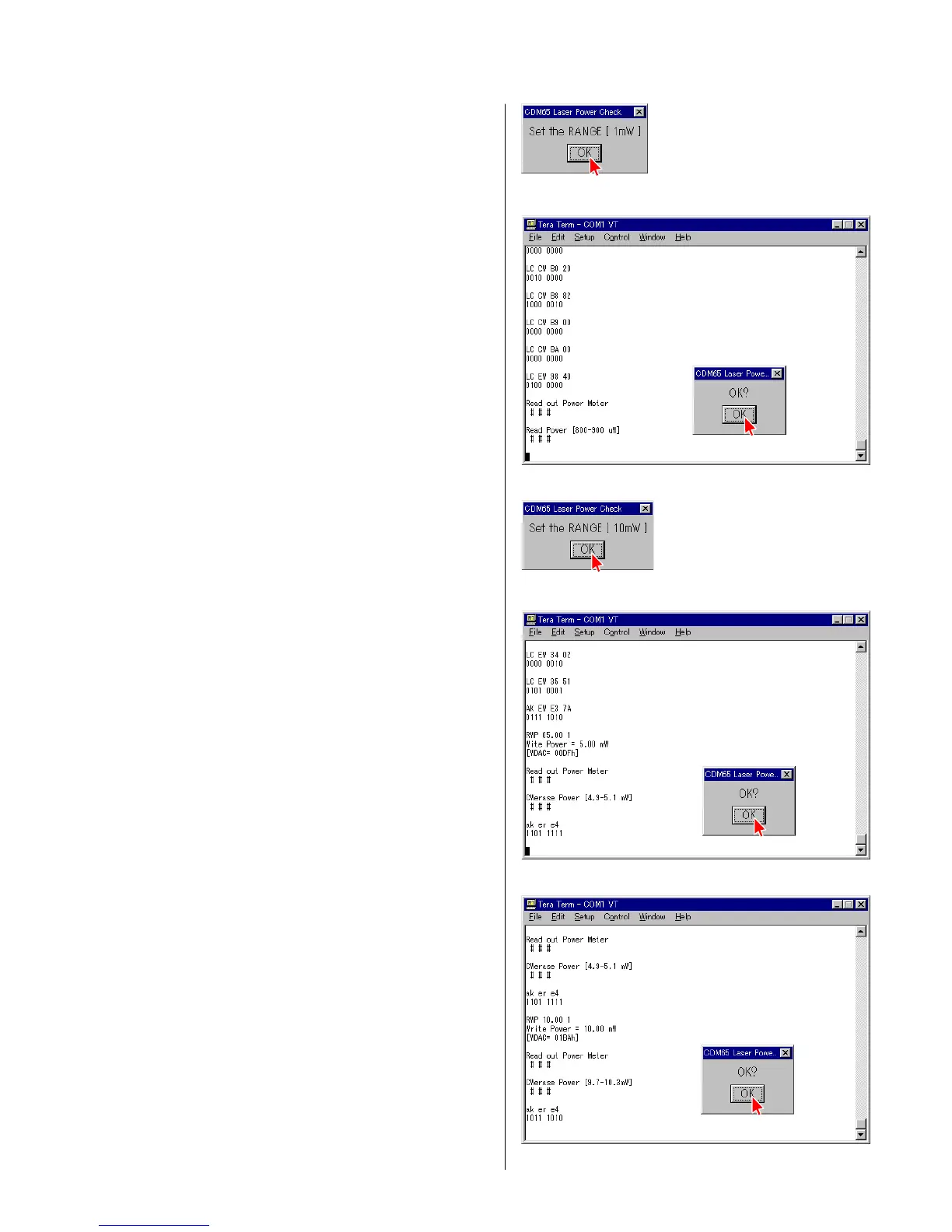
4) When the display shown in Fig. 3-4 appears, set the Range of a
laser power meter to “1 mW” and press “OK”.
5) Check that the laser power meter reading satisfies the following
requirement. When the laser power satisfies the required
specification, press “OK”. (Fig. 3-5)
LEADER LPM-8001 : 0.76 to 0.86 mW
6) When the display shown in Fig. 3-6 appears, set the Range of a
laser power meter to “10 mW” and press “OK”.
7) Check that the laser power meter reading satisfies the following
requirement. When the laser power satisfies the required
specification, press “OK”. (Fig. 3-7)
LEADER LPM-8001 : 4.5 to 4.7 mW
8) Check that the laser power meter reading satisfies the following
requirement. When the laser power satisfies the required
specification, press “OK”. (Fig. 3-8)
LEADER LPM-8001 : 9.2 to 9.6 mW
4 Fig. 3-4
4 Fig. 3-5
4 Fig. 3-7
4 Fig. 3-8
4 Fig. 3-6


 To Next Page
 Loading...