Using
the
CONTROL
S
Control
System
Remote
Receiver
VCR Tuner,
etc
OUT
TV
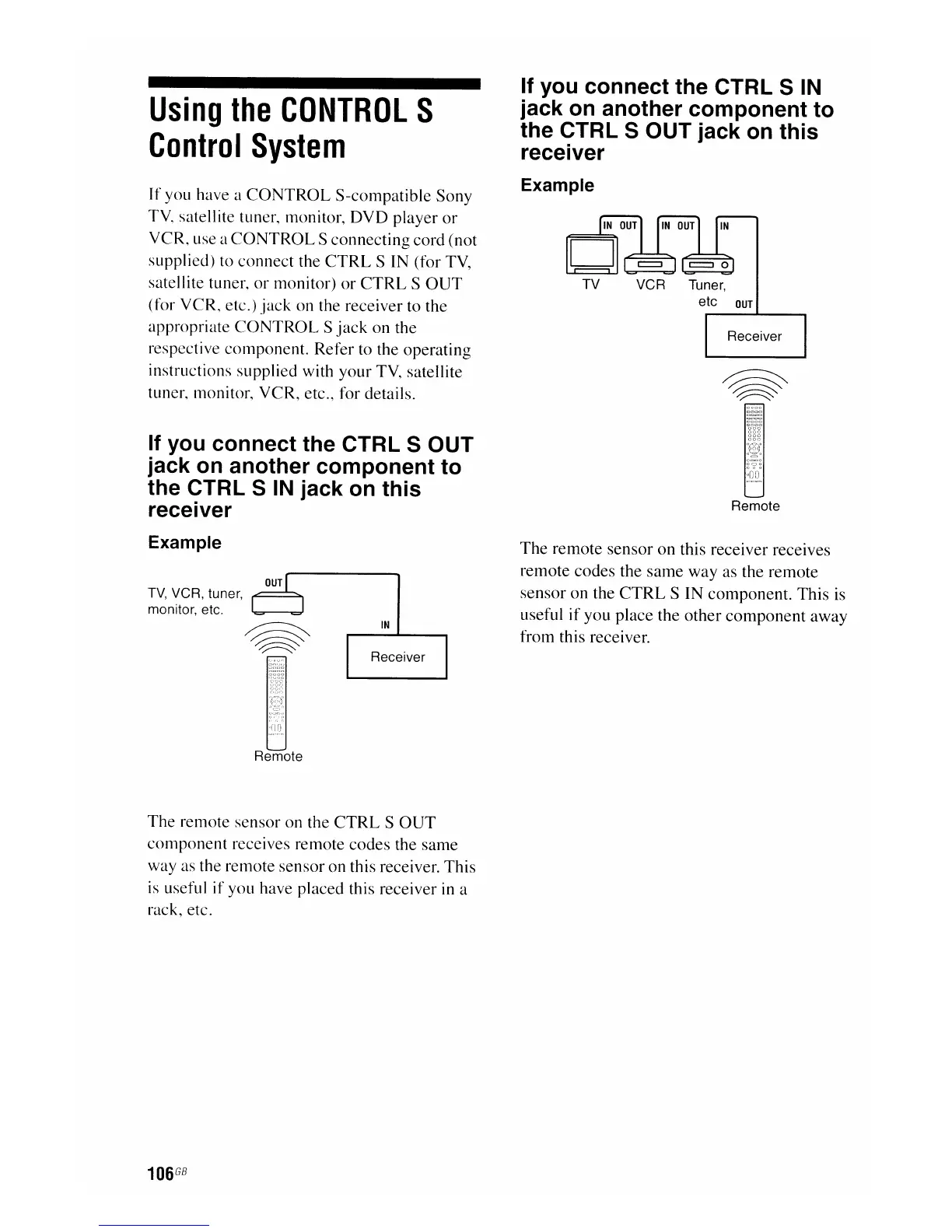
The
remote
sensor
on
this receiver receives
remote codes the
same
way
as the remote
sensor
on
the
CTRL
S
IN
component.
This
is
useful
if
you
place the
other
component
away
from this receiver.
If you connect the CTRL S
IN
jack on another component to
the CTRL S OUT jack
on
this
receiver
Example
IN
Receiver
~
~
~"
..••..
"
..•
,._.,."-'
••
'--'.'::_'-~'."
..
_:
•.
"t}"
Wi
Remote
TV,
VCR, tuner, t"---"""""
monitor, etc.
If you connect the CTRL S OUT
jack on another component to
the CTRL S
IN
jack
on
this
receiver
Example
If
you have a
CONTROL
S-compatible
Sony
TV, satellite tuner, monitor,
DVD
player
or
VCR, use a
CONTROL
S
connecting
cord
(not
supplied) to
connect
the
CTRL
S IN (for TV,
satellite tuner,
or
monitor)
or
CTRL
S
OUT
(for
VCR,
etc.)
jack
on the receiver to the
appropriate
CONTROL
S
jack
on
the
respective
COITIpOnent.
Refer
to the operating
instructions supplied with
your
TV, satellite
tuner, ITIonitor,
VCR,
etc., for details.
The
remote
sensor
on the
CTRL
S
OUT
conlponent
receives remote
codes
the
same
way as the remote
sensor
on
this receiver.
This
is useful
if
you have placed this receiver in a
rack, etc.
106
GB

















 To Next Page