1 Press
1/(9
while pressing
RM
SET UP.
The
RM
SET UP button flashes.
2 Press 1 or 2 while the
RM
SET UP
button
is
flashing.
When you press
1,
the
command
mode is
set to
AV
SYSTEM
1.
When you press 2,
the command mode is set to
AV
SYSTEM
2.
3 Press ENTER when the
RM
SET UP
button lights
up.
The
RM
SET
UP button flashes twice, then
the command mode setting process
is
completed.
7:
Operating
the
receiver
using
the
GUI
(Graphical
User
Interface)
By using the GUI menu, you can make various
settings and adjustments.
1 Connect a TV monitor to this
receiver.
Refer to "3: Connecting the monitor"
(page
19).
2 Turn on the receiver and the
TV.
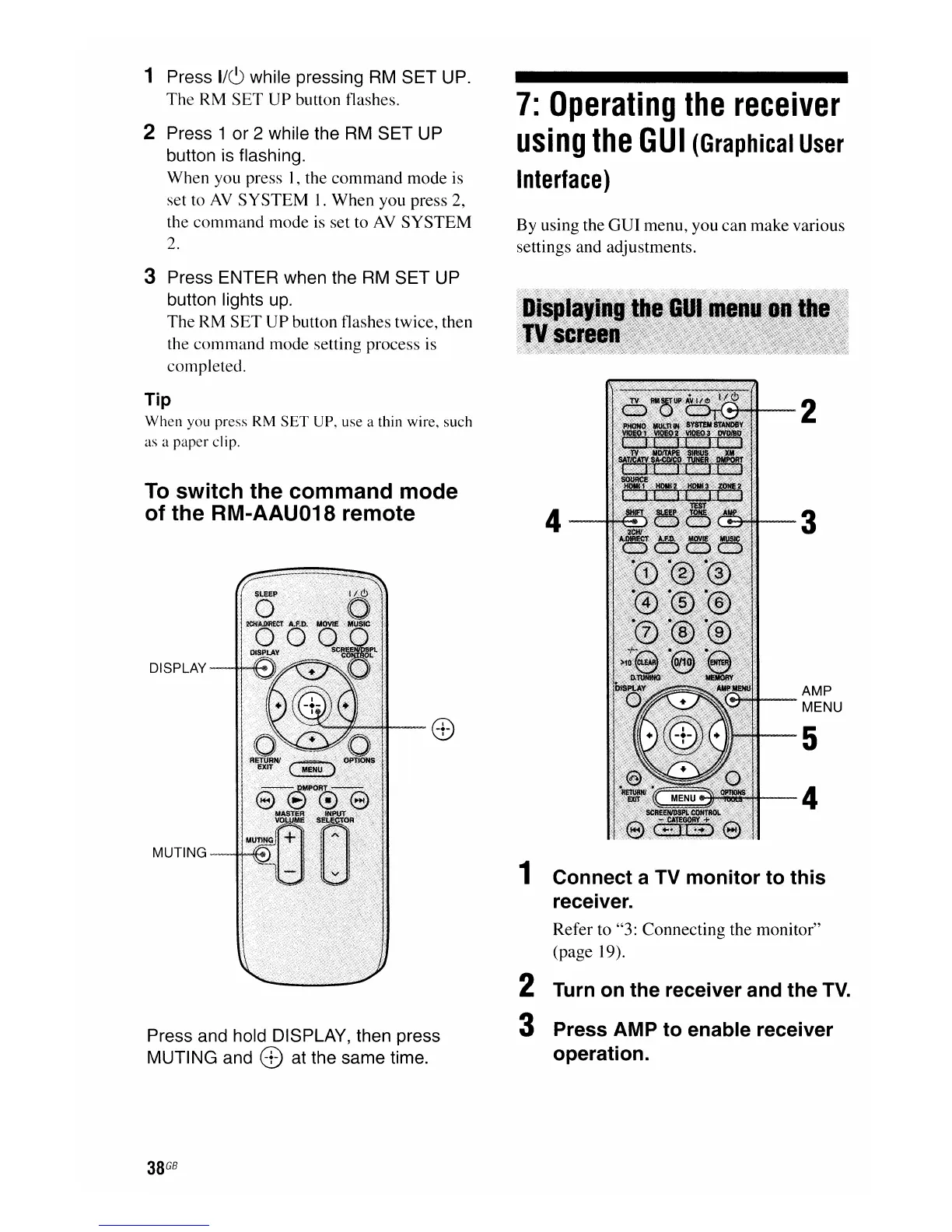
3 Press AMP to enable receiver
operation.
Tip
When
you press RM
SET
UP, use a thin wire, such
as a
paper
clip.
To
switch the command mode
of the RM-AAU018 remote
DISPLAY
MUTING-~
Press and hold DISPLAY, then press
MUTING and
8)
at the same time.
38
GB
4
2
3
AMP
MENU
5
4

















 To Next Page