Using
a
hi-amplifier
connection
If
you are not using surround back speakers,
you can use the SUR BACK SPEAKERS
terminals for the front speakers for use with a
bi-amplifier connection.
To
connect speakers
Notes
•
You
cannot use the FRONT SPEAKERS B jacks
for a bi-amplifier connection.
• When you use the auto calibration function, make
the bi-amplifier settings before you perform auto
calibration.
•
If
you make the bi-amplifier settings, the speaker
level, balance, and equalizer settings
of
the
surround back speakers become invalid, and those
of
the front speakers are used.
• Signals output from the PRE OUT jacks are used
with the same settings
as
those
of
the SPEAKERS
terminals.
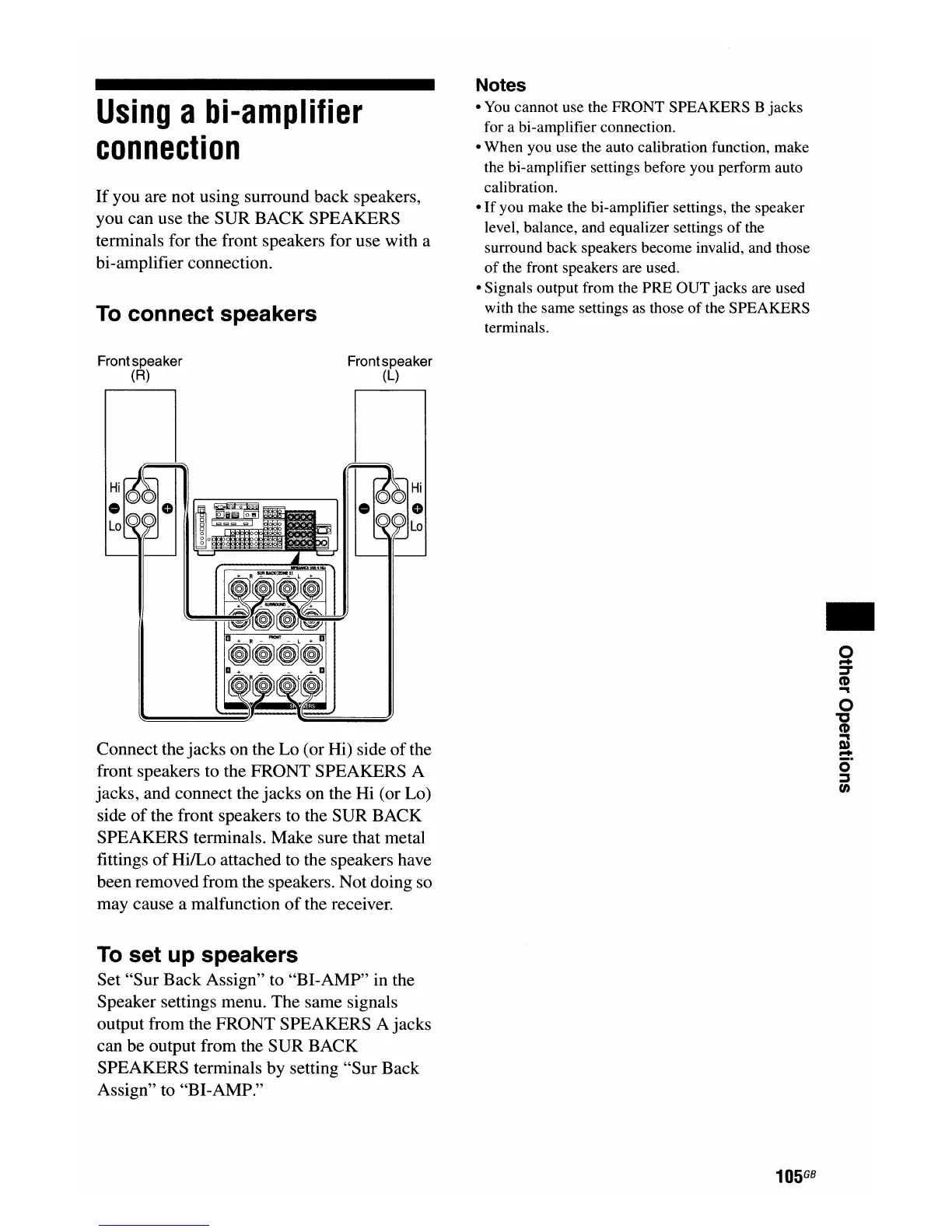
Connect the jacks on the Lo (or Hi) side
of
the
front speakers to the FRONT SPEAKERS A
jacks, and connect the jacks on the Hi (or Lo)
side
of
the front speakers to the SUR BACK
SPEAKERS terminals. Make sure that metal
fittings
of
HilLo attached to the speakers have
been removed from the speakers. Not doing so
may cause a malfunction
of
the receiver.
Frontspeaker
(R)
:~O~o
lO~~
~i~¥~
~o
Frontspeaker
(L)
I.~~:
~~lO
..
o
...
::T
CD
"'"
o
"'C
CD
"'"
I»
...
o·
::::J
tn
To
set up speakers
Set "Sur Back Assign" to "BI-AMP" in the
Speaker settings menu. The same signals
output from the FRONT SPEAKERS A jacks
can be output from the SUR BACK
SPEAKERS terminals by setting "Sur Back
Assign" to "BI-AMP."
105
GB

















 To Next Page