4a:
Connecting
the
audio
components
•
This section describes how to hook up your
components to this receiver. Before you begin,
refer to "Component to be connected" below
for the pages which describe how to connect
each component.
After hooking up all your components,
proceed to "5: Connecting the antennas
(aerials)" (page 35).
Component to be connected Page
Super Audio CD
With digital audio
22
player/ CD player output
With multi-channel
24
audio output
With analog audio
25
output only
MD player
With digital audio
22
output
With analog audio
25
output only
Tape deck, Analog disc turntable
25
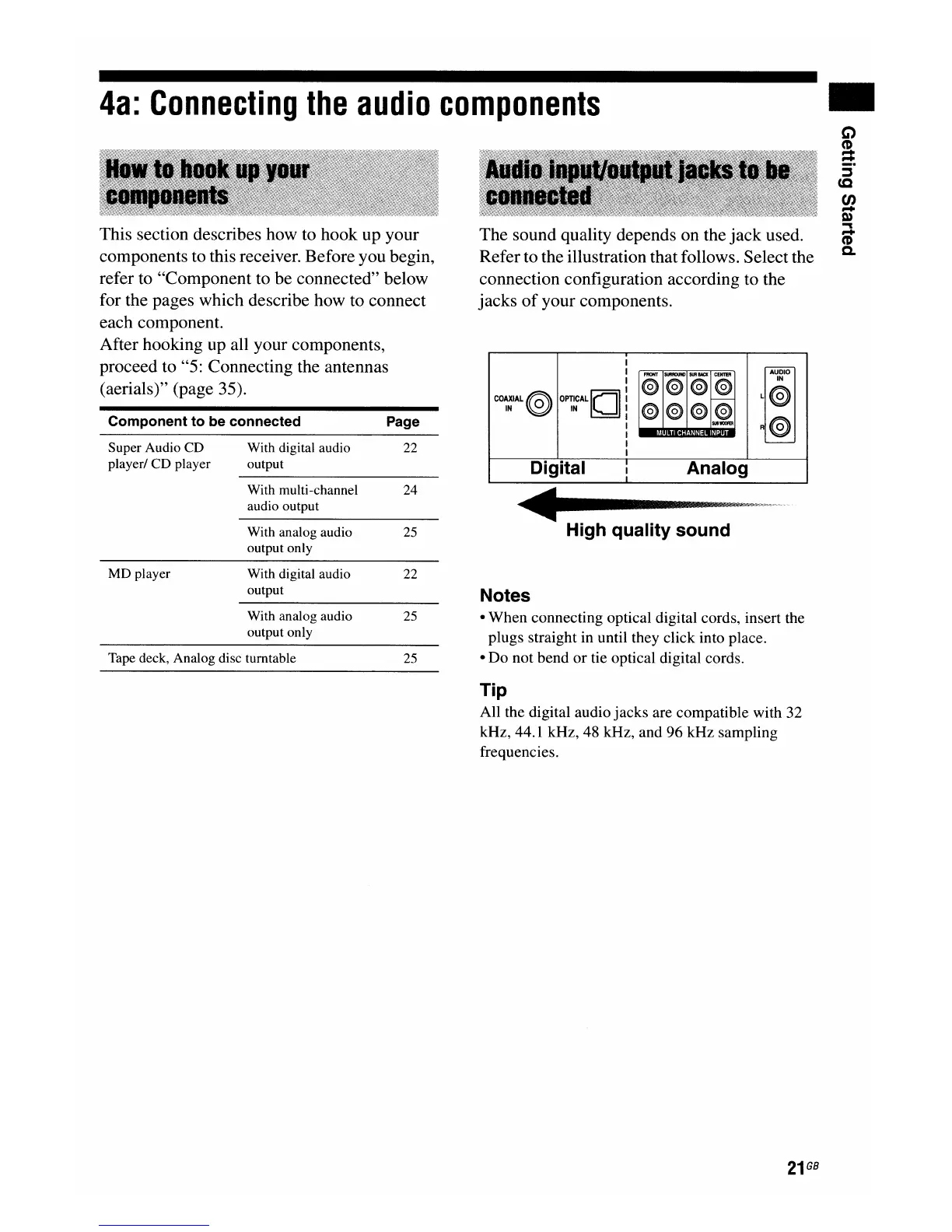
The sound quality depends on the
jack
used.
Refer to the illustration that follows. Select the
connection configuration according to the
jacks
of
your components.
AUDiO
FRONT
SURROUND
SURuat
CENTEJl
@ @ @ @
IN
CO~IAL@
OP~~CALIOI
L@
f---
@ @
@
~
R@
'----
Digital
I
Analog
I
High quality sound
Notes
• When connecting optical digital cords, insert the
plugs straight in until they click into place.
• Do not bend
or
tie optical digital cords.
Tip
All the digital audio jacks are compatible with 32
kHz, 44.1 kHz, 48 kHz, and 96 kHz sampling
frequencies.
21
GB

















 To Next Page