Switching
between
digital
and
analog
audio
(INPUT
MODE)
When you connect components to both digital
and analog audio input jacks on the receiver,
you can fix the audio input mode to either
of
them, or switch from one to the other,
depending on the type
of
material you intend
to
watch.
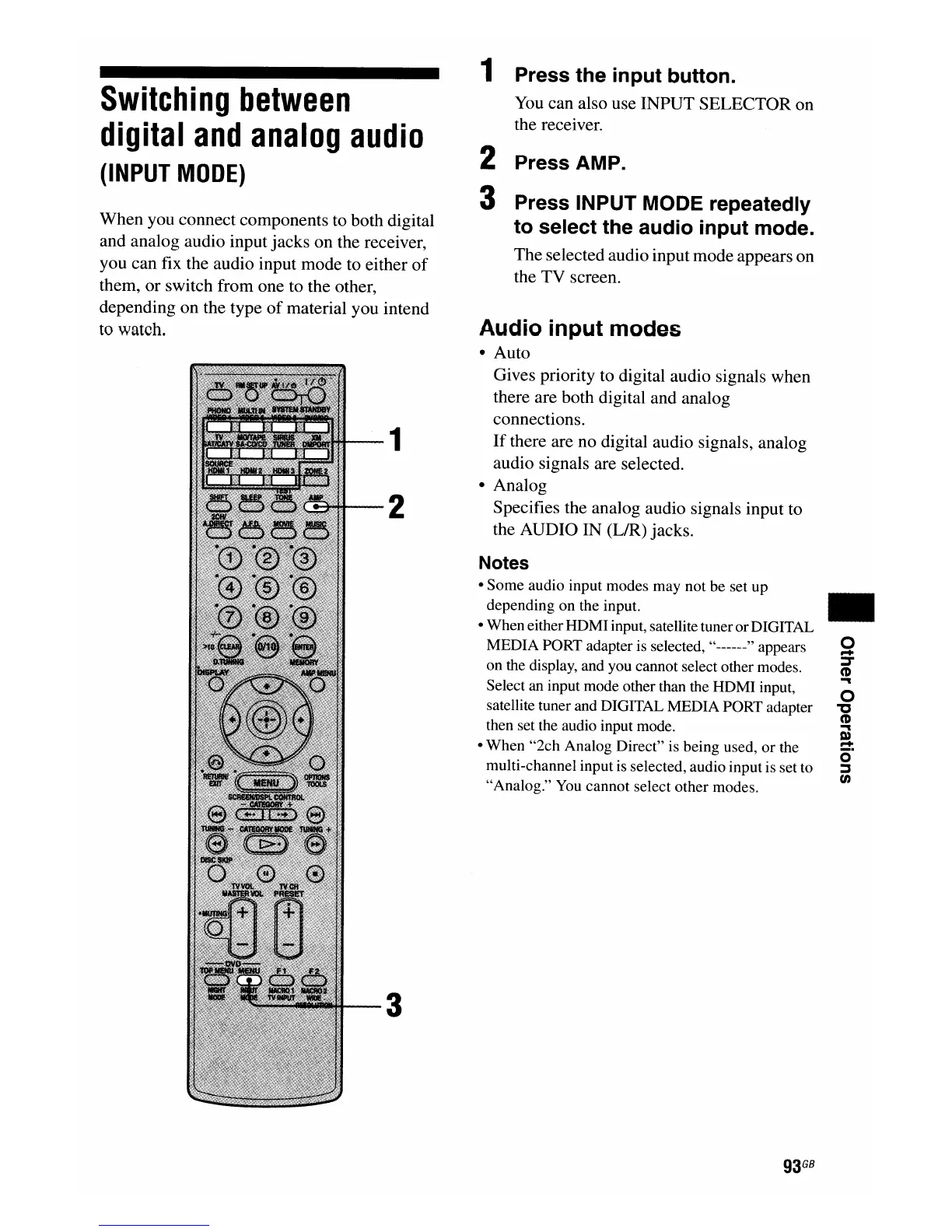
1
2
3
1 Press the input button.
You
can also use INPUT SELECTOR on
the receiver.
2 Press AMP.
3 Press INPUT MODE repeatedly
to select the audio input mode.
The selected audio input mode appears on
the TV screen.
Audio input modes
• Auto
Gives priority to digital audio signals when
there are both digital and analog
connections.
If
there are no digital audio signals, analog
audio signals are selected.
• Analog
Specifies the analog audio signals input to
the AUDIO IN (L/R) jacks.
Notes
• Some audio input modes may not be set up
depending on the input.
• When eitherHDMIinput, satellite tunerorDIGITAL
MEDIA PORT adapter is selected, ,,------" appears
on the display, and you cannot select other modes.
Select an input mode other than the HDMI input,
satellite tuner and DIGITAL MEDIA PORT adapter
then set the audio input mode.
• When "2ch Analog Direct" is being used,
or
the
multi-channel input is selected, audio input is set to
"Analog." You cannot select other modes.
93
GB
..
o
...
:::T
CD
...
o
"C
CD
...
m
...
o·
:::s
en

















 To Next Page