EasyManua.ls Logo

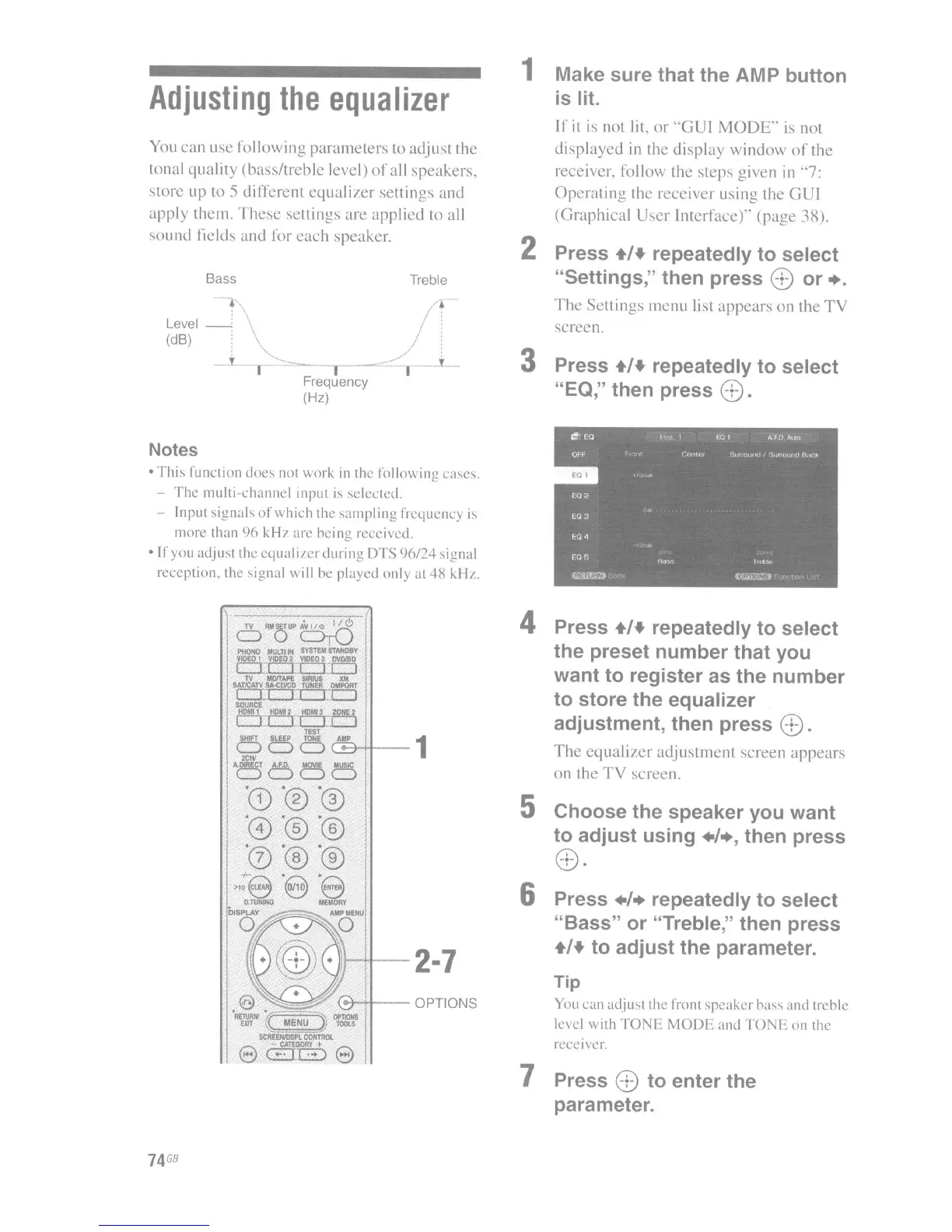
Sony STR-DA3300ES - Adjusting the Equalizer

Sony STR-DA3300ES
162 pages
Print Icon
To Next Page IconTo Next Page
To Previous Page IconTo Previous Page
Loading...
Adjusting
the
equalizer
You
can
use following
parameters
to adjust the
tonal
quality
(bass/treble
level)
of
all speakers,
store up to
5 different
equalizer
settings and
apply them.
These
settings
are
applied to all
sound
liclds
and
for
each
speaker.
Bass
+
Level
_'
(dB)
Frequency
(Hz)
Treble
+
1 Make
sure
that
the
AMP
button
is lit.
If
it
is not lit.
or
"GUI
MODE"'
is
not
displayed
in the
display
window
of
the
receiver. folio,"" the steps given
in
"'7:
Operating
the receiver lIsing the
GUI
(Graphical
User
Interface)'"
(page
38).
2 Press +/+ repeatedly
to
select
"Settings,"
then
press
8
or
•.
The
Settings menu list
appears
on
the
TV
screen.
3 Press +/+ repeatedly
to
select
"EO," then
press
8.
Notes
·This
function
docs
not work
in
the
following
cases.
-
The
multi-channel
input
is
selectcd.
- Input
signals
of
which
the
sampling
frequcncy
is
morc
than
96
kHI
arc
heing
reccived.
If
you
adjust
the
equal
i/cr
duri ng
DTS
96/:24
signal
rcception.
the
signal will he
played
only at
4H
kH/.
oPMo~~
I
PHOHO
MlJln
IN
IYSTtM
STAHDBY
I
VIDEO
1
VIO£O
2:
VUO
S !MWO
CTI
"
IC]
lV
MDnAPE
SIRIUS
XM
SAT,tCATV
SAoQ)'CD
!\lNER
0Ufl0m
CTI
"
II
I
SOURCE
HOMll
HOMI2:
H0Ml3
ZOffl:
2:
I
II
n
II
I
TEST
o
C5
0 C
A
!':"'Ht--1
2ClV
0000
74
GB
4 Press +/+ repeatedly
to
select
the
preset
number
that
you
want
to
register
as
the
number
to
store
the
equalizer
adjustment,
then
press
8.
The
equalizer
adjustment
screen
appears
on the
TV
screen.
5
Choose
the
speaker
you
want
to
adjust
using
./.,
then
press
6 Press
./.
repeatedly
to
select
"Bass"
or
"Treble," then
press
+/+
to
adjust
the
parameter.
Tip
¥ou
can
adjust
the front
speaker
hass
and
trehle
bel
with
TONE
MODE
and
TONE
on
the
rccci\cr.
7 Press 8
to
enter
the
parameter.

Table of Contents

Other manuals for Sony STR-DA3300ES

Related product manuals