listening
to
FM/AM
radio
You
can listen to FM and AM broadcasts
through the built-in tuner.
Before
operation.
make sure you havc
connccted
thc FM and
AM
antennas
(aerials) to the receiver
(page 35).
Tip
The
luning
,calc
for
direclluning
j,
,hown
heIO\\.
oFM
hand
100
kH/
oAMhand
IOkH/*
"The
AM
luning
,calc
can
be
changed
(page 135).
Automatic
tuning
76
G8
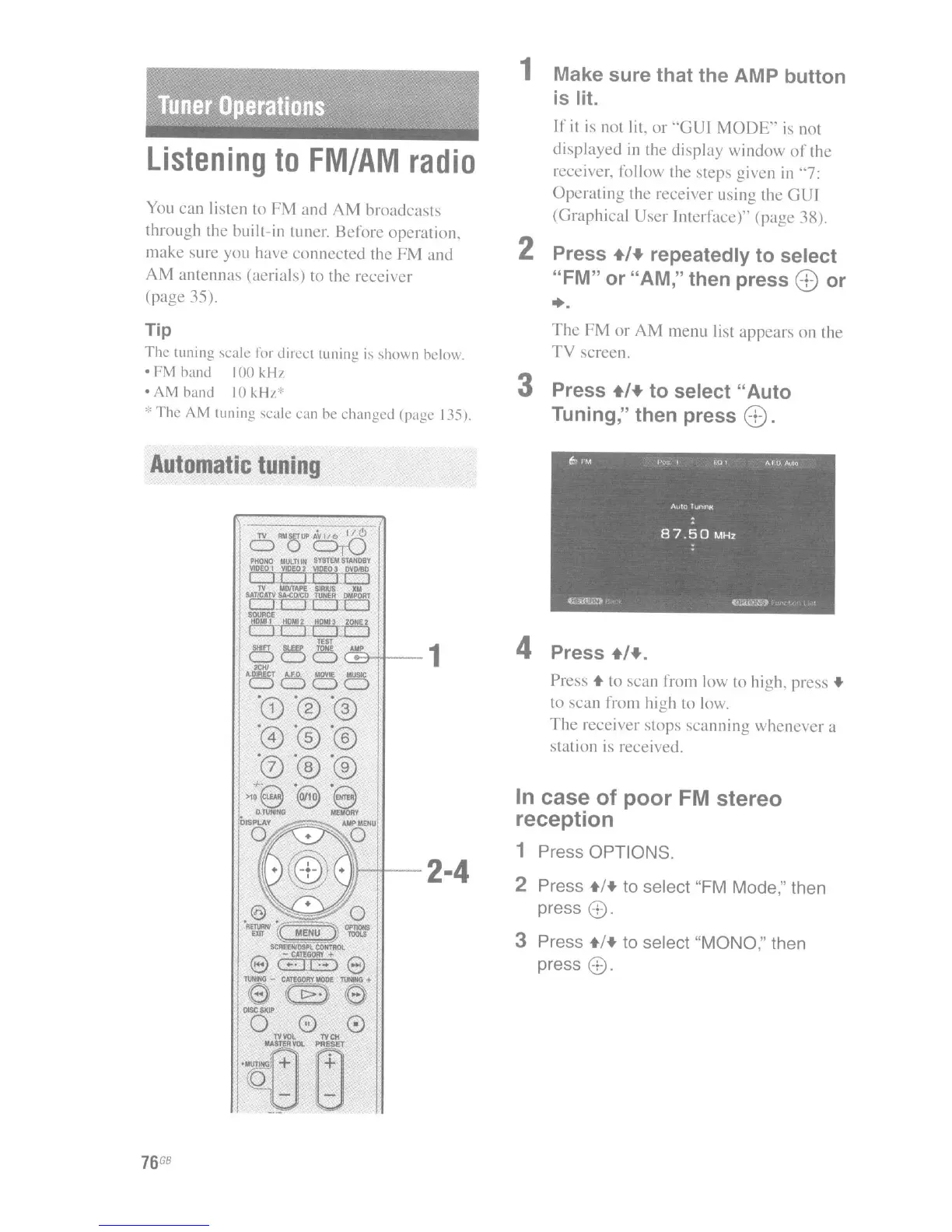
1 Make sure that the AMP button
is lit.
If
it
is
not lit.
or
"GUI
MODE"
is
not
displayed
in the
display
window
of
the
receiver. follow the steps given in "7:
Operating
the receiver using the
GUI
(Graphical User Interface)" (page 3R).
2 Press +/+ repeatedly to select
"FM" or "AM," then press
(B or
...
The
FM
or
AM
menu list
appears
on the
TV
screen.
3 Press +/+ to select "Auto
Tuning," then press
(B.
4 Press +/+.
Press +to scun from low to high. press +
10
scan
frolll high to low.
The
receiver
SlOpS
scanning
whenever
a
station is received.
In
case of poor
FM
stereo
reception
1 Press OPTIONS.
2 Press +/+ to select "FM
Mode,"
then
press
8.
3 Press +/+ to select "MONO," then
press
8.

















 To Next Page