In
the video input/output conversion table classified by the menu
settings
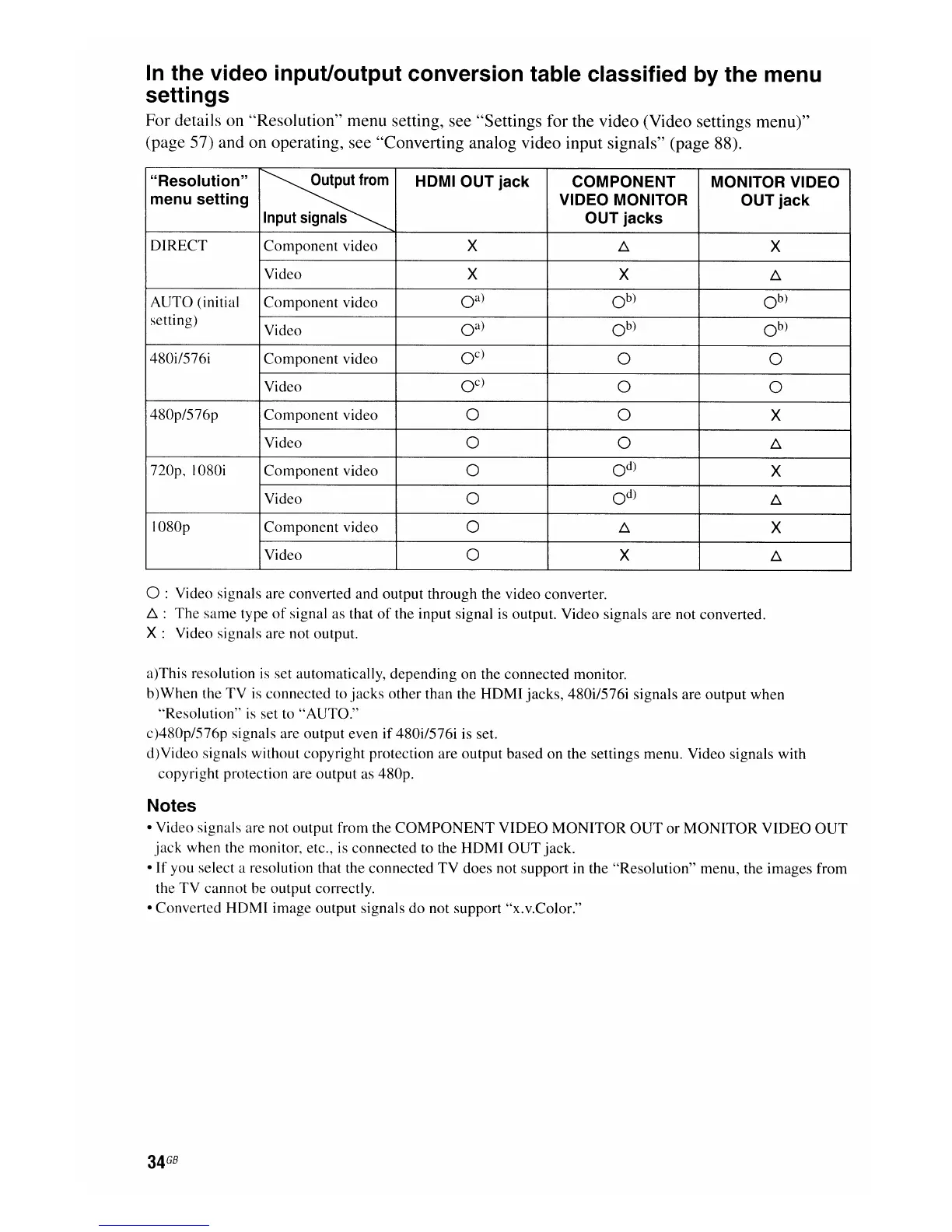
For details on "Resolution" menu setting, see "Settings for the video (Video settings menu)"
(page 57) and on operating, see "Converting analog video input signals" (page 88).
"Resolution"
~
HDMI OUT jack COMPONENT MONITOR VIDEO
menu setting VIDEO MONITOR OUT jack
Input
signals
OUT jacks
DIRECT Component video
X
b,.
X
Video
X X
b,.
AUTO (initial Component video
oa)
Ob)
Ob)
setting)
Video
oa)
Ob)
Ob)
480il576i Component video
oc)
0 0
Video
oc)
0
0
480p/576p Component video
0
0
X
Video
0
0
b,.
720p, I080i Component video
0
Od)
X
Video
0
Od)
b,.
I080p Component video
0
b,.
X
Video
0
X
b,.
o :Video signals are converted and output through the video converter.
b,.:
The
same type
of
signal as that
of
the input signal is output. Video signals are not converted.
X:
Video signals are not output.
a)This resolution
is
set automatically, depending on the connected monitor.
b)When the TV
is
connected to jacks other than the
HOM
I jacks, 480i/576i signals are output when
"Resolution"
is
set to "AUTO."
c)480p/576p signals are output even if 480i/576i is set.
d)Video signals without copyright protection are output based on the settings menu. Video signals with
copyright protection are output as 480p.
Notes
• Video signals are not output from the
COMPONENT
VIDEO
MONITOR
OUT
or
MONITOR
VIDEO
OUT
jack
when the monitor, etc., is connected to the
HDMI
OUT
jack.
•
If
you select a resolution that the connected
TV
does not support in the "Resolution" menu, the images from
the TV cannot be output correctly.
• Converted HDMI image output signals do not support "x.v.Color."
34
GB

















 To Next Page