Message
list
after
auto
calibration
Display
Code
30
Code
31
Code
32
Code
33
Warning
40
Warning
41
Warning
42
Warning 43
Explanation
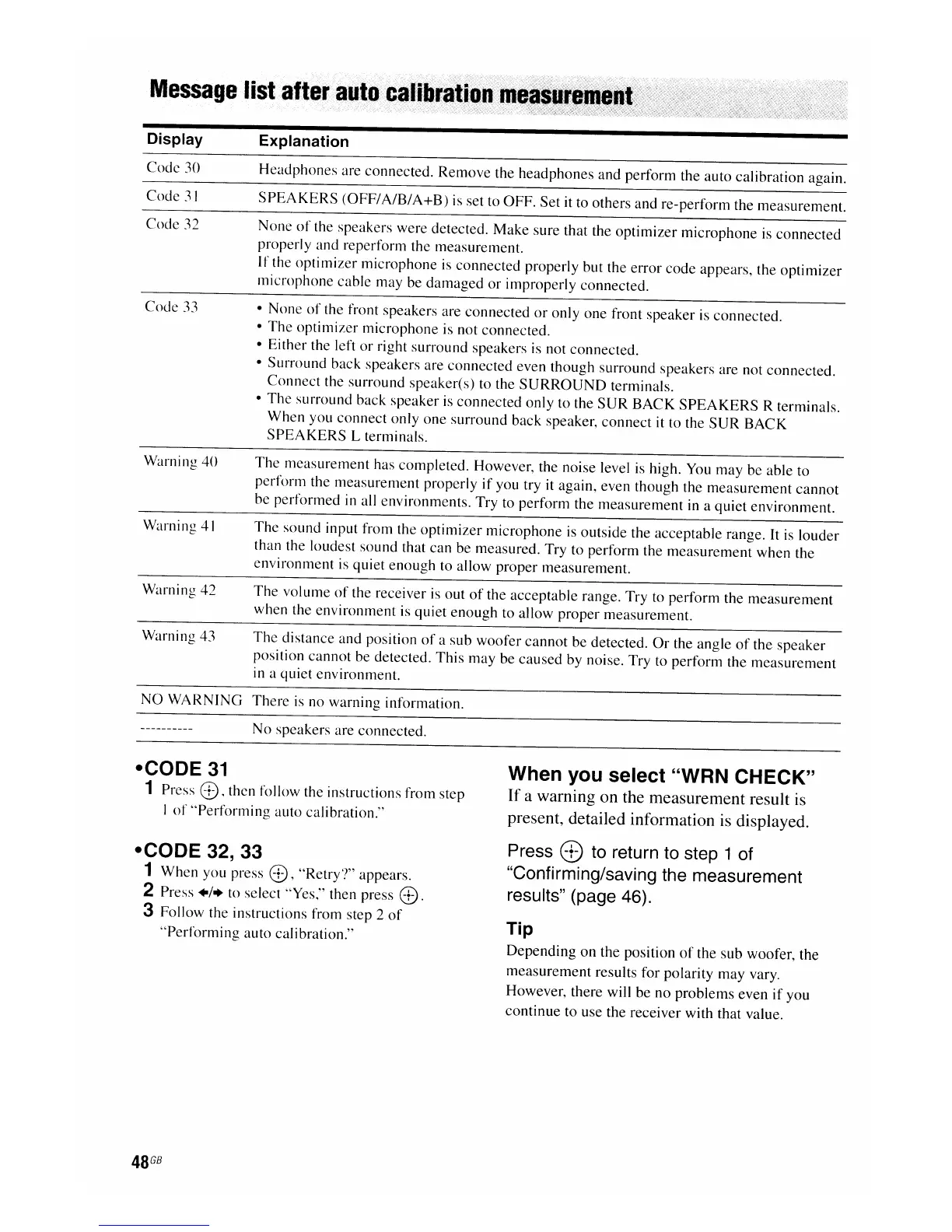
Headphones are connected.
Remove
the headphones and perform the auto calibration again.
SPEAKERS
(OFF/
A/B/
A+B)
is set to OFF. Set it to others and re-perform the measurement.
None
of
the speakers were detected.
Make
sure that the
optimizer
microphone is
connected
properly and reperform the measurement.
If
the
optimizer
microphone is connected properly but the error code appears, the
optimizer
microphone cable may be
damaged
or
improperly connected.
• None
of
the front speakers are connected
or
only one front speaker is connected.
•
The
optimizer microphone is not connected.
• Either the left
or
right surround speakers is not connected.
• Surround back speakers are
connected
even though surround speakers are not connected.
Connect
the surround speaker(s) to the
SURROUND
terminals.
•
The
surround back speaker
is
connected only to the
SUR
BACK
SPEAKERS
R terminals.
When
you
connect
only one surround back speaker,
connect
it to the
SUR
BACK
SPEAKERS
L terminals.
The
measurement has completed. However, the noise level is high. You
may
be able to
perform the measurement properly
if
you try it again, even though the measurement
cannot
be performed in all environments. Try to perform the measurement in a quiet environment.
The
sound input from the
optimizer
microphone is outside the acceptable range.
It
is louder
than the loudest sound that can be measured. Try to perform the
measurement
when the
environment is quiet enough to allow proper measurement.
The
volume
of
the receiver
is
out
of
the acceptable range. Try to perform the
measurement
when the environment is quiet
enough
to allow proper measurement.
The
distance and position
of
a sub woofer
cannot
be detected.
Or
the angle
of
the speaker
position cannot be detected. This
may
be caused by noise. Try to perform the
measurement
in a quiet environment.
NO WARNING There is no warning information.
No speakers are connected.
-CODE
31
1 Press
8,
then follow the instructions from step
I
of
"Performing
auto calibration."
-CODE 32, 33
1
When
you press
8),
"Retry?"
appears.
2 Press
+/+
to select "Yes," then press
8).
3 Follow the instructions from step 2
of
"Performing
auto calibration."
48
GB
When you select "WRN CHECK"
If
a warning on the measurement result is
present, detailed information is displayed.
Press
c:B
to retu
rn
to step 1 of
"Confirming/saving the measurement
results" (page 46).
Tip
Depending
on
the position
of
the sub woofer, the
measurement
results for polarity may vary.
However, there will be no problems even
if
you
continue to use the receiver with that value.

















 To Next Page