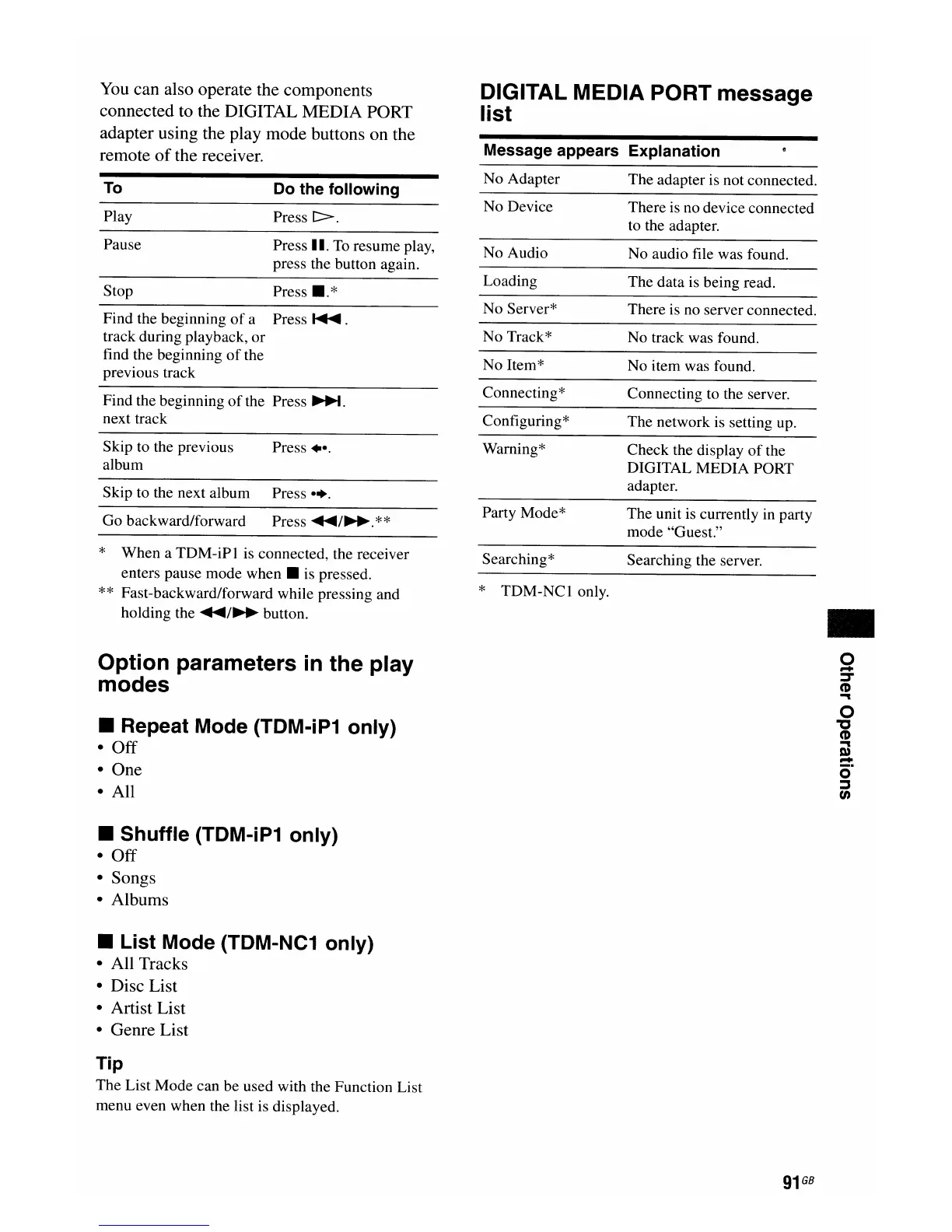
You
can also operate the components
connected to the DIGITAL MEDIA PORT
adapter using the play mode buttons on the
remote
of
the receiver.
DIGITAL MEDIA PORT message
list
Message appears Explanation
Find the beginning
of
the Press
~.
next track
Find the beginning
of
a Press
~
.
track during playback,
or
find the beginning
of
the
previous track
To
Play
Pause
Stop
Do
the following
Press
[::::::>.
Press II.
To
resume play,
press the button again.
Press
•.
*
No Adapter
No Device
No Audio
Loading
No Server*
No Track*
No Item*
Connecting*
Configuring*
The adapter is not connected.
There is no device connected
to the adapter.
No audio file was found.
The data is being read.
There is no server connected.
No track was found.
No item was found.
Connecting to the server.
The network is setting up.
Searching* Searching the server.
* TDM-NCI only.
Skip to the previous Press
••.
album
Skip to the next album Press
••.
Go backward/forward Press
~/~.**
* When a TDM-iPI is connected, the receiver
enters pause mode
when.
is pressed.
**
Fast-backward/forward while pressing and
holding the
~/~
button.
Option parameters
in
the play
modes
• Repeat Mode (TDM-iP1 only)
•
Off
• One
• All
• Shuffle (TDM-iP1 only)
•
Off
• Songs
• Albums
• List Mode (TDM-NC1 only)
• All Tracks
• Disc List
• Artist List
• Genre List
Tip
The List Mode can be used with the Function List
menu even when the list is displayed.
Waming*
Party Mode*
Check the display
of
the
DIGITAL MEDIA PORT
adapter.
The unit is currently in party
mode "Guest."
..
91
GB

















 To Next Page